
How to Choose the Best Accounting Software in Saudi Arabia: A Practical Framework
No single system is best for every business. Here is a weighted scoring framework, a way to test a system before you buy, red flags to watch for in a demo, and how to calculate cost over three years.
Author:سامي الحيدري
There is no single best accounting software for every Saudi business. The right system fits your size, your sector and the way you close each month. Choose it with a weighted scorecard, test it on a real month of your own data, check its e-invoicing files and data export, and compare three-year costs in writing.
Search for the best accounting software and you will find dozens of lists that reach the same conclusion: every system is good. The problem is the question, not the lists. Some systems will cost you time and money because they are in the wrong place. This guide replaces the list with a framework: weighted criteria, a test before you buy, and signs that a system will not hold up after six months.
Where should you start: the system's name or your problem?
Start with the problem. Before any demo, write three sentences on a single page: what is running late today, who is held up by it, and what the delay costs you each month.
Real examples from Saudi businesses: the month-end close takes ten days because inventory sits in a separate Excel file. Tax invoices are rejected because their numbers are typed in by hand. Nobody knows whether the second branch is profitable. Purchases are approved over WhatsApp and appear in the accounts a month later.
Those three sentences are your specification, and every criterion that follows is measured against them. A system that does not solve those three problems is not the best accounting software for you, however long its feature list.
Before comparing anything, settle an earlier question: do you need accounting software or a full enterprise resource planning (ERP) system? ERP is a set of connected modules that runs sales, purchasing, inventory and accounting on one database. The difference is not just price but how the whole business works, and it is covered in detail in accounting software or ERP for Saudi businesses.
How do you score accounting software objectively?
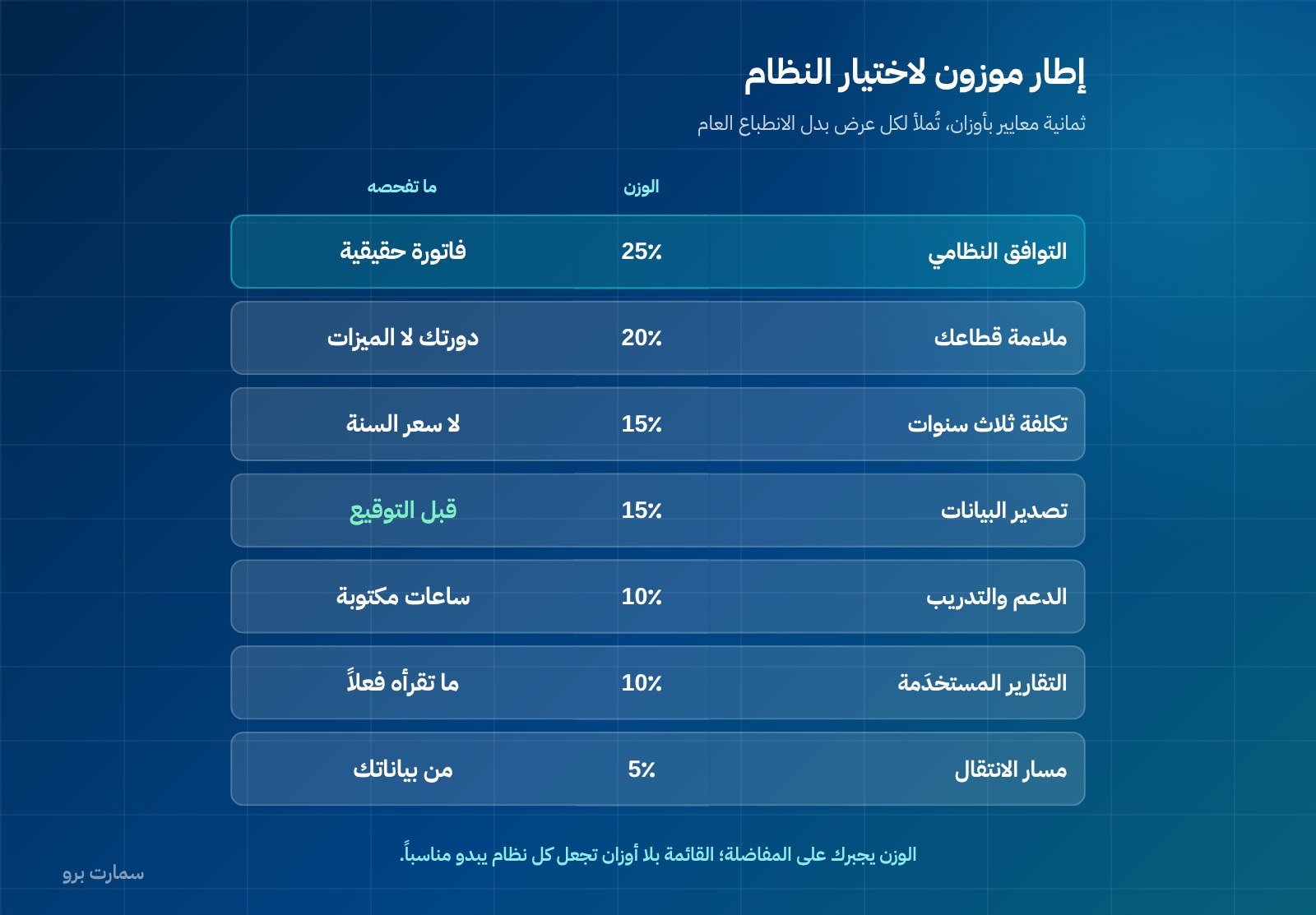
Give each criterion a weight, rate each system out of five, then multiply. The result is not a final verdict, but it stops you favouring whichever demo looked best. The weights below are a reasonable starting point for a mid-sized business; adjust them to your priorities.
| Criterion | Weight | What to actually check |
|---|---|---|
| E-invoicing compliance | 20% | XML output in UBL 2.1 format, cryptographic stamp, a counter that never resets, a hash chain, and a QR code on simplified invoices |
| Fit with your sector | 18% | Does the system understand your cycle: project costs, production orders, contracting progress payments, stock expiry |
| Branches, users and permissions | 12% | Accounts separated by branch, field-level permissions, an audit log of changes |
| Reports you will actually read | 12% | Do you get profitability by branch, customer and product without exporting to Excel |
| Data ownership and export | 12% | Full export in a readable format, at any time, at no charge |
| Support and training | 10% | Training hours specified in the contract, an Arabic support channel, a written response time |
| Total cost over three years | 10% | Licence, renewal, training, migration and customisation together |
| Migration path | 6% | Who enters your opening balances and customer history, and at what cost |
The working rule: any system that scores below three on a criterion weighted 18% or more is ruled out, even if it excels everywhere else.
What does ZATCA actually require, and what doesn't it?
This is where buyers are most often misled. The Zakat, Tax and Customs Authority (ZATCA) does not approve accounting software or issue it an approval certificate. What ZATCA publishes is an indicative list of e-invoicing solution providers, meaning providers that have passed qualification requirements. A taxpayer who meets the e-invoicing requirements is considered compliant even if their provider is not on that list.
In practice, do not ask the vendor "are you approved?" Ask them to issue one invoice in front of you and hand you its XML file. Phase 2 e-invoicing requires:
- XML in the UBL 2.1 standard, the structured format in which invoice data is exchanged.
- A cryptographic stamp, a digital seal proving the invoice came from your system unaltered.
- An invoice counter that is never reset.
- A hash chain, where each invoice carries a fingerprint of the previous one so none can be removed or changed unnoticed.
- A QR code on simplified tax invoices.
These are things you can see in a file, not on a slide. For the full requirements, and what "approved" really means in sales material, see the ZATCA e-invoicing guide.
How do you test a system before buying it?
A typical demo lasts forty minutes and shows you what the system does well. Reverse that: give the vendor your data and ask them to show you what it finds hard. Three tasks reveal more than any feature comparison.
1. Run your own month-end close
Take a real month that has already closed and enter its transactions in a trial environment: sales, purchases, expenses, bank reconciliation, depreciation and closing stock. Then reconcile the result with your current books. Any difference tells you where the system will leak your time later.
2. Issue real invoices
Issue a real tax invoice to a real customer, a simplified invoice and a credit note. Keep the files. Check the QR code and the counter sequence between the two invoices.
3. Export your data back out
After entering your data, export it: chart of accounts, journal entries, customers, suppliers, items and stock balances. A chart of accounts is the structured list of every account your business posts to. Open the files on your own computer; if you cannot read back what you entered, you are not testing a system but building a prison for your data.
Give these three tasks one week and one person from your finance team. That week costs far less than a year in the wrong system.
What are the red flags in a software demo?
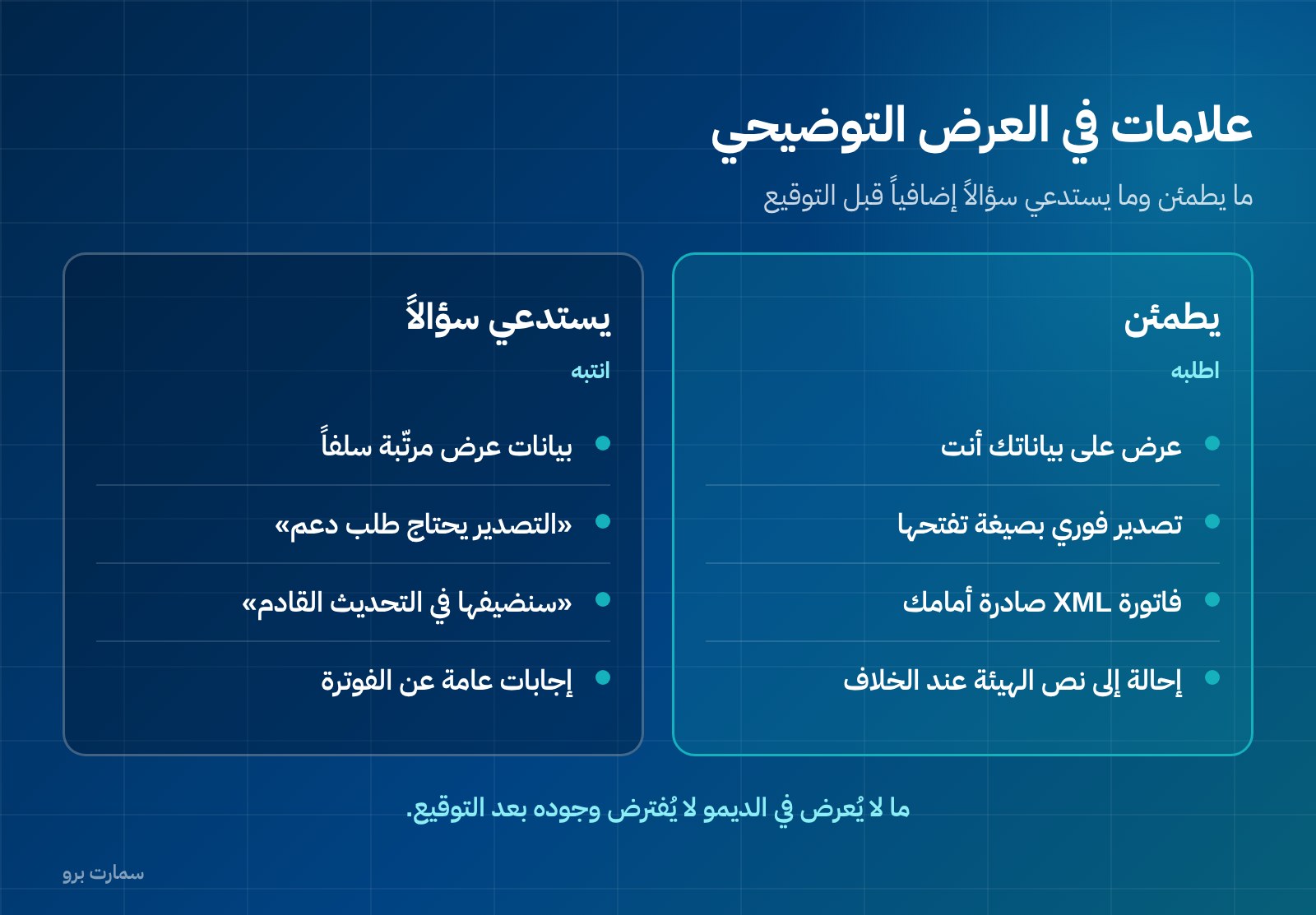
- The demo runs only on ready-made sample data, and entering your own data is refused or postponed.
- There is no full export function, or export is available only "on special request" or for a fee.
- E-invoicing questions get vague answers such as "the system is fully compliant" without an XML file being shown.
- "We'll add it later" about a feature you need today, with no date and no clause in the contract.
- The quoted price says nothing about annual renewal, training or migration.
- You are not given a named support contact or a written response time.
- The customisation you need is described as "simple" with no estimate of hours or cost.
One of these on its own is not a reason to walk away. Three together mean you will carry the entire risk.
Why compare three-year cost instead of the first-year price?
The first-year price is a marketing number. The number that matters is the total you will pay over three years: licence or subscription, annual renewal, extra training hours, data migration, customisation, any modules added as you grow, and the internal cost of your finance team's time.
Build a seven-line table covering three years and ask every vendor to fill it in writing. Comparing two final totals is more honest than comparing two feature lists.
To show how packages are built in practice: at SmartPro, the Mini package is SAR 1,500 a year including VAT, for one user and the main branch, with 6 training hours. Pro is SAR 4,500 a year for three users with 12 training hours, and Max is SAR 20,500 a year for 10 users, adding Manufacturing and Projects for factories, contracting and project businesses. Each additional branch costs SAR 1,000 a year.
The point is not the price but the structure. The number of users, the number of branches and the training hours are the variables that move the bill with any vendor. If a quote does not specify these three, you do not know what you are buying. For a breakdown of budget lines, see what ERP costs in Saudi Arabia.
Who owns your data, and can you take it with you?
This is the most neglected criterion. Most businesses that switch accounting systems do not do so because the system is bad, but because the business has changed. Most that delay switching do so because their data is locked in.
Before signing, ask four questions and get the answers in the contract:
- Can I export all my data at any time without prior approval?
- In what format, and does it include journal entries and not just reports?
- Is export free of charge?
- What happens to my data if I stop renewing, and how long is it kept?
Data you cannot get out is not your data. This criterion alone rules out many systems that look excellent in a demo.
Which type of system suits which business?
| System type | Suits | Where you will hit limits |
|---|---|---|
| Basic accounting | A trading business with one branch and simple activity | Struggles with multiple branches or detailed costing |
| Accounting with inventory and sales | Retail and wholesale with moving stock | Manufacturing cost and project reporting |
| Integrated modular system | Manufacturing, contracting, projects, multiple branches | Needs configuration and disciplined procedures |
| Fully custom solutions | Unique operations unlike anyone else's | Cost, and dependence on a single developer |
If your business is essentially financial accounting and you want to start from journal entries, reports and e-invoicing, begin with the Finance & Accounting module and ask for a trial environment in which you can close a full month.
Where can you check the official requirements?
To verify the e-invoicing requirements and the indicative list of solution providers, go to ZATCA's official website: zatca.gov.sa. Any regulatory obligation you read in marketing material should have a matching source there.
What are the six steps to choosing?
- Write your problem in three sentences.
- Set your weights.
- Rule out any system that fails a heavily weighted criterion.
- Close a real month in a trial environment.
- Issue an invoice, pull its XML file and export your data.
- Compare three-year costs in writing, then sign with the vendor who put their commitments on paper, not the one who promised them verbally.
Read also
- Accounting software or ERP: which one fits your business
- What ERP costs in Saudi Arabia: the real budget lines
- ZATCA e-invoicing guide: requirements and what "approved" really means
Key takeaway: The best accounting software is the one that solves your three written problems, produces compliant e-invoicing files you can inspect, and lets you export all your data. Prove all three on your own data before you sign.
To run that test yourself, start a free SmartPro trial or book a 30-minute demo for your industry.
Article visuals
Frequently asked questions
Is there accounting software approved by ZATCA?
ZATCA does not approve accounting software or issue it an approval certificate. What it publishes is an indicative list of e-invoicing solution providers that have passed qualification requirements. A taxpayer who meets the e-invoicing requirements is considered compliant even if their provider is not on that list, so check the technical output yourself rather than relying on the word "approved" in marketing material.
What is the most important criterion when comparing accounting systems?
Two criteria come before the rest: compliance with e-invoicing requirements, and your ability to export all your data at any time. The first protects you from rejected invoices, and the second stops you being locked into a system that no longer fits. Next comes fit with your sector, because a system that does not understand your business cycle will push you to work outside it in separate files.
How can I test accounting software before buying without wasting my team's time?
Assign one week and one person from your finance team. Close a real past month in a trial environment and reconcile the result with your books, issue a tax invoice and a simplified invoice and keep the XML files, then export everything you entered and open it on your own computer. These three tasks reveal what no demo will.
Do I need accounting software or a full ERP system?
The dividing line is not the size of the business but how many connected processes it runs. If you need journal entries, financial reports and tax invoices, accounting software is enough. If your work extends into manufacturing, projects, multi-branch inventory or a purchase approval cycle, you will need integrated modules, or you will end up back in side Excel files.