
Multi-Branch POS System: A Practical Guide to Running Your Branches
Your second branch exposes every shortcut. A guide to choosing a multi-branch POS system: stock and cash per branch, transfers between them, permissions and consolidated reports.
Author:سامي الحيدري
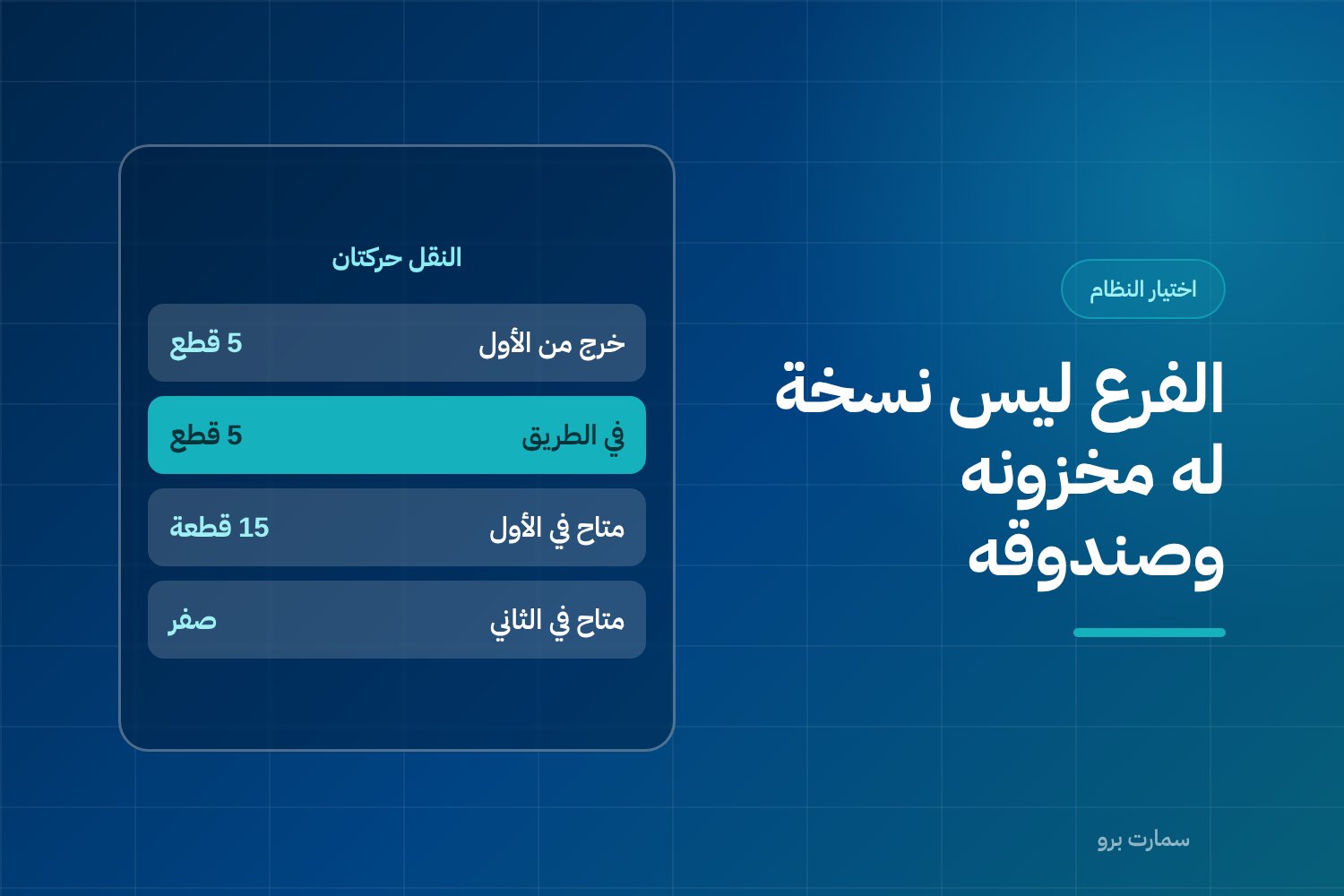
A multi-branch POS system treats each branch as its own unit for stock, cash and accountability, while sharing one item file, one pricing policy and one set of reports. Before buying, test four things on two branches: branch-level stock, two-step transfers, shifts closed under a named employee, and Phase 2 e-invoicing per device.
Most owners start looking for a multi-branch POS system after opening the second branch, not before. A single branch forgives many shortcuts: a note in the drawer, a stocktake at month-end, a discount the cashier gives after a quick word with the owner. The day the second branch opens, those shortcuts surface all at once, and the owner usually finds out from a stock variance, not from a report on screen.
This article explains what actually changes when you move from one branch to several, and what to test in a system before you buy. The comparison is based on criteria only, without naming systems or brands, because a criterion stays valid after the names change.
Multi-branch POS system: what changes on day one of the second branch?
In a single branch you have one source of truth: the drawer in front of you, the shelf behind you, and an employee who asks you before every exception. With a second branch you have two truths, and you can't keep your eye on both.
Three problems appear in roughly the same order for most store owners:
- An item shows as available in the system but isn't on the shelf, or the other way round.
- A cash difference that nobody can be held responsible for, because the shift wasn't closed under a specific name.
- Discounts in one branch that cut its profit without showing up in total sales.
What the three have in common is that the system was run as if the new branch were a copy of the first. It isn't.
Why isn't a branch just a copy of the first one?
The rule that solves most of the above is simple: each branch is independent in the accounts and shared in management.
Independent in three things:
- Stock: quantity belongs to the branch, not the company. "We have 40 pieces" is useless if 38 of them sit in a branch that doesn't sell that item.
- Cash: each branch has its own shifts, opening balances and closing balances.
- The person responsible: a named individual who closes the day and signs off the variance.
Shared in three things: the item file, the pricing and discount policy, and the reports that compare branches on the same basis.
If a system allows multiple branches but keeps stock at company level only, you have several tills, not several branches. That is the first question in your trial, not the last. If you are building this foundation from scratch, the cashier setup details are covered in how to choose the right POS system in Saudi Arabia.
How should stock and transfers between branches work?
The most important technical detail in running multiple branches is the transfer. The rule: a transfer is two movements, not one.
- An issue movement from the sending branch.
- A receipt movement at the receiving branch.
Between them sits a third state: "in transit". The quantity has left but hasn't been received yet, and it isn't available for sale in either branch.
The common shortcut is to record a transfer as a single movement that deducts here and adds there instantly. It feels convenient, and it is the number one source of phantom stock: an item recorded in a branch where nobody actually received it, so the sending branch doesn't look for it and the receiving branch doesn't know it is responsible for it. After three months the gap is big enough to notice and small enough to be impossible to trace.
What the system should provide:
- A transfer order with a number and reference, not a direct edit of quantities.
- A separate receipt by the receiving branch, with the option to receive less and record the difference.
- A report of pending transfer orders, because a transfer not received after a week is a problem, not a record.
- Stocktakes at branch level, not one stocktake for the whole company.
For how per-branch quantities, transfers and reorder levels are handled in practice, see SmartPro Inventory.
One price list or a price list per branch?
Different prices between branches aren't necessarily a mistake. There are legitimate cases: a branch in a location with higher rent, a branch in another city with different delivery costs, or a limited campaign in one branch.
The difference between the two cases is who decides:
- Branch price: an approved price list linked to the branch, set by the owner or management and applied automatically to every transaction.
- Uncontrolled discount: one price in the system, and the employee lowers it when needed.
The second is usually called "flexibility". In the accounts it is a leak in your margin that is hard to measure, because it doesn't appear as a discount but as a lower selling price.
What you need: a price list that can be linked to a branch, a discount cap per user, and a report showing discounts granted per branch and per employee. Exceptions stay possible, but visible.
How should cash and shifts work in each branch?
A shift isn't an administrative formality. It is the only thing that answers the question: whose variance is this?
The minimum you need:
- Opening a shift with an opening balance under a specific employee's name.
- Closing a shift with an actual cash count, so the system calculates the difference between expected and counted.
- Separating payment methods at closing: cash, card (mada) and bank transfer. Most variances come from mixed-up methods, not missing cash.
- A log that can't be deleted: a closed shift isn't reopened and edited; corrections are made with a new movement that has a reason.
- Closing done in the branch and reviewed by management later, because the owner can't be in two branches at once.
The practical test: if closing a branch needs the owner present or a phone call, the system isn't ready for a second branch.
Permissions: what can a branch employee see and change?
In a multi-branch setup, permissions aren't about trust. They are clear boundaries that also protect employees from being accused.
What is usually controlled:
- Scope: a branch employee sees only their branch's data, not other branches' sales or costs.
- Discount: a cap as a percentage or amount; anything above it needs approval.
- Returns: can the employee return an invoice alone? Is there a time or amount limit? Uncontrolled returns are the easiest way to take cash out of the drawer.
- Price changes at the till: best blocked entirely, relying on price lists instead.
- Cancelling a transaction before it is issued: allowed, but logged under the name of whoever cancelled it.
- Stocktakes and transfers: who creates the transfer order, who approves it and who receives it. Separating these three reduces errors more than any report.
The rule: every exception is allowed, as long as it is recorded with a name, a time and a reason.
Consolidated reports: how do you compare branches on the same basis?
A report that adds all branches' sales into one number is useful for the bank, not for managing branches. What you need is a comparison on the same basis:
- Gross margin per branch, not just sales. A branch that sells more with bigger discounts may be less profitable.
- Stock turnover per branch: an item that is slow in one branch may move fast in another, which makes it a transfer decision, not a purchasing decision.
- Average invoice value and number of invoices, to separate the effect of customer numbers from the effect of basket value.
- Discounts and returns as a percentage of sales, per branch and per employee.
- Cash variance rate per branch.
All of this assumes that sales, stock and journal entries feed from one source. Keeping POS and accounting separate means double entry and numbers that don't match at month-end, a point discussed in how to choose the best accounting software in Saudi Arabia.
How does e-invoicing work across branches?
Phase 2 e-invoicing in Saudi Arabia requires invoices to be generated in XML format following UBL 2.1, with a cryptographic stamp, a counter that is never reset, a hash chain linking each invoice to the previous one, and a QR code on simplified invoices. A hash chain is a sequence in which each invoice carries a digital fingerprint of the one before it, so any gap or edit shows. Simplified invoices are reported within 24 hours of issue, without prior clearance. An invoice can't be edited after issue; corrections are made with a credit note.
What this means in a branch environment: each issuing unit keeps its own counter and chain, so the sequence remains verifiable for each device separately. Merging several branches' devices onto one counter turns any connection drop into a sequencing problem, while separate counters confine any fault to one device and let the other branches keep working.
Three practical questions for your trial:
- If the internet drops in a branch, does invoicing continue locally and get reported later within the deadline?
- Can you view reporting status for each branch and each device separately?
- Does a return automatically create a credit note linked to the original invoice?
For the QR code and the rest of the Phase 2 requirements, see the ZATCA e-invoicing guide.
Watch for a point that keeps coming up in sales pitches: ZATCA doesn't approve or certify software products. Any offer that says "officially approved" is describing itself, not reality.
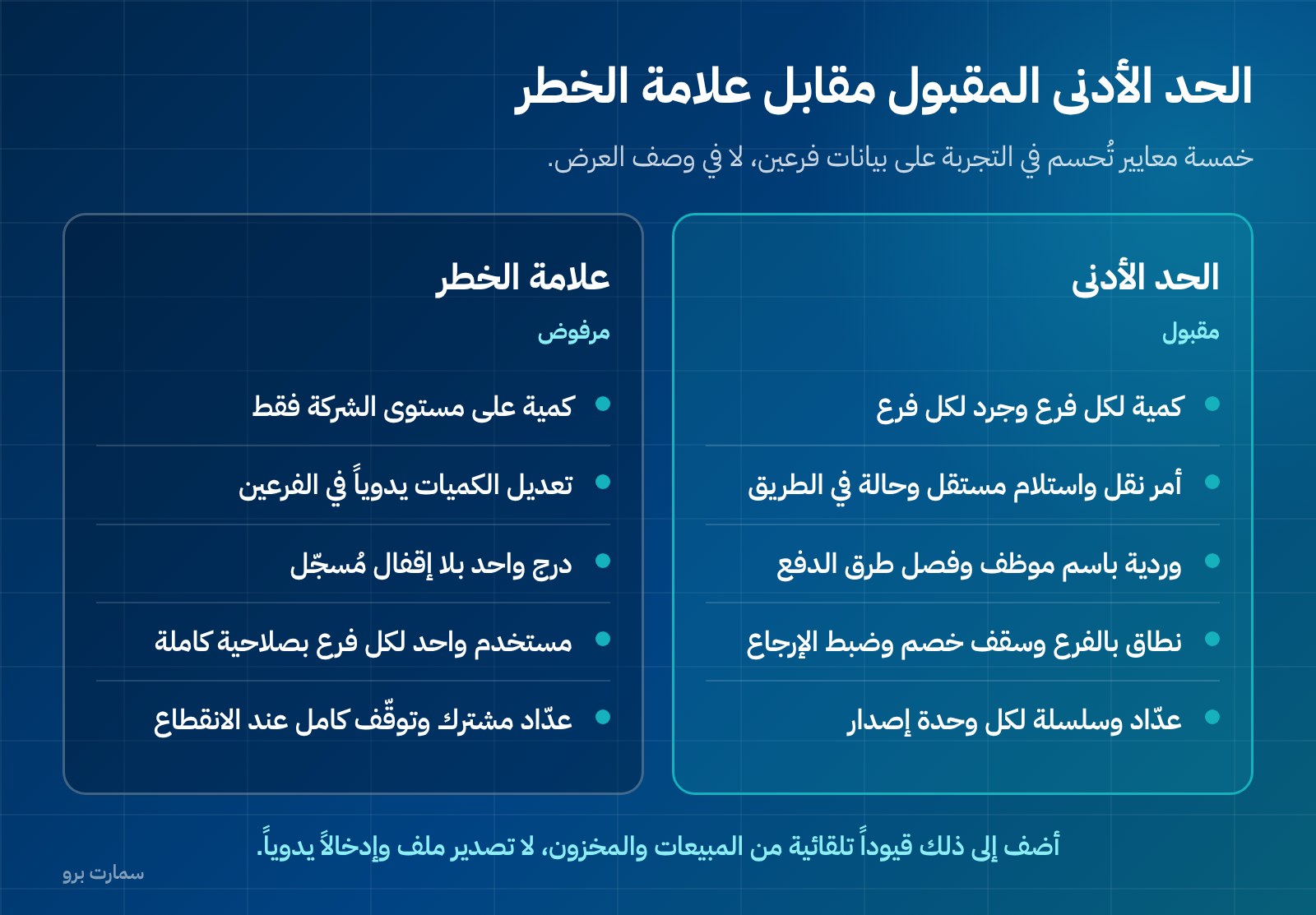
Selection criteria table
| Criterion | Acceptable minimum | Red flag |
|---|---|---|
| Stock | Quantity per branch and stocktake per branch | Company-level quantity only |
| Transfers between branches | Transfer order + separate receipt + "in transit" state | Manually editing quantities in both branches |
| Prices | Price list that can be linked to a branch | One price, with differences handled by cashier discounts |
| Cash | Shift under an employee's name + separated payment methods | One drawer with no recorded closing |
| Permissions | Branch scope + discount cap + controlled returns | One full-access user per branch |
| Reports | Margin and turnover per branch | Total sales only |
| E-invoicing | Counter and chain per issuing unit + offline operation | Shared counter and full stop when offline |
| Accounting link | Automatic entries from sales and stock | File export and manual entry |
| Expansion | Add a branch without re-creating items | Separate item file per branch |
If you want to see these criteria applied in one product, look at SmartPro Sales & POS, which includes ZATCA Phase 2 e-invoicing and a POS that keeps working offline, and try it on data for two branches.
Trial checklist: two branches and one transfer
Don't trial the system with one branch. A useful trial takes under an hour and is done in this order:
- Create two branches and one item, and enter 20 pieces in the first branch and zero in the second.
- Create a transfer order for 5 pieces from the first to the second, and don't receive it. Check both branches' stock: you should see 15 available and 5 in transit, not 5 available in the second branch.
- Receive only 4 pieces and record one piece as a difference. Does the system ask for a reason? Does the difference stay in a report?
- Link a different price list to the second branch and sell the item there. Was the branch price applied automatically?
- Set up a user with a 5% discount cap and request a 15% discount. Was it blocked or sent for approval?
- Issue a simplified invoice from each branch, and check that each device has its own counter and chain and that the numbers don't overlap.
- Disconnect one branch's device, issue an invoice, then reconnect and check the reporting status.
- Return one of the two invoices and confirm the return created a credit note, not an edit to the original.
- Close both branches' shifts with a cash count that differs from the expected amount in one of them, and see whose name the variance is recorded under.
- Open one report showing each branch's margin and turnover, and compare. If you have to combine the numbers in an external spreadsheet, the reports fall short.
A system that passes all ten is fit for a third branch. One that stumbles on step 2 or step 9 will cost you variances you'll never be able to explain.
The numbers and the packages
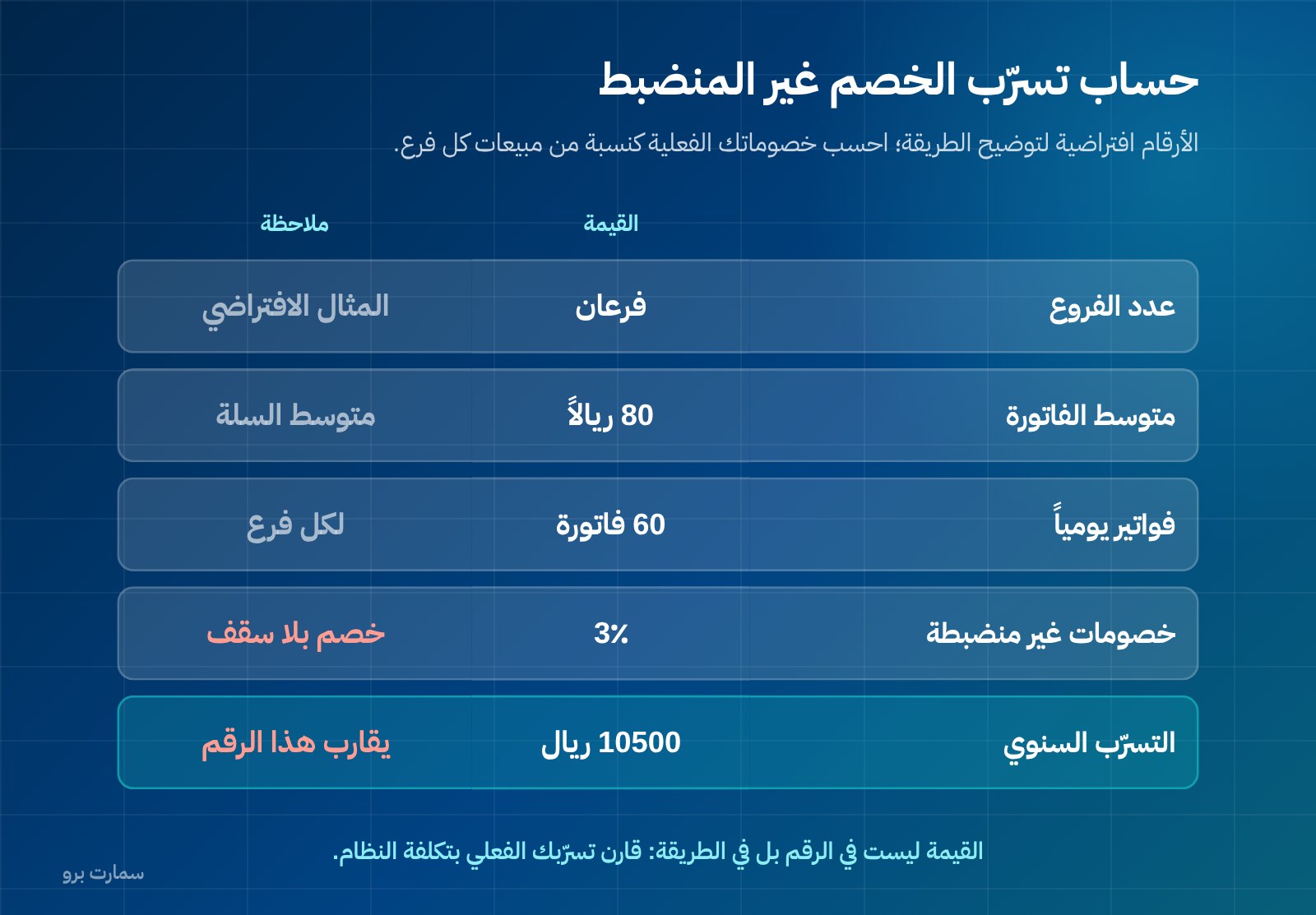
The following figures are hypothetical, to illustrate the method. With two branches, an average invoice of SAR 80, 60 invoices a day in each branch and uncontrolled discounts averaging 3%, the leak is about SAR 288 a day (2 × 60 × 80 × 3%), or roughly SAR 105,000 a year. The value isn't in the number but in the method: calculate your actual discounts as a percentage of sales per branch, then compare that with the cost of the system.
SmartPro packages, all prices including 15% VAT: Mini at SAR 1,500 a year (1 user included), Pro at SAR 4,500 a year (3 users included, plus the mobile app) and Max at SAR 20,500 a year (10 users included, plus Projects and Manufacturing). Every package includes the main branch only; each additional branch costs SAR 1,000 a year, and extra users are priced in graduated tiers. Exact totals depend on your users, branches and systems, and the pricing page lists every package and system. Choose based on the number of branches you expect in a year, not today's number, because moving up a package keeps your data and setup in place, while changing systems means rebuilding them.
The official reference
For e-invoicing requirements and their official texts, refer to the official ZATCA website: Zakat, Tax and Customs Authority (ZATCA). Rely on the official source for any regulatory detail, and don't base a decision on a description in a sales pitch.
Read also
- How to choose the right POS system in Saudi Arabia
- SmartPro Inventory: stock across branches
- How to choose the best accounting software in Saudi Arabia
Key takeaway: Treat every branch as its own unit for stock, cash and accountability, and insist on two-step transfers, named shifts and a separate e-invoicing counter per device. Run the ten-step two-branch trial before you sign.
To run that trial on your own data, start a free trial or book a demo with a SmartPro product expert.
Article visuals
Frequently asked questions
What is the difference between a multi-branch POS system and a single-branch system?
The key difference is that stock and cash belong to the branch, not the company. In a single-branch system quantity is one number, while in a multi-branch system each branch has its own quantity, shifts and responsible person. On top of that come transfers between branches, permissions limited to a branch's scope, and reports that compare branches on the same basis.
How do I prevent phantom stock when transferring between branches?
Require transfers to be two movements, not one: an issue from the sending branch and a separate receipt at the receiving branch, with an "in transit" state in between. Transfer orders that deduct and add quantities instantly without a receipt are the number one source of variances. Also monitor the pending transfer orders report, since any order not received after a week needs follow-up.
Can an item's price differ between branches?
Yes, and the difference is legitimate when it is a management decision: an approved price list linked to the branch and applied automatically. If the system has one price and employees lower it at the till, that is an uncontrolled discount that leaks from your margin without showing up as a discount. Set a discount cap for each user and review the discount report for each branch.
How does Phase 2 e-invoicing work with multiple branches?
Invoices are generated in XML following UBL 2.1, with a cryptographic stamp, a counter that is never reset, a hash chain linking each invoice to the previous one, and a QR code on simplified invoices. Each issuing unit keeps its own counter and chain, so the sequence stays verifiable for each device separately. Simplified invoices are reported within 24 hours of issue without prior clearance, and they can't be edited after issue; corrections are made with a credit note.