
Pharmacy Accounting Software: Practical Selection Criteria
How to choose pharmacy accounting software that tracks batches, expiry dates, substitutes, returns and invoices billed to third parties, with a criteria table and a demo checklist.
Author:سامي الحيدري
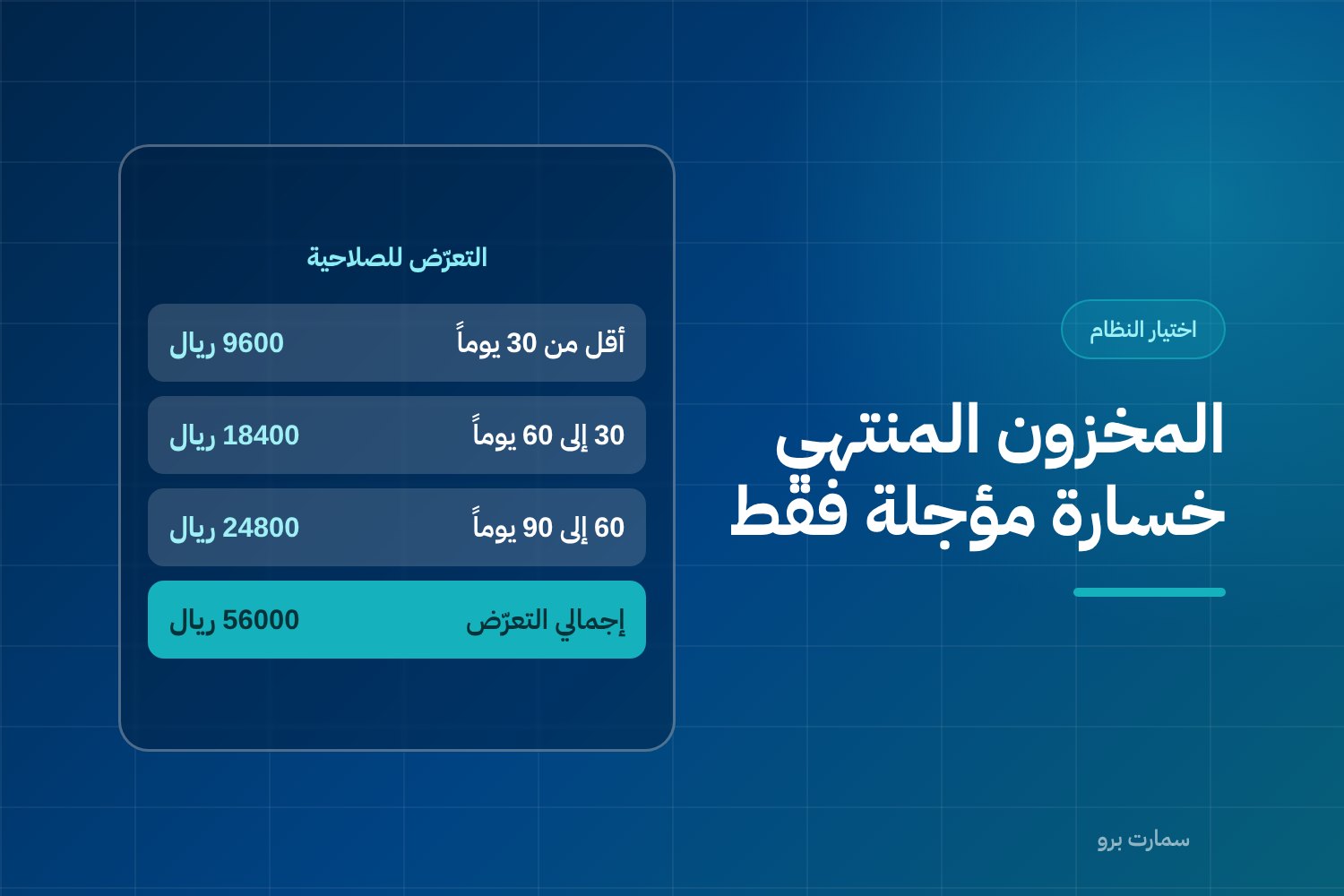
Choosing pharmacy accounting software is not a scaled-down version of choosing software for any retail shop. A pharmacy buys the same item in different batches, each with its own expiry date and purchase price. It returns a large share of purchases to suppliers and dispenses some items on a third party's account. A system that cannot handle these four things will misstate both your stock and your profit, even if its journal entries are perfectly correct.
This guide is a set of criteria and questions to ask during a demo, not a comparison of brand names. Names change; criteria don't.
Why does generic accounting software fail in a pharmacy?
Generic accounting software rests on a simple idea: one item, one quantity, one average purchase cost and one selling price. That is enough for a clothing shop or a spare-parts store. In a pharmacy it breaks in four places:
- An item is not a single unit. You may have three batches of the same product on the shelf, expiring on three dates and bought at three prices. A system that only sees "120 boxes" does not know that 30 of them will be worthless in two months.
- You don't always sell by the box. A customer asks for one strip from a box of three, or a set quantity of a product dispensed by weight or by unit.
- Returns are not the exception. Returning goods to suppliers is a recurring monthly activity in a pharmacy, not a rare event.
- The payer is not always the buyer. When you dispense on a third party's account, the receivable sits with that party, not with the person who collected the medicine.
If you pick a system first and then patch these gaps with spreadsheets, you end up with paper stock that doesn't match the shelf, and a profit margin that looks healthy until the stocktake.
Why must pharmacy accounting software start from the batch and expiry date?
Stock that expires is not stock; it is a loss that has not been recognised yet. While a batch sits on the shelf and in the system at full book value, your balance sheet shows an asset that will drop to zero on a date you already know. A system that does not track batches and expiry dates cannot value stock honestly, because it lacks the one piece of information that decides whether the quantity can be sold at all.
A batch (or lot) is a quantity of a product made in one production run, identified by a batch number and an expiry date. At batch level, the system should provide:
- Batch capture at purchase, not at sale: the batch number and expiry date are entered with the supplier invoice.
- First-expired, first-out (FEFO) dispensing. FEFO means selling the batch that expires soonest first. The system should suggest the batch automatically on the sales screen and allow a manual override that records who overrode it and why.
- Stock valuation at the actual batch cost, not an average that hides the fact that an older batch was bought at a different price.
- A block or warning when an expired batch is dispensed, with an override permission not every user holds.
- An expiry report in time bands (90 / 60 / 30 days) that shows monetary value, not just a count of items.
- A write-off or destruction entry that removes the batch from stock and records the loss in a separate account, so you know the cost of expiry as an annual figure.
The last point separates serious systems from the rest. If destruction is just a "stock adjustment" in your system, the expiry loss dissolves into general stocktake variances and you never see it.
Hypothetical example: how big is your expiry exposure?
The figures below are hypothetical, used only to illustrate the method. They are not market data or sector averages. The point is to redo the calculation with your own pharmacy's numbers.
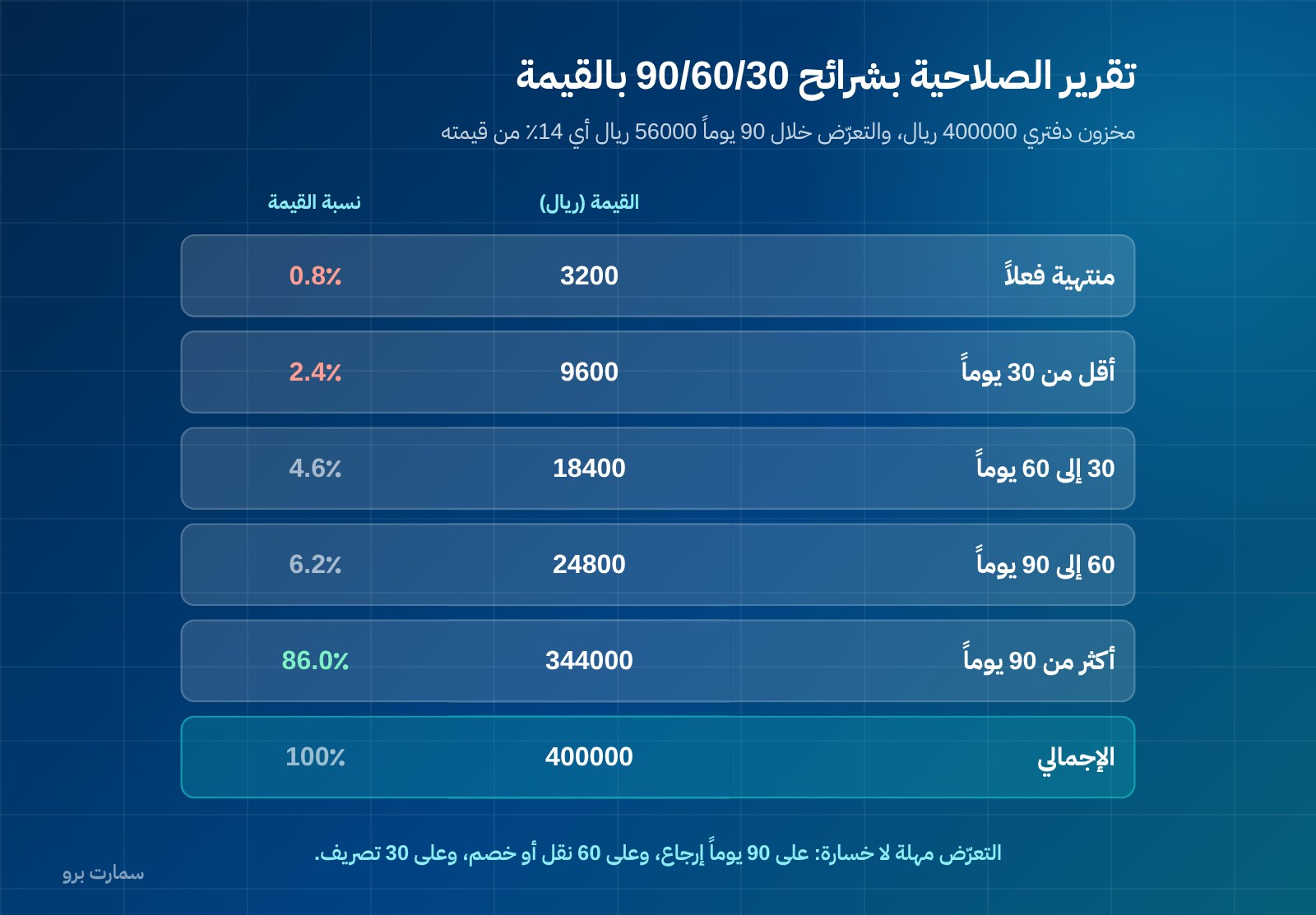
Assume a pharmacy with a book stock value of SAR 400,000 runs its expiry report in bands:
| Expiry band | Number of items | Stock value (SAR) | Share of stock value | What is still possible |
|---|---|---|---|---|
| Already expired | 12 | 3,200 | 0.8% | Destroy and record the loss |
| Under 30 days | 26 | 9,600 | 2.4% | Quick clearance or a bundled offer |
| 30 to 60 days | 41 | 18,400 | 4.6% | Targeted discount or transfer to a faster-moving branch |
| 60 to 90 days | 55 | 24,800 | 6.2% | Negotiate a return with the supplier |
| Over 90 days | The rest | 344,000 | 86.0% | No action |
| Total | — | 400,000 | 100% | — |
Read the table from the bottom up. Exposure up to the 90-day mark, including what has already expired, is SAR 56,000, or 14% of stock value. This is not a loss; it is a window. Each row higher in the table means fewer options and higher cost: at 90 days you can negotiate a return, at 60 days you can transfer or discount, at 30 days you are down to clearing at any margin, and once expired only the loss entry remains.
A 90/60/30 alert policy does not reduce expiry by itself; it moves the decision from after expiry to before it. Its real value is turning one vague figure ("shrinkage") into three different work lists, each with a specific action and a specific owner. That requires the report to be automatic and scheduled, not something someone has to remember to run.
How to build this policy at stock level is covered on the inventory management with batches and expiry dates page.
How should the system handle substitutes, barcodes and part-box sales?
Three capabilities can be tested in two minutes on the sales screen, and most generic systems fail at least one of them.
Substitutes and equivalents. When an item runs out, the person at the till needs to see the linked substitutes for that exact item immediately, not search by name and rely on memory. The link is built once, at the level of the active ingredient or a group the pharmacist defines, and then appears as a suggestion on screen. There is an accounting benefit too: the sale is not lost, and unmet demand is recorded instead of disappearing.
Barcodes at two levels. The box barcode and the unit barcode are not the same thing. The system must accept more than one barcode per item and know the conversion factor between the purchase unit and the selling unit. Without that, you buy by the carton, sell by the box, and let the difference leak out at every stocktake.
Selling part of a box. If the pharmacy sells one strip from a box of three, the system needs to deduct one third of a box from stock and keep the opened box as remaining units tied to the same batch and expiry date. A system that only handles whole numbers will force you to deduct a full box, and you will discover the difference later as an unexplained shortage.
A quick test: in the demo, ask to sell one unit from a box, then pull the stock report for that item, then return that unit. If the quantity goes back to the correct batch, the system understands what you do. More on sales-screen behaviour in how to choose a POS system in Saudi Arabia.
How should returns to suppliers and credit notes work?
A pharmacy returns more than almost any other retailer: batches close to expiry, slow movers, items that arrived in unacceptable condition, and items the supplier has discontinued. So a supplier return is not a minor screen; it is a full cycle the system has to manage:
- A return request linked to the original purchase invoice and to the specific batch number, not just the item.
- Stock leaving from the same batch, not from whichever batch is available.
- The supplier's credit note recorded and settled against the supplier's account, with follow-up on anything not yet settled. A credit note is a document that reduces the amount owed on an earlier invoice.
- An ageing report of return requests: what was sent but not yet matched by a credit note, because that is a balance the supplier owes you that shows up nowhere else.
On the other side, customer returns after an invoice has been issued are handled with a credit note linked to the original invoice. This is not a matter of preference: under Phase 2 e-invoicing an invoice cannot be edited after it is issued, and corrections are made with a credit or debit note. If your system handles a return by "editing the invoice", you have a structural problem, not a setting to adjust.
How should invoices billed to third parties (insurance and contracts) be recorded?
Part of what a pharmacy dispenses goes to a recipient who is not the payer: an insurance company, a government body or a corporate contract. The operational and accounting treatment is fundamentally different from a cash sale, and this is what the system needs:
| What happens on the ground | What the system must record |
|---|---|
| The recipient takes the medicine and pays part or nothing | Full revenue, partial cash collection, and the rest as a receivable |
| The balance is owed by a third party, not the recipient | The receivable is opened on the third party's account, not under the recipient's name |
| Claims are batched and submitted periodically | Line items grouped into one claim that can be printed and exported |
| The third party may reject a line | Partial settlement: collected, rejected and outstanding as separate balances |
| Payment arrives weeks later | A receivables ageing report for each third party separately |
The accounting conclusion is simple and often missed. If your system records these transactions as cash sales with a discount, you show revenue as collected when it is not, and you lose sight of how much each third party owes you. If it records them under the recipient's name, you will accumulate thousands of individual accounts instead of one account you can claim against and reconcile.
What a buyer should ask: can a single invoice be split between cash and a third-party receivable? Can a claim be partially closed? Does a rejected amount appear as a balance you can follow up, or is it silently written off? These are operational questions about system capability, not a quotation of any regulation.
What does a multi-branch pharmacy need for transfers between branches?
Having more than one branch changes what "stock" means. The system needs:
- A separate balance for each branch, with the option to see the combined balance on one screen.
- An inter-branch transfer order that records quantity, batch and expiry date, with separate send and receive steps, so you know what is "in transit".
- Branch-level pricing and promotions when needed, with one central item catalogue.
- Branch comparison reports: turnover, shrinkage and expiry exposure for each branch.
- Branch-based permissions, so a branch manager cannot see another branch's data without authorisation.
Transferring stock between branches is the cheapest tool for reducing expiry: an item that sits idle in one branch may sell quickly in another. But it only works if the transfer carries the batch and its expiry date; otherwise you move the problem instead of solving it. If you are looking for inventory management with batches and expiry dates, this is exactly where to start.
What does e-invoicing require in a pharmacy?
A pharmacy issues a large number of simplified invoices every day, so ZATCA's Phase 2 e-invoicing requirements affect its sales screen more than any other area. A simplified tax invoice is the invoice issued for sales to individual consumers. What is established, and what the system must provide:
- The invoice is issued in XML format according to UBL 2.1.
- A cryptographic stamp on the invoice.
- A counter that cannot be reset, and a hash chain linking each invoice to the one before it. A hash chain is a digital fingerprint of each invoice carried into the next, so no invoice can be removed or altered unnoticed.
- A QR code on simplified invoices.
- Simplified invoices are reported within 24 hours of issue and do not need prior clearance.
- No edits after issue; corrections are made with a credit or debit note.
Two practical points matter for pharmacies in particular. First, the counter and hash chain mean an internet outage must not break the sequence, so ask how the system behaves when working offline and how it reports afterwards within the 24-hour window. Second, frequent returns mean frequent credit notes, so test issuing a credit note linked to an older simplified invoice and confirm it comes out with the same complete requirements.
A necessary clarification: ZATCA does not approve or certify software; it publishes an indicative list of e-invoicing solution providers. Any offer claiming its software is "approved" is using imprecise wording. The difference between the two invoice types and its effect on the sales screen is explained in the ZATCA e-invoicing guide.
Selection criteria table
| Criterion | What a pharmacy specifically needs | Question to ask in the demo |
|---|---|---|
| Batch and expiry | Batch and expiry date on every movement | Enter two batches of the same item and show me the stock valuation |
| Dispensing policy | Automatic FEFO with a documented override | Who can override first-expired, and is it logged? |
| Expiry alerts | 90/60/30 bands in monetary value | Show me the report scheduled, not run manually |
| Write-off | A separate entry for expiry loss | Which account does a write-off post to? |
| Barcodes | Multiple barcodes per item and a conversion factor | Buy by the carton and sell by the box in front of me |
| Partial sales | Fractional quantities tied to the batch | Sell one unit from a box, then return it |
| Substitutes | Substitute links shown on the sales screen | How is the link built, and who maintains it? |
| Supplier returns | Batch-level returns and a settled credit note | Show me the ageing of unsettled return requests |
| Third-party invoices | Split invoice and a claim that can be partially settled | Partially close a claim in front of me |
| Branches | Batch-level transfer order with send and receive steps | What shows up as "in transit"? |
| E-invoicing | XML, stamp, counter, hash chain and QR | How does it work offline and then report? |
| Permissions | Permissions by branch and by role | Can the cashier see cost prices? |
| Reports | Profit by item, batch and branch | Run a margin report by batch |
| Data | Full export in an open format | Export my items and balances now |
Hands-on checklist: test with your own items
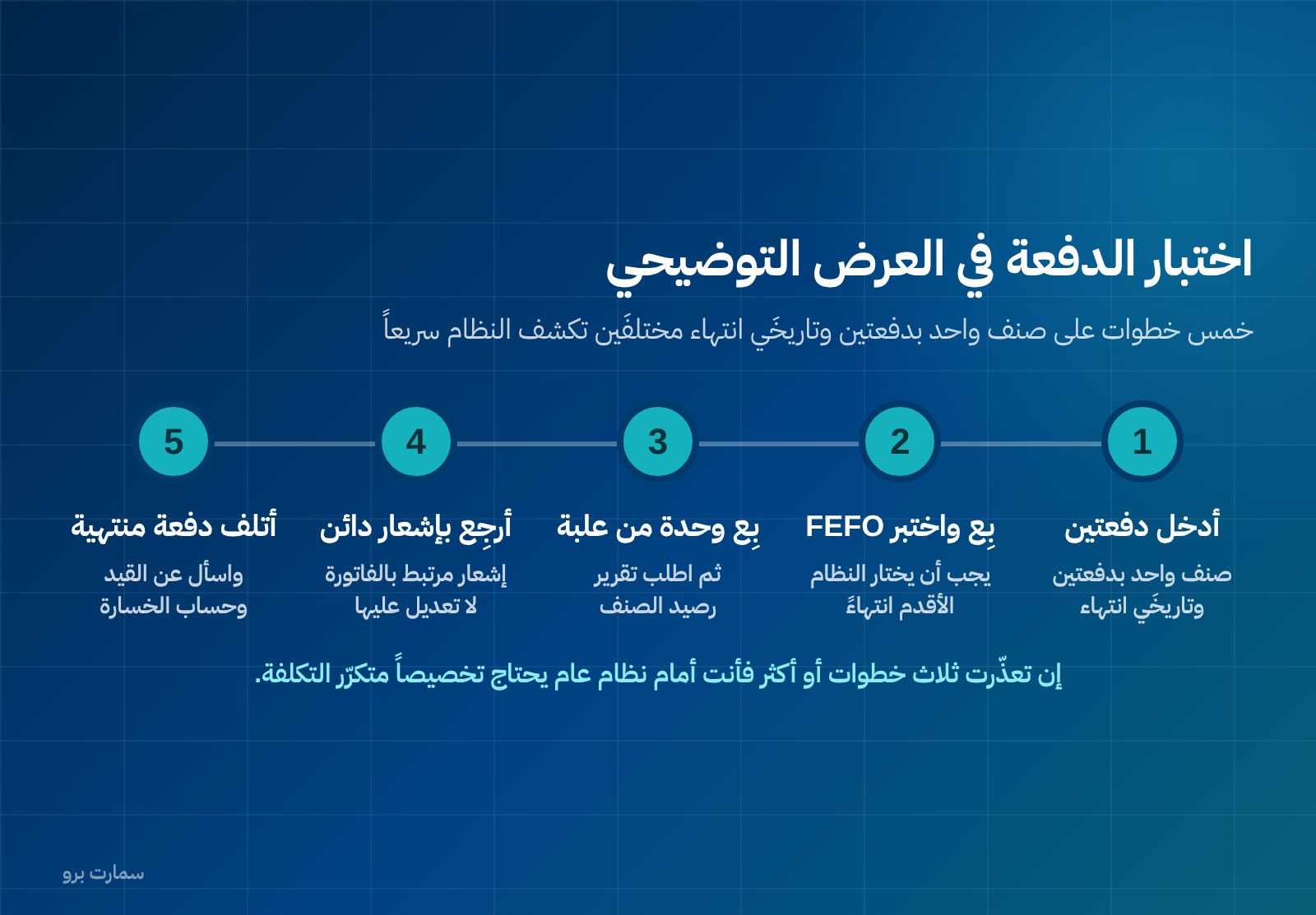
Don't accept a demo on ready-made data. Take a file of 50 of your real items, with their names, batches and dates, and run this scenario:
- Import the 50 items with their barcodes and conversion factors.
- Enter a purchase invoice containing one item in two batches with two different expiry dates.
- Sell that item and confirm the system picked the batch that expires first.
- Sell one unit from a box, then print the item balance report.
- Issue a simplified invoice and check the QR code and the XML format.
- Return a line from yesterday's invoice with a credit note.
- Record a third-party invoice: part cash and part owed by the third party.
- Create a transfer order for a batch to another branch without receiving it, then request the "in transit" report.
- Run the expiry report in 90/60/30 bands and request it in monetary value.
- Write off an expired batch and ask about the resulting journal entry.
- Request a profit margin report by batch.
- Ask to export all your data to an open file while you are still in the demo.
If three or more steps fail, you are looking at a generic system that needs customisation, and customisation is a recurring cost that does not appear in the advertised price. General comparison criteria between systems are explained in how to choose the best accounting software in Saudi Arabia.
How should you read the cost?
The advertised price is not the cost. Before deciding, add up: the annual subscription, the cost of each extra user, the cost of each extra branch, setting up items and barcodes, training the till team, and any fees for integrations or invoice volumes. Then ask one question: what gets more expensive if I open a third branch or add two users?
For comparison against one published reference, SmartPro's packages are: Mini at SAR 1,500 a year including 15% VAT (1 user), Pro at SAR 4,500 (3 users) and Max at SAR 20,500 (10 users). Only the main branch is included in each package, and each additional branch costs SAR 1,000 a year. Full details are on the pricing page. Read any other offer with the same logic: what the price includes, what is charged on top, and how it changes as the pharmacy grows.
Where is the official reference?
E-invoicing requirements and integration timelines are published by the Zakat, Tax and Customs Authority (ZATCA) at zatca.gov.sa. Rely on the official text whenever it conflicts with what any sales pitch says, and remember that ZATCA publishes an indicative list of providers and does not issue approvals for software.
Read also
- Inventory management with batches and expiry dates
- How to choose the right POS system in Saudi Arabia
- ZATCA e-invoicing guide
Key takeaway: Judge pharmacy accounting software by how it handles batches, expiry, part-box sales, supplier returns and third-party billing on your own items, not by its feature list. A system that values stock by batch and turns expiry into scheduled work lists protects both your margin and your balance sheet.
To run this checklist on your own items, book a demo or start a free trial of SmartPro.
Article visuals
Frequently asked questions
What makes pharmacy accounting software different from generic accounting software?
The core difference is treating the batch and expiry date as part of every stock movement, not as an extra field. On top of that come selling in a unit smaller than the purchase unit, linking substitute items, a full return cycle with suppliers, and invoices charged to a third party rather than the recipient. Generic software may record entries correctly, but it cannot value expiring stock or track receivables owed by third parties.
How do I find out how exposed my pharmacy is to expiry?
Run the expiry report in 90, 60 and 30-day bands and request it in monetary value, not by number of items. The total of the bands is your window, not your loss, and each closer band means fewer options: returning to the supplier, then transferring between branches, then discounting, then writing off. The figures in the article are hypothetical, meant to show the method so you can redo the calculation on your own data.
How should the system handle returns to suppliers?
The return request should be linked to the original purchase invoice and to the specific batch number, and stock should leave from that same batch, not from any available batch. The supplier's credit note is recorded and settled against the supplier's account, with a report showing return requests not yet matched by a credit note. Customer returns are handled with a credit note linked to the original invoice, because under Phase 2 e-invoicing an invoice cannot be edited after it is issued.
Does a pharmacy system need special e-invoicing setup?
The requirements are the same: XML in UBL 2.1 format, a cryptographic stamp, a counter that cannot be reset, a hash chain, and a QR code on simplified invoices, which are reported within 24 hours of issue without prior clearance. What changes in a pharmacy is volume: many simplified invoices and many credit notes, so test how the system behaves during a connection outage and when issuing a credit note for an older invoice. Note that ZATCA does not approve software; it publishes an indicative list of solution providers.