
E-commerce Accounting Software: A Practical Buyer's Guide
The amount that lands in your bank account is not your revenue. A practical guide to choosing e-commerce accounting software that handles gateway fees, shipping, returns and cash on delivery.
Author:سامي الحيدري
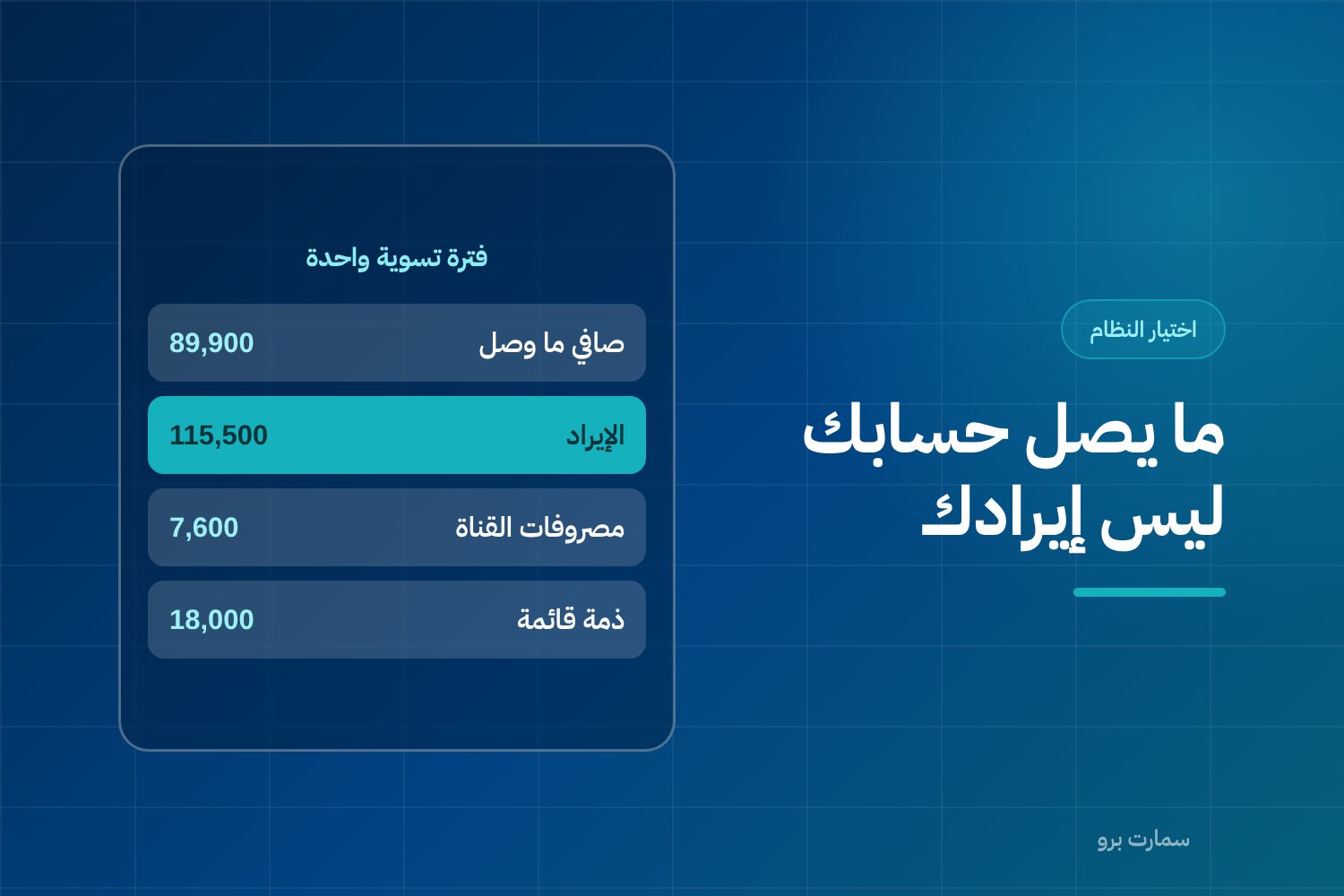
Choosing e-commerce accounting software is not about the number of screens or how good the reports look. It comes down to one question: what happened between the moment an order was placed and the moment the money reached your bank account? It also asks whether each part of that gap is recorded in its correct place as revenue, expense or receivable.
An online store sells like any other business, but its books break in places a physical shop never sees. This guide is written for a store owner who wants numbers they can trust, not for an accountant looking for definitions.
Why isn't the amount in my bank account my revenue?
This is where everything starts. Several layers sit between the order and the bank deposit: payment gateway fees, the shipping you charge customers and the shipping you pay the courier, cash collected on delivery by the courier and not yet settled, returns, and a settlement period that can push today's payout into next week.
A system that records the bank deposit as revenue gets the number wrong in two directions at once. Revenue looks lower than it is, because fees and returns were deducted before it was shown. Expenses also look lower than they are, because gateway fees and courier charges were never recorded at all.
The result is that your apparent margin looks nothing like your real margin. You end up making pricing and advertising decisions based on a figure built from items that have nothing to do with each other.
The working rule: a bank deposit is a cash movement, not a line in the income statement. Revenue is recognised at the point of sale, fees are a separate expense, and money held by an intermediary is a receivable until it is transferred.
How do you break down a single payout? A worked example
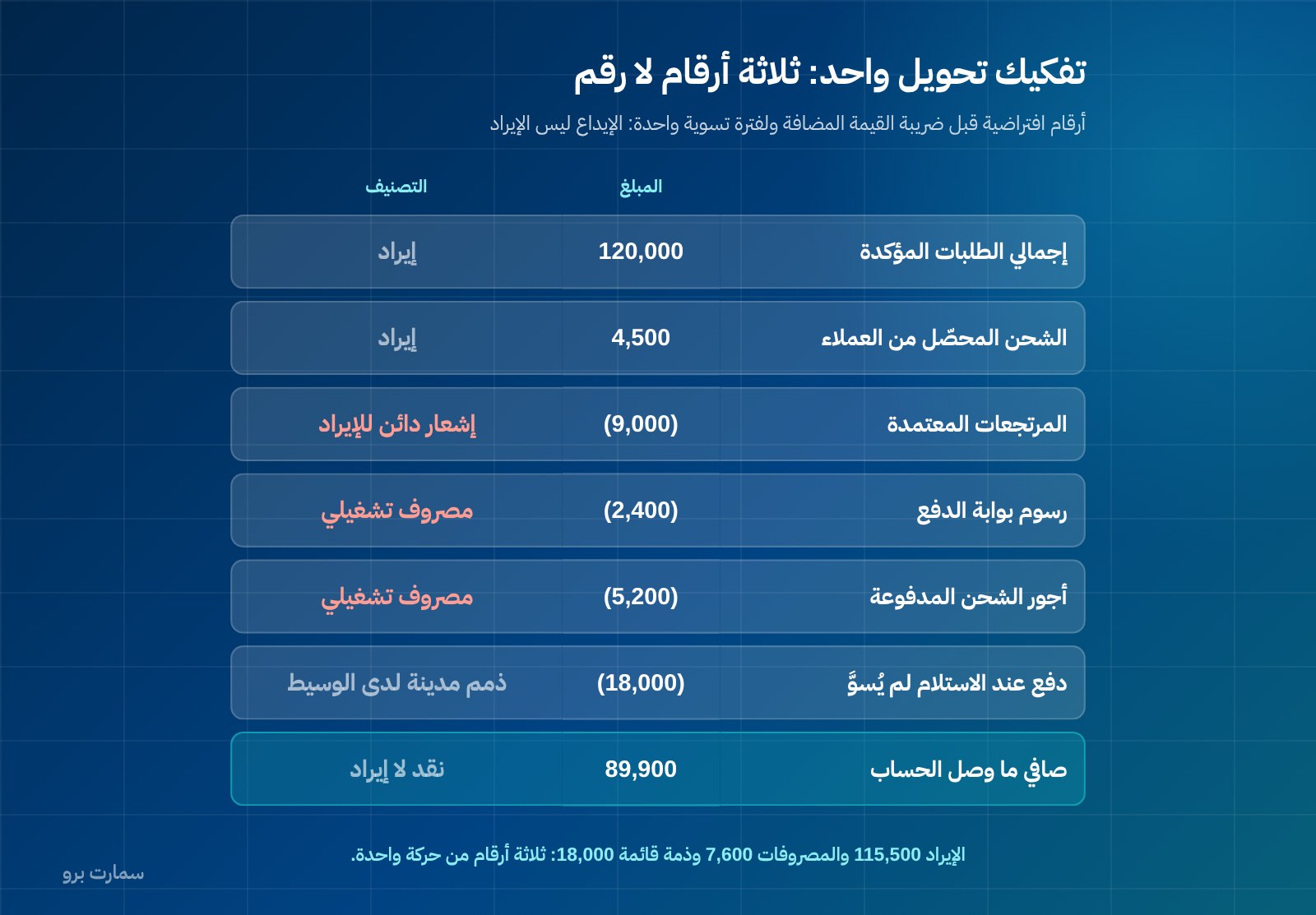
The figures below are hypothetical, used only to illustrate the method; they do not represent any market rates or percentages. Amounts are shown before VAT to keep things simple, and they cover one settlement period.
| Item | Amount (SAR) | Correct accounting treatment |
|---|---|---|
| Total confirmed orders in the period | 120,000 | Revenue |
| Shipping charged to customers | 4,500 | Revenue (or a reduction in expense, depending on policy) |
| Approved returns | (9,000) | Credit note reducing revenue |
| Payment gateway fees | (2,400) | Operating expense |
| Courier charges paid | (5,200) | Operating expense |
| Cash-on-delivery amounts not yet settled | (18,000) | Receivable from the courier |
| Net amount received in the bank | 89,900 | Cash |
Look at the gap. The figure on your bank statement is SAR 89,900, but your revenue for the period is SAR 115,500 after returns, your channel-related expenses are SAR 7,600, and you have an outstanding receivable of SAR 18,000 still on its way. Three completely different numbers, all generated from a single movement if the system is built for it.
A good system does not ask you to enter this breakdown by hand every week. It imports the settlement report from the store platform and the payment gateway, matches it against the orders, then posts each item to its account.
Whatever does not match appears in a short exceptions list for you to review, not as an unexplained difference you hunt for at month end. This is the core of running e-commerce operations on a sound accounting footing.
How should cash on delivery be recorded?
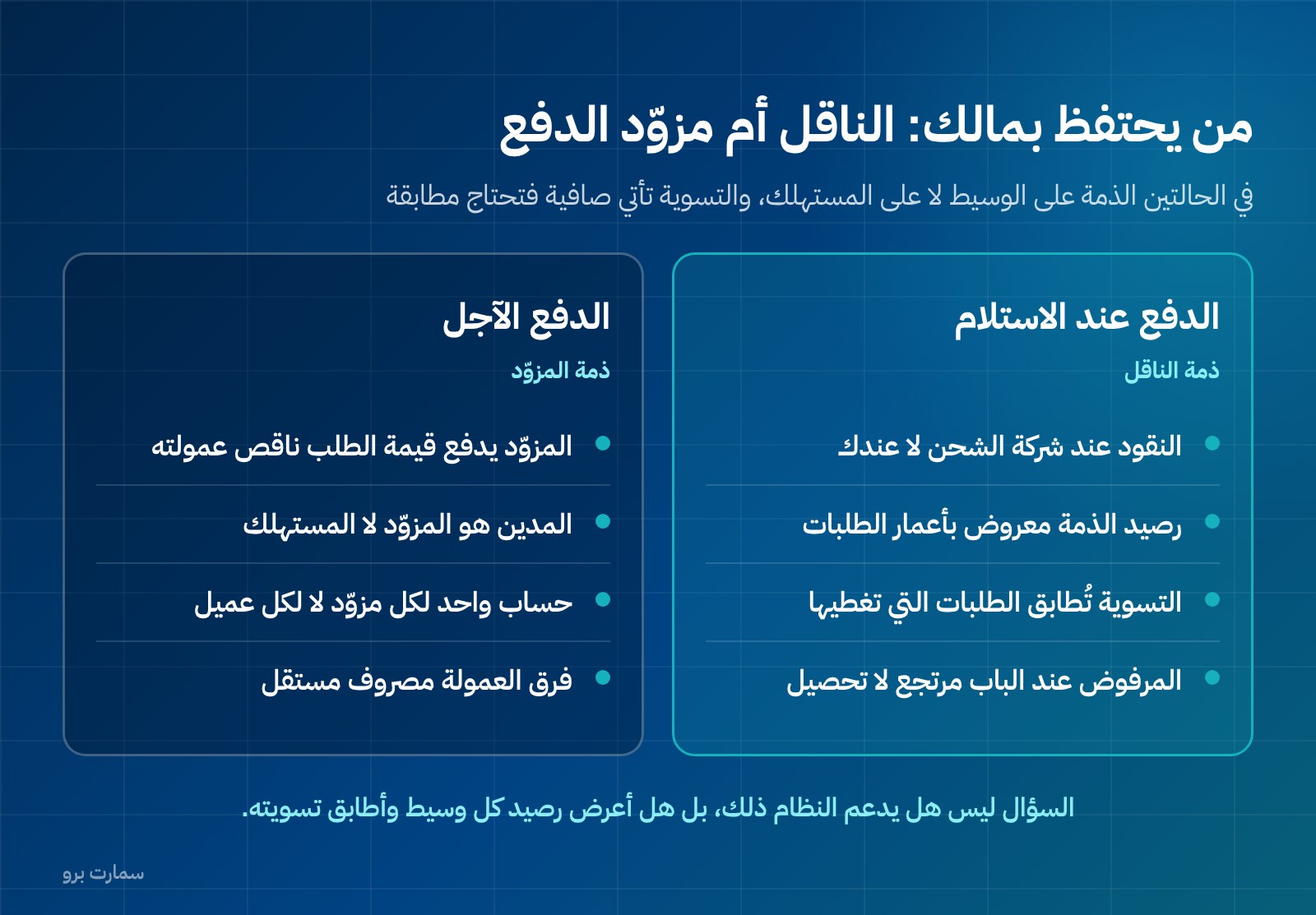
With cash on delivery (COD), the goods go to the customer and the cash goes to the courier, not to you. In accounting terms this is not a cash sale; it is a sale that creates a receivable from the party holding the money on your behalf.
The system needs to handle three points:
- Balances by courier and by age. The receivable from each courier should be visible at any moment, broken down by order age. If money has been stuck for more than a month, you should see it before anyone has to remind you.
- Net settlements matched to orders. Settlements usually arrive net: the amount collected minus courier charges and any collection fees. The system should match each settlement to the specific orders it covers, not record it as one lump payment of unknown origin.
- Refused orders treated as returns. Some of this money will never arrive, because the order was refused at the door or sent back. That is not a late collection; it is a return that needs a credit note and inventory handling. A system that confuses "late" with "never coming" leaves phantom receivables in your books that grow over time.
What do returns actually affect?
In e-commerce, a return is a routine event, not an exception. Every return moves three things in the system: revenue, inventory and tax.
Revenue
Correcting a sale after the invoice is issued is not done by editing the invoice. An issued invoice cannot be edited or deleted; the correction is made with a credit note linked to the original invoice.
This is not an internal housekeeping choice; it is a requirement of the e-invoicing regime. Issuing the credit note is therefore not optional, and a system that lets a customer-service agent delete an order and hide its trace is not fit for use.
Inventory
A returned item does not automatically go back into stock available for sale. Its return depends on inspection: what can be resold goes back into available stock, and what cannot is moved to damaged or recycling stock and charged to expense.
A store that puts every return back on the virtual shelf ends up selling items that do not physically exist.
Tax
A credit note adjusts output VAT in your return. Ignoring credit notes means paying VAT on a sale that never completed. See the details in our ZATCA e-invoicing guide.
How do you stop the online store and the branch selling the same stock?
Overselling happens for one reason: two channels sell from the same shelf without sharing a single quantity. The online store sees ten units, the branch sells three for cash, and the store keeps selling from a balance that no longer exists. It ends with cancelled orders, an angry customer and a bad review.
The fix is not to inflate the displayed stock as a buffer, nor to reduce it by an arbitrary safety margin. The fix is to keep the quantity in one place, reserve it the moment an order is confirmed, and release it if the order is cancelled.
A system built this way can also tell you the actual cost of each sale, because cost comes from the same movement record as the balance. When evaluating, ask how cost is calculated, how multiple warehouses are handled, and how the reserve-and-release sequence works. You will find more detail in our article on choosing an inventory management system.
Who owes you money with buy now, pay later?
When a customer pays through a buy now, pay later (BNPL) service, the customer drops out of the collection picture. The provider pays you the order value minus its commission on an agreed schedule, and collects the instalments from the customer itself.
The accounting result is clear: the receivable is owed by the service provider, not the consumer. You should not open a customer receivable for everyone who bought this way, because you are not claiming anything from them.
What you need is one account per provider, reconciled against the settlement statements it sends, with the commission recorded as a separate expense.
The same logic applies to any intermediary that holds money before transferring it to you. The question to ask the system is not "does it support BNPL?" but "can I create an intermediary account, link its orders, reconcile its settlements and see its outstanding balance at any moment?"
When should the simplified invoice be issued for an online order?
Many stores get this wrong. VAT becomes due on the earliest of three events: the date of supply, the date the invoice is issued, or the date payment is received. So waiting for the money to arrive from the payment gateway or the courier before issuing the invoice is not an option, because the earliest event has already happened.
A sale to a final consumer is invoiced with a simplified tax invoice carrying a QR code, issued against the order, not against the settlement. It is then reported to ZATCA within 24 hours of issue, with no prior clearance needed before giving it to the customer.
That is why issuing it should be tied automatically to the order-confirmation event on the store platform, with no human step in between.
What does Phase 2 e-invoicing require technically?
An online store issues many small invoices, so any weakness in the integration multiplies quickly. Phase 2 e-invoicing (the integration phase of ZATCA's Fatoora programme) sets specific requirements the system must cover:
- Invoices issued in XML format under the UBL 2.1 standard.
- A cryptographic stamp on each invoice.
- A sequential counter that never resets.
- A hash chain linking each invoice to the one before it.
- A QR code on simplified invoices.
- Reporting of each simplified invoice within 24 hours of issue.
- No editing after issue, with corrections made through a credit note linked to the original invoice.
An important point when buying: ZATCA does not approve software or issue approval certificates. Any sales pitch claiming a product is "ZATCA-approved" is describing something that does not exist.
What you can verify is that the system produces invoices that meet the technical requirements and completes reporting successfully. More in our article on how to choose e-invoicing software.
What criteria should you use to choose e-commerce accounting software?
| Criterion | Why it matters for an online store | Question to ask the vendor |
|---|---|---|
| Store platform integration | Orders are recorded automatically instead of keyed in | How are orders and returns synced, and how often? |
| Settlement reconciliation | The bank deposit is made up of several items | Show me one settlement reconciled with its orders |
| Intermediary accounts | Money sits with the gateway, the courier and the BNPL provider | Can I open an account per intermediary and see balance ageing? |
| Returns handling | A return moves revenue, inventory and tax together | What happens automatically when a return is approved? |
| Unified inventory | Overselling comes from two separate quantities | Is there one quantity for the store and the branch, and how does reservation work? |
| E-invoicing | A technical obligation with no middle ground | Show me the XML file, the hash chain and the reporting result |
| Margin reports | Commercial decisions need margin after fees and shipping | Does order margin show after gateway fees and courier charges? |
| Permissions | Returns and credit notes are an entry point for errors | Who can issue a credit note, and is the trail logged? |
For a wider look at the options in the local market, see our practical framework for choosing accounting software in Saudi Arabia.
What should you check in a software demo?
A marketing presentation reveals nothing. Ask for one thing: take a real order from my store, from the moment it is placed to the moment its money is settled, and show me what happens in the system at every step.
- The order is recorded automatically from the store platform, with all its lines and shipping charges.
- The simplified invoice is issued the moment the order is confirmed, along with its reporting result.
- The quantity leaves inventory and the available balance drops in the other channel.
- The order is recorded as a receivable from the courier if it is cash on delivery.
- The settlement statement is imported and matched to the orders it covers.
- Gateway fees and courier charges are split into separate expense accounts.
- One return is approved: credit note, decision on whether the item can be resold, and the VAT effect.
- The same order appears in the margin report after all of the above.
- The list of unmatched exceptions is shown at the end of the process.
If the demo stumbles at any of these nine steps, you know exactly where your business will stumble three months from now.
How much does it cost?
SmartPro's packages are published: Mini at SAR 1,500 a year including VAT, Pro at SAR 4,500, and Max at SAR 20,500. The practical basis for choosing is order volume, number of channels and number of users, not the number of features in the comparison table.
A store selling through one channel at modest volumes does not need what a store running a branch, two warehouses and three collection methods needs. Full details are on the pricing page.
Where can you check the official requirements?
The technical e-invoicing requirements and the integration and enforcement dates are published by their official source. Check the Zakat, Tax and Customs Authority (ZATCA) website at zatca.gov.sa before making any technical decision, and do not rely on a summary in a sales deck.
Key takeaway: In an online store, the bank deposit is cash, not revenue. Choose software that splits every payout into revenue, fees and intermediary receivables, and that issues and reports the simplified invoice at order confirmation.
Read also
- Choosing an inventory management system in Saudi Arabia
- A practical framework for choosing accounting software in Saudi Arabia
- ZATCA e-invoicing guide
To test this order-to-settlement flow on your own store, start a SmartPro free trial.
Article visuals
Frequently asked questions
Is the payout from the payment gateway my store's revenue?
No. The payout is a net amount after gateway fees, returns and sometimes shipping charges have been deducted. Revenue is recorded at the full sale value, fees are recorded as a separate expense, and amounts not yet transferred appear as a receivable. Recording the bank transfer as revenue understates both revenue and expenses at the same time.
How do I account for cash on delivery?
The sale is recorded at the point of supply, and the cash collected by the courier stays as a receivable from the courier until it is settled. On settlement, the payment is matched to the specific orders it covers, and courier charges and collection fees are split into expense accounts. Orders refused at the door are handled as returns with a credit note, not as late collections.
When should I issue the simplified invoice for an online order?
Issue it when the order is confirmed, not when the money reaches your account. VAT is due on the earliest of the date of supply, the invoice date or the date payment is received, so waiting for settlement means falling behind the earliest event. The simplified invoice carries a QR code and is reported to ZATCA within 24 hours of issue, without prior clearance.
Is there ZATCA-approved accounting software for online stores?
ZATCA does not approve software or issue approval certificates, so any offer claiming this describes something that does not exist. What you can verify in practice is that the system issues invoices in XML under UBL 2.1 with a cryptographic stamp, a counter that never resets and a hash chain, and completes reporting successfully. In the demo, ask to see the actual invoice file and the reporting result.