
How to Choose E-Invoicing Software: A Frank Buyer's Guide
E-invoicing software that prints a PDF is not an e-invoicing system. This guide covers the three levels, a question-and-proof table for every integration requirement, and a checklist to run during the demo.
Author:سامي الحيدري
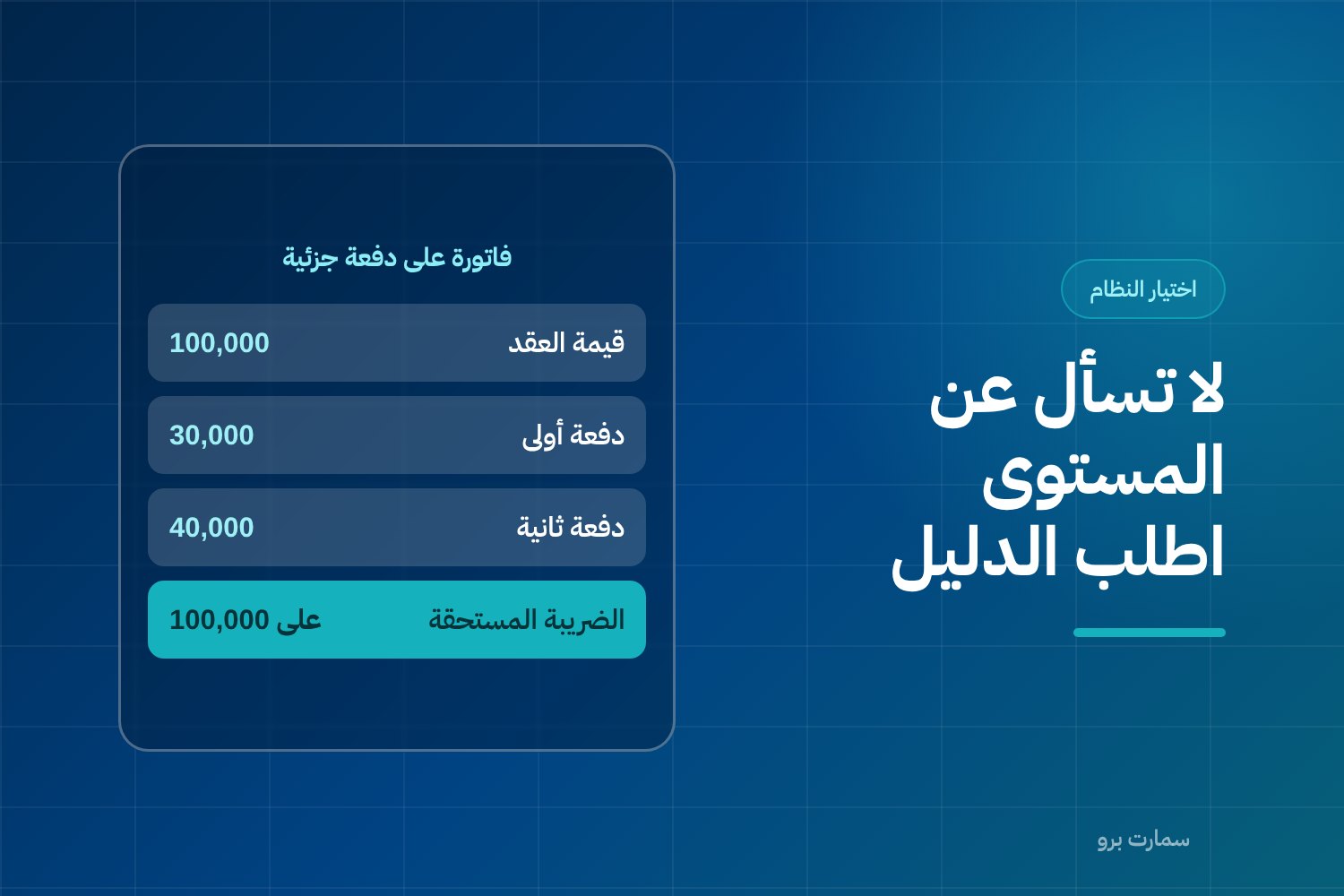
To choose e-invoicing software in Saudi Arabia, judge it by proof, not by a sales page. The software must issue invoices as XML to the UBL 2.1 standard, add a cryptographic stamp, a counter and a hash chain, report simplified invoices within 24 hours and get tax invoices cleared before delivery. Ask the vendor to show each one live.
The question we hear most from businesses looking for e-invoicing software is: "Is our software compliant?" The answer is not on the marketing page. It comes from three questions put to the system itself, because there is a fundamental difference between software that prints an invoice as a PDF, software that issues an e-invoice in the regulatory sense, and a system that connects that invoice to the ZATCA platform (Fatoora).
This guide is written from the buyer's side, not the vendor's. It covers the three levels every product on the market falls into, the question to ask for each requirement, and the proof to demand instead of a promise.
What are the three levels of e-invoicing software?
Most of the confusion in the market comes from the phrase "e-invoice" being used for three completely different things.
Level 1: Printing an invoice. The software produces a document a person can read: a PDF, an image or a printed sheet. This is a sales system, and it may be good at its job, but it is not an e-invoicing system. A printed document carries no data structure the platform can read.
Level 2: Compliant issuing. The software produces the invoice as XML to UBL 2.1, a structured data format that machines can read, places the mandatory fields where they belong, and generates a QR code on simplified invoices. This is a much higher level, but on its own it is not enough for the integration phase (Phase 2 e-invoicing).
Level 3: Full integration with the platform. The system does everything above and adds the cryptographic stamp, a digital seal that proves the invoice came from your system unaltered; a counter that cannot be reset; and a chain that links each invoice to the one before it through a hash value, a digital fingerprint of the previous invoice. It then works with the platform on two tracks: simplified invoices are reported within 24 hours of issue and need no prior clearance, while tax invoices addressed to registered businesses go through clearance before they are delivered to the customer.
The gap between Level 2 and Level 3 is what separates a nice-looking invoice template from a system you can rely on for compliance. You will find these requirements explained in our ZATCA e-invoicing guide.
When you ask a vendor which level they are at, none will say Level 1. So don't ask about the level. Ask for the proof.
What should you ask the vendor for each integration requirement?
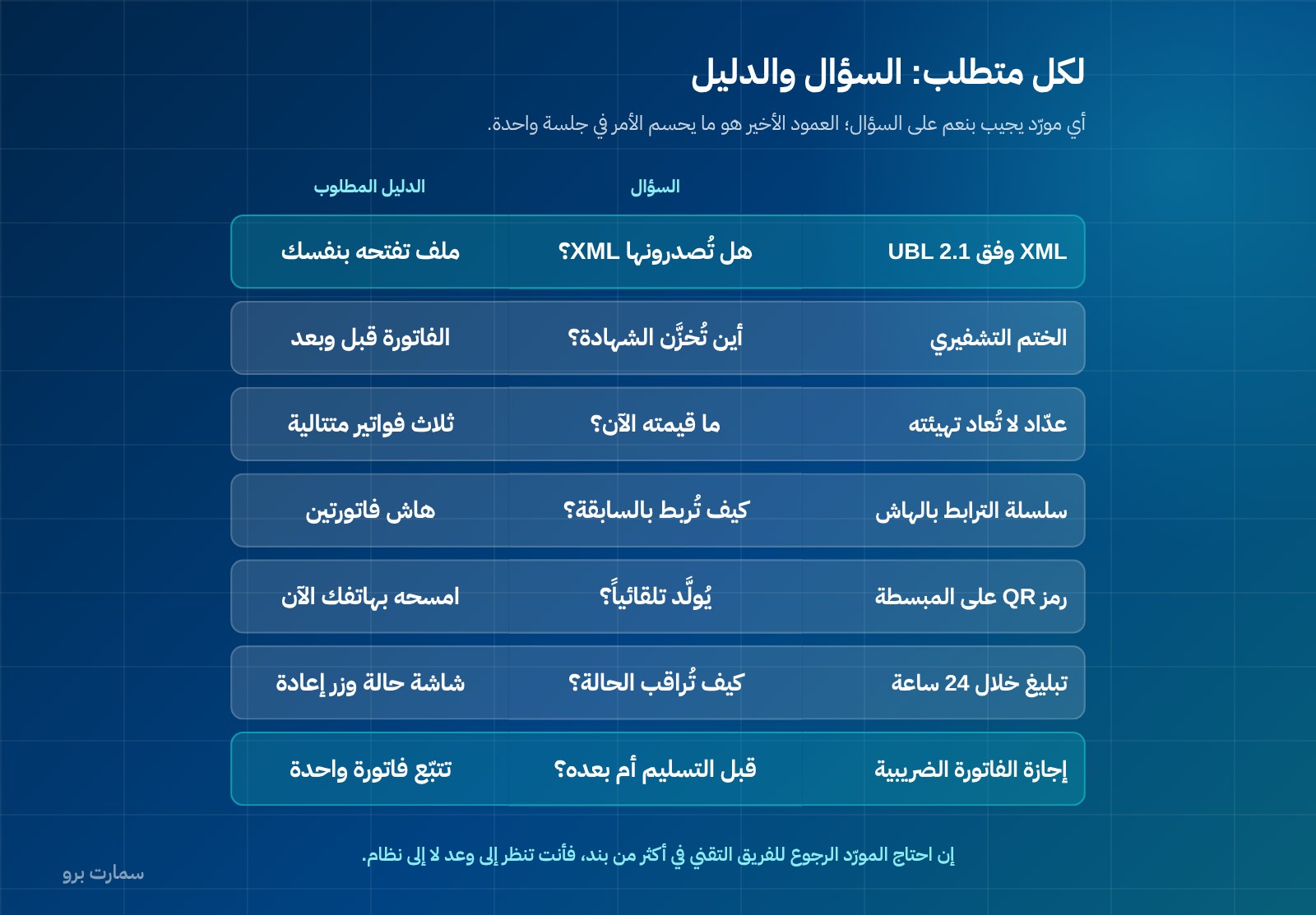
This table is the heart of the guide. The third column is what settles the matter, because any vendor can answer "yes" to the second.
| Regulatory requirement | The question to ask the vendor | The proof to demand in the demo |
|---|---|---|
| XML to UBL 2.1 | Do you issue invoices as XML to UBL 2.1? | One XML file for a real invoice, downloaded to your own device in front of you and opened by you |
| Cryptographic stamp | How is the stamp applied, where is the certificate stored, and who holds the key? | The invoice shown before and after stamping, where the certificate sits in the system, and who has access to it |
| Counter that cannot be reset | What is the counter's value now? What happens to it when the system restarts, the device changes or a new year begins? | Issue three consecutive invoices and watch the counter sequence, then restart the device and issue the fourth |
| Hash chain | How is each invoice linked to the one before it? | The hash value shown on two consecutive invoices, confirming the second carries the hash of the first |
| QR code on simplified invoices | Is the code generated automatically on every simplified invoice without user input? | Scan the code with your phone during the demo and read the data it shows |
| Reporting simplified invoices within 24 hours | How do you monitor reporting status? What happens if reporting fails? | One screen showing each invoice's status (reported, pending, failed) with a retry button |
| Clearing tax invoices | Is the invoice delivered to the customer before or after clearance? What stops early delivery? | One tax invoice tracked on screen from issue through clearance to delivery |
Notice that every proof in the third column can be carried out in a single session in front of you. If the vendor needs to "check with the technical team" on more than one item, you are looking at a promise, not a working system.
The QR code in particular is often overlooked at purchase and then surfaces at the first field inspection.
How does e-invoicing software handle advance payments?
This point fails a large number of systems, and almost nobody asks about it during purchase.
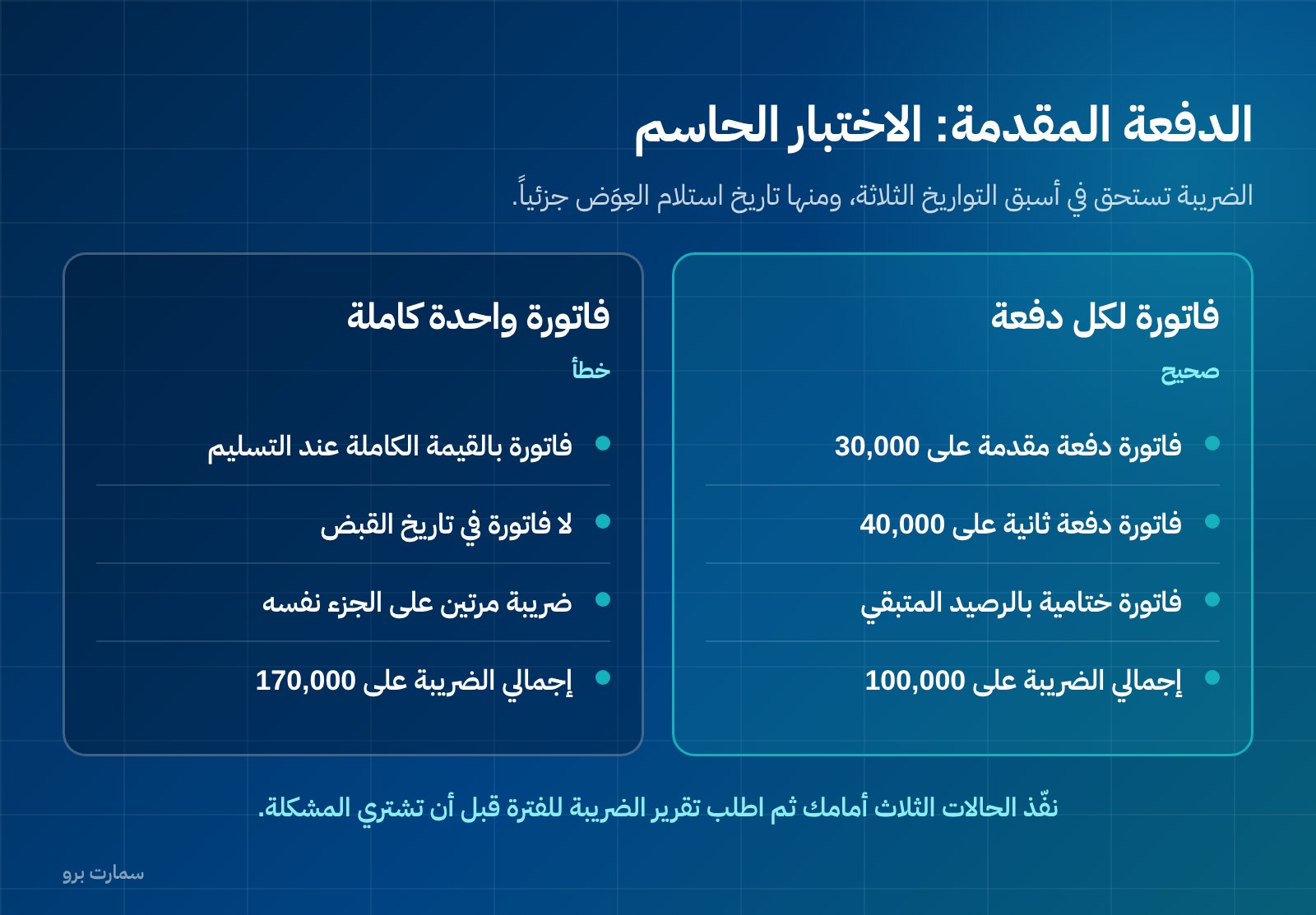
VAT becomes due on the earliest of three dates: the date of supply, the date the invoice is issued, or the date the consideration is received in full or in part.
In practice, this means that if you receive an advance payment from a customer today, the VAT is due today, even if the supply happens three months later and even if no invoice has been issued for the full amount.
Now ask yourself: can the system issue an invoice for a partial payment linked to a contract or work order, then issue the final invoice for the remaining balance, without charging VAT twice on the same portion?
Many programs issue a single invoice for the full value only at delivery. A business that works on instalments (contracting, annual service contracts, manufacturing to work orders, training with upfront fees, any business that collects before it supplies) is left with two bad options: issue a full invoice before supply, or issue no invoice at all when collecting. The first distorts the VAT return; the second is an outright compliance gap.
The demo test is straightforward. The figures below are hypothetical, to illustrate the method (amounts in SAR):
| Case | Contract value | Amount received | Invoice required | VAT due |
|---|---|---|---|---|
| First payment at signing | 100,000 | 30,000 | Advance-payment invoice for the amount received | On 30,000 at the date of receipt |
| Second payment at mid-execution | 100,000 | 40,000 | Second payment invoice | On 40,000 at the date of receipt |
| Final invoice | 100,000 | 30,000 | Invoice for the remaining balance, deducting what came before | On 30,000 only, not on the full amount |
Ask the vendor to run these three cases in front of you on the system, then ask for the VAT report for the period. If total VAT appears on SAR 170,000 instead of SAR 100,000, you have found the problem before buying it.
Are simplified and tax invoices handled the same way?
No, and treating every invoice the same way is the common mistake. The two tracks differ in timing and in procedure.
A simplified invoice, used mainly for sales to consumers, is issued and handed to the customer immediately, then reported to the platform within 24 hours of issue, with no prior clearance. A tax invoice addressed to a registered business goes through clearance before it is delivered to the customer.
The mandatory fields of a simplified invoice are defined, and the system must place them in their own fields, not in free text:
| Field | Note on how the software should implement it |
|---|---|
| Issue date | Taken from the system, not typed in by the user |
| Supplier name, address and VAT registration number | Fixed fields in the company settings, not text typed by hand every time |
| Description of goods or services | Linked to the item or service card |
| Amount due | Calculated from the invoice lines |
| VAT amount in SAR, or a clear statement that the amount includes 15% VAT | One of the two forms, not both and not neither |
Ask the vendor to show you where each of these fields is stored in the database and who has permission to change it. The full comparison of the two invoice types and the detailed fields of a tax invoice deserve their own review before you sign.
What happens when the internet goes down?
This is a practical question, not a theoretical one, especially for point-of-sale terminals, branches and remote sites.
The two tracks behave differently during an outage. A simplified invoice is issued and handed to the customer locally, and the system has 24 hours to report it, so a short outage can be absorbed if the system queues invoices and retries automatically. A tax invoice needs clearance before delivery, so here an outage stops delivery, not issuing.
Questions to ask the vendor:
- Does issuing simplified invoices continue locally when the connection drops, with an intact stamp, counter and hash chain?
- Is there a queue visible to the user showing how many invoices have not yet been reported?
- Is retrying automatic, or does someone have to press a button?
- Who is alerted if an invoice stays in the queue longer than a number of hours you set?
A system that doesn't show you its reporting queue is a system where you only learn your compliance status after someone asks you about it.
How do you correct an invoice after it is issued?
Through a credit or debit note, not by editing. Many buyers assume the opposite because they come from programs that allow an invoice to be edited after saving.
Once issued, an invoice is neither edited nor deleted. The cryptographic stamp, hash chain and counter make any back-end change detectable, and that is their purpose. Corrections are made through a credit note or a debit note that is linked to the original invoice and refers to it.
In the demo, ask for:
- An invoice to be issued, then an attempt to change its amount. The system must clearly refuse, not allow it under manager permission.
- A credit note linked to it, then a look at how its effect flows into the VAT report.
- A partial credit note, not a full one, because partial cases are the most common in practice.
Software that lets a user edit an issued invoice may feel convenient, but it is building you a problem that will surface at the first audit.
How should e-invoices be archived?
The regulatory document is the XML file. This is one of the most misunderstood points. A printed image or PDF is a human-readable representation of the invoice. The regulatory document is the stamped XML file, and that is what is requested in an audit.
So ask your vendor about these four things specifically:
- Can I download the XML files? For each invoice individually, and for a whole period through bulk export.
- How long are they kept? And what happens to them if I end the subscription or move to another system.
- Is the export in an open format? Or is it an internal report that only works inside the system itself.
- Who owns the data? Ask for the answer in writing in the contract, not verbally in a meeting.
A business that keeps only PDFs and believes it is archived discovers the difference at the worst possible time. Ask to download one XML file now, in the demo, to your device. If it doesn't happen now, it won't happen later.
What does "ZATCA-approved software" really mean?
You will read the phrase "ZATCA-approved software" on many websites. In regulatory terms, the Zakat, Tax and Customs Authority (ZATCA) does not approve accounting software. What it publishes is an indicative list of e-invoicing solution providers who have passed its qualification requirements.
The decisive point for the buyer: a taxpayer who meets the requirements is considered compliant even if their provider is not on that list. A vendor's presence on the list is a positive signal, but it is not a product certification, and its absence is not a violation. The full explanation is in what "ZATCA-approved accounting software" really means.
Use this to your advantage: move the conversation away from the approval badge and towards the proof table above.
What will e-invoicing software cost, now and later?
Compare the full cost, not the licence price alone. The items that create large differences after purchase are: setup and initial integration, training, the number of users and branches, any cap on the number of invoices, the cost of adding a POS terminal or warehouse, the cost of support outside working hours, and the cost of exporting your data if you decide to leave.
Ask for prices to be published and in writing. At SmartPro, three packages have published prices including VAT: Mini at SAR 1,500 a year, Pro at SAR 4,500 and Max at SAR 20,500, while Enterprise is priced on request. Details of the accounting and invoicing module are on the SmartPro finance and accounting page, and every package and system is listed on the pricing page.
One question reveals a lot: what will be added to this figure in year two?
What checklist should you run on a real invoice during the demo?
Don't accept a demo on ready-made sample data. Give the vendor one of your own items and one of your own customers, and run this list in order:
- Issue one simplified invoice and scan its QR code with your phone.
- Download that invoice's XML file to your device and open it.
- Issue three consecutive invoices and follow the counter, then restart the device and issue the fourth.
- Show the hash value on two consecutive invoices and check the link.
- Issue a tax invoice to a registered business and follow it through clearance to delivery.
- Try to edit an issued invoice and confirm the system refuses.
- Issue a partial credit note and follow its effect in the VAT report.
- Issue an invoice for a partial advance payment, then the final invoice, and review total VAT.
- Cut the connection, issue a simplified invoice, then reconnect and watch the reporting queue.
- Export a full month of invoices as XML in a single file.
Ten steps in one session. Software that passes them in front of you is a working product; software that promises them is a business plan.
Where can you check the official requirements?
The source for the requirements and any updates to them is the official website of the Zakat, Tax and Customs Authority: zatca.gov.sa. Don't rely on a vendor's quotation of a regulation without checking it at the source.
Read also
- ZATCA e-invoicing guide
- ZATCA-approved accounting software: what the phrase really means
- How to choose the best accounting software in Saudi Arabia
Key takeaway: Judge e-invoicing software by what it does live in front of you (XML, stamp, counter, hash chain, reporting, clearance, advance payments and credit notes), not by approval badges or a printed PDF.
To run this checklist on your own items and customers, start a SmartPro free trial or book a 30-minute demo.
Article visuals
Frequently asked questions
What is the difference between e-invoicing software and software that only prints invoices?
Software that prints invoices produces a human-readable document such as a PDF or a printed sheet, with no data structure the ZATCA platform can read. An e-invoicing system in the integration phase issues the invoice as XML to UBL 2.1 and adds a cryptographic stamp, a counter that cannot be reset, a hash chain linking each invoice to the previous one, and a QR code on simplified invoices. It then works with the platform: simplified invoices are reported within 24 hours, and tax invoices are cleared before delivery.
Do I have to choose software that is on ZATCA's list?
ZATCA does not approve accounting software; it publishes an indicative list of e-invoicing solution providers who have passed its qualification requirements. A taxpayer who meets the requirements is considered compliant even if their provider is not on that list. Base your choice on practical proof that the system complies, not on whether its name appears on a list.
How should e-invoicing software handle advance payments?
VAT becomes due on the earliest of three dates: the date of supply, the date the invoice is issued, or the date payment is received in full or in part. Receiving an advance payment therefore creates a VAT liability on the date of receipt, even if the supply comes later. Require the system to issue an invoice for a partial payment and then a final invoice for the remaining balance without charging VAT twice, and test it live in the demo.
Can I edit an invoice after it has been issued?
No. Once issued, an invoice is neither edited nor deleted, because the cryptographic stamp, hash chain and counter make any back-end change detectable. Corrections are made through a credit note or debit note that is linked to the original invoice and refers to it. In the demo, check that the system actually refuses edits and supports partial credit notes, not only full ones.