
How to Choose the Right Inventory Management System for Your Business in Saudi Arabia
A practical guide to choosing an inventory management system in Saudi Arabia: why stock counts don't match the books, the criteria to compare, linking inventory to accounting, and a checklist you can run yourself.
Author:سامي الحيدري
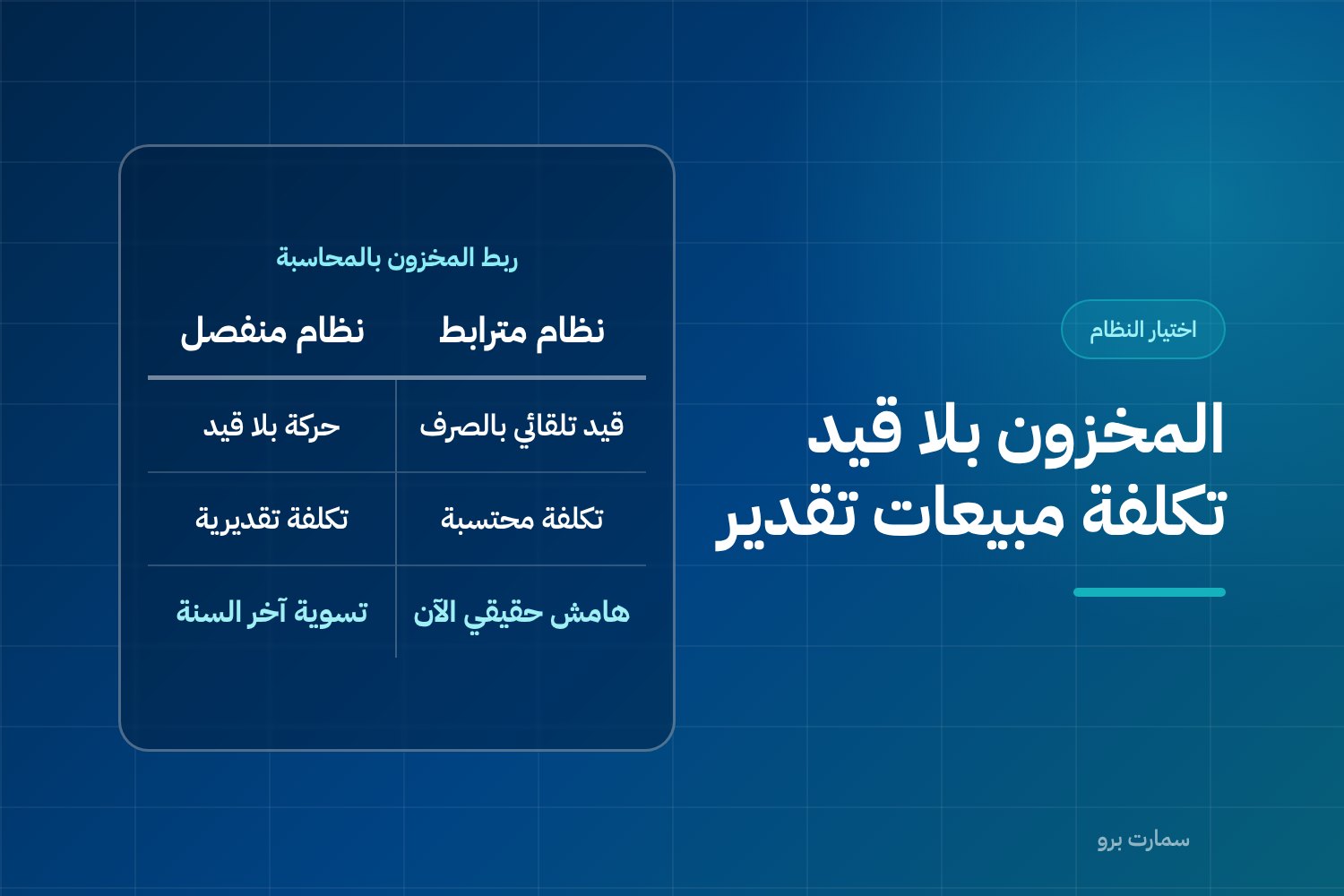
The right inventory management system for a Saudi business records every stock movement with a numbered, dated document, values each movement automatically in the accounts, and keeps physical counts matching the books. Showing how many units you have is the easy part. The real test is whether the system prevents the variances that turn cost of sales into a guess.
Most searches start with one question: how many units do I have in the warehouse? That is the simplest thing the system does, and it is not where things break. What actually breaks the business is when the physical count doesn't match the books. Cost of sales then becomes an estimate instead of a calculated figure, and purchasing decisions rest on the warehouse keeper's instinct. This guide explains the criteria that separate a system that holds up from one that, two months in, becomes a spreadsheet with a different interface.
What does an inventory management system actually do?
Showing balances is the result, not the job. The job is to record every movement into or out of the warehouse with a document that has a number, a date and a responsible person, and then translate that movement into a financial value. The balance you see on screen is not a figure typed in by hand; it is the sum of the movements.
In practice the system handles four core operations: receipts (from a supplier, or a customer return), issues (a sale, internal use, or damaged stock), transfers (between warehouses or branches), and adjustments (the result of a stocktake). Any system that doesn't distinguish these four and lumps them all under "balance adjustment" will give you balances you cannot explain later.
Why doesn't the stocktake match the books?
The gap between the physical count and the book balance is not random. In most cases it comes from specific, recurring causes:
Issues without a document. A salesperson takes an item from the warehouse for a customer, planning to record it later. The stock has gone down physically but not on the books. The build-up of these cases is the number one cause of variances.
Returns that never reached the shelf. A sale is cancelled or the customer returns the item, so the financial effect is corrected on the invoice while the item stays in the van or with the technician. On the books it is back; in reality it isn't.
Mixed units of measure. An item is received by the carton, sold by the piece and counted by the box. If the system doesn't know that a carton equals a set number of boxes and a box a set number of pieces, every conversion between units creates a variance you cannot trace.
Single-entry branch transfers. The item leaves the first branch and is never received at the second, or is received in a different quantity. A system that allows a transfer with no matching receipt leaves the item in a third state: neither here nor there.
Open stocktakes. Counting starts while movement continues, so items are sold and shipments received during the count. The resulting variance has nothing to do with accuracy and everything to do with timing.
Each of these causes has a fix in the system's settings, not in staff training alone. That is why you should test these exact cases before you buy.
Which criteria should you compare when choosing an inventory management system?
These are the criteria worth measuring during a demo, with why each matters and what to ask the vendor to show you:
| Criterion | Why it matters | What to ask for in the demo |
|---|---|---|
| Multiple units of measure | Stops cartons, boxes and pieces getting mixed up and keeps balances accurate | Add an item with three units, buy by the carton and sell by the piece, then check balance and cost |
| Barcodes | Reduces human error in data entry and counting | Print a label and scan it on a sales invoice and on a count sheet |
| Multiple warehouses and branches | A total balance with no breakdown is useless for transfer or purchase decisions | Transfer a quantity between two branches and check there is a matching receipt |
| Minimum level and reorder | Warns you before you run out, not after | Set a minimum for one item and watch the alert when it is crossed |
| Cycle counts and full stocktakes | A full stocktake stops work; a cycle count lets you count one group of items without stopping | Run a count for just one group of items |
| Weighted average valuation | Sets the cost of every unit issued and directly affects reported profit | Buy the item twice at two prices, sell, then check the calculated cost |
| Expiry dates and batches | Essential for food, medicine and building materials with a limited life | Record two batches with different expiry dates and check the issue order |
| Automatic link to accounting | Without it, cost of sales is an estimate, not a calculation | Issue a quantity and open the resulting journal entry straight away |
Weighted average is a valuation method in which each unit's cost is the total cost of stock on hand divided by the quantity on hand, recalculated with every purchase.
The criteria don't carry equal weight. A retailer needs barcodes and multiple branches more than batches; a food business needs expiry dates and batches before anything else. Rank the list by your own activity before comparing options.
Why is the link between inventory and accounting the deciding criterion?
If you want a single criterion to decide by, it is this: does issuing stock from the warehouse create an accounting entry automatically, or not?
In a connected system, when you issue a sales invoice two things happen at the same moment: the item's balance falls, and an entry moves the item's value from the inventory account to the cost of sales account at the calculated cost, not the selling price. As a result, the income statement gives you a real margin at any moment, and the inventory balance on the balance sheet equals the value of what is actually in the warehouse.
In a disconnected system, stock moves and the accounts don't know. The gap is covered at year end with one large adjusting entry based on an estimated count. That means you work all year on incorrect profit figures, and every pricing or discount decision rests on an unconfirmed cost.
The difference here is not one of features but of nature. If you are weighing accounting software against an integrated solution, the topic is covered in detail in accounting software vs ERP for Saudi businesses, and the criteria for choosing the accounting software itself are in how to choose accounting software in Saudi Arabia.
Test this criterion one way: ask the vendor to issue a quantity in front of you, then open the journal entry created by that specific issue. If it needs a manual step or a report run later, the link doesn't exist.
How do you calculate the reorder point? A worked example
The reorder point is the balance at which you raise the purchase order, not the balance at which the item runs out. The formula:
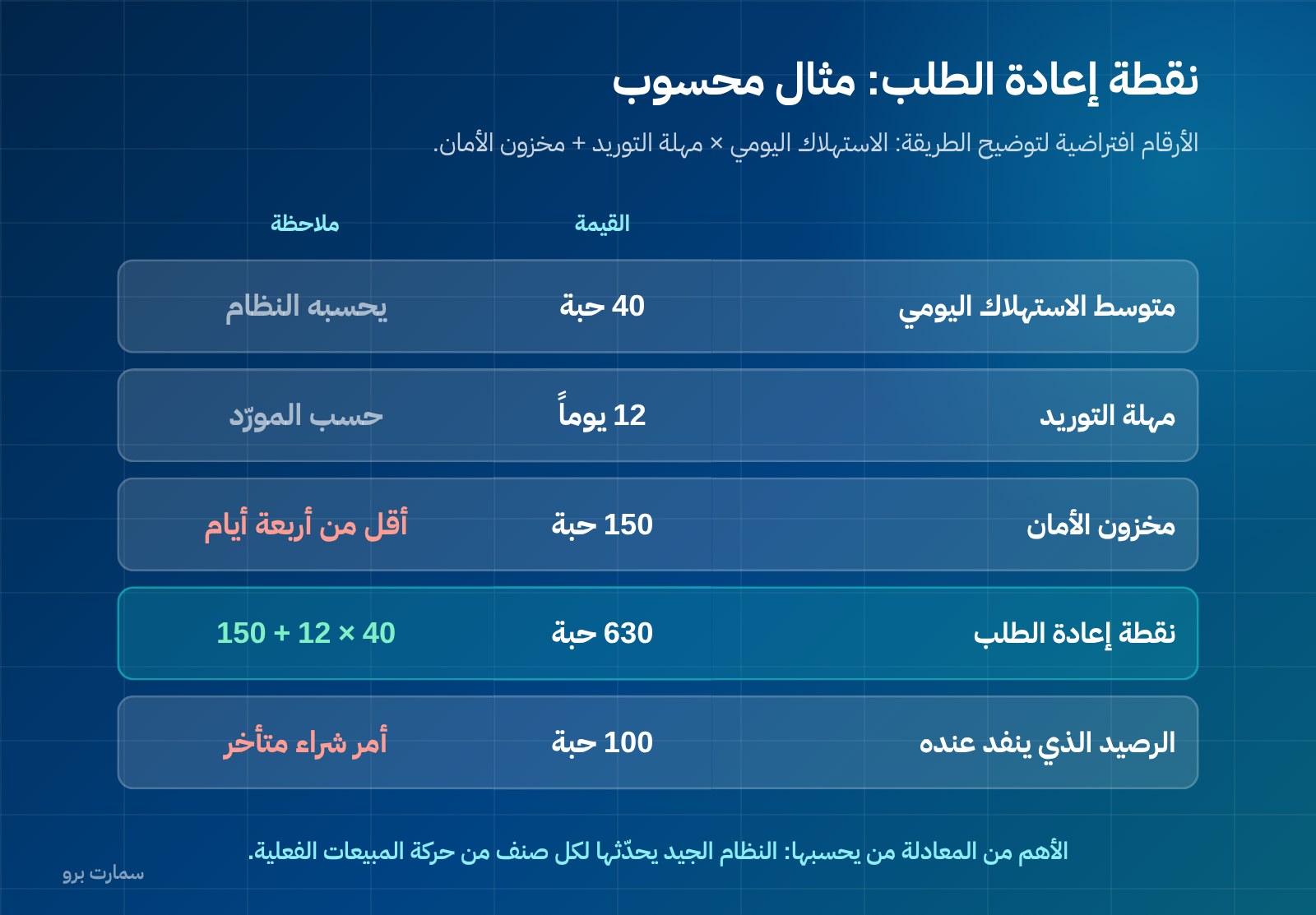
Reorder point = average daily usage × supplier lead time + safety stock
The figures below are hypothetical, to illustrate the method:
| Element | Value |
|---|---|
| Average daily usage | 40 pieces |
| Supplier lead time | 12 days |
| Safety stock | 150 pieces |
| Reorder point | 40 × 12 + 150 = 630 pieces |
The conclusion: when this item's balance reaches 630 pieces you raise the purchase order, not when it reaches 100. And if the supplier runs late, safety stock of 150 pieces covers less than four days of usage, which means the supplier's real lead time needs reviewing.
What matters in the system is not the formula itself but who calculates it. A good system calculates average usage from actual sales movement and updates the reorder point automatically for each item, so a seasonal item isn't managed with the same number all year. A weak system asks you to enter a fixed number and forget it.
How should a stocktake be run?
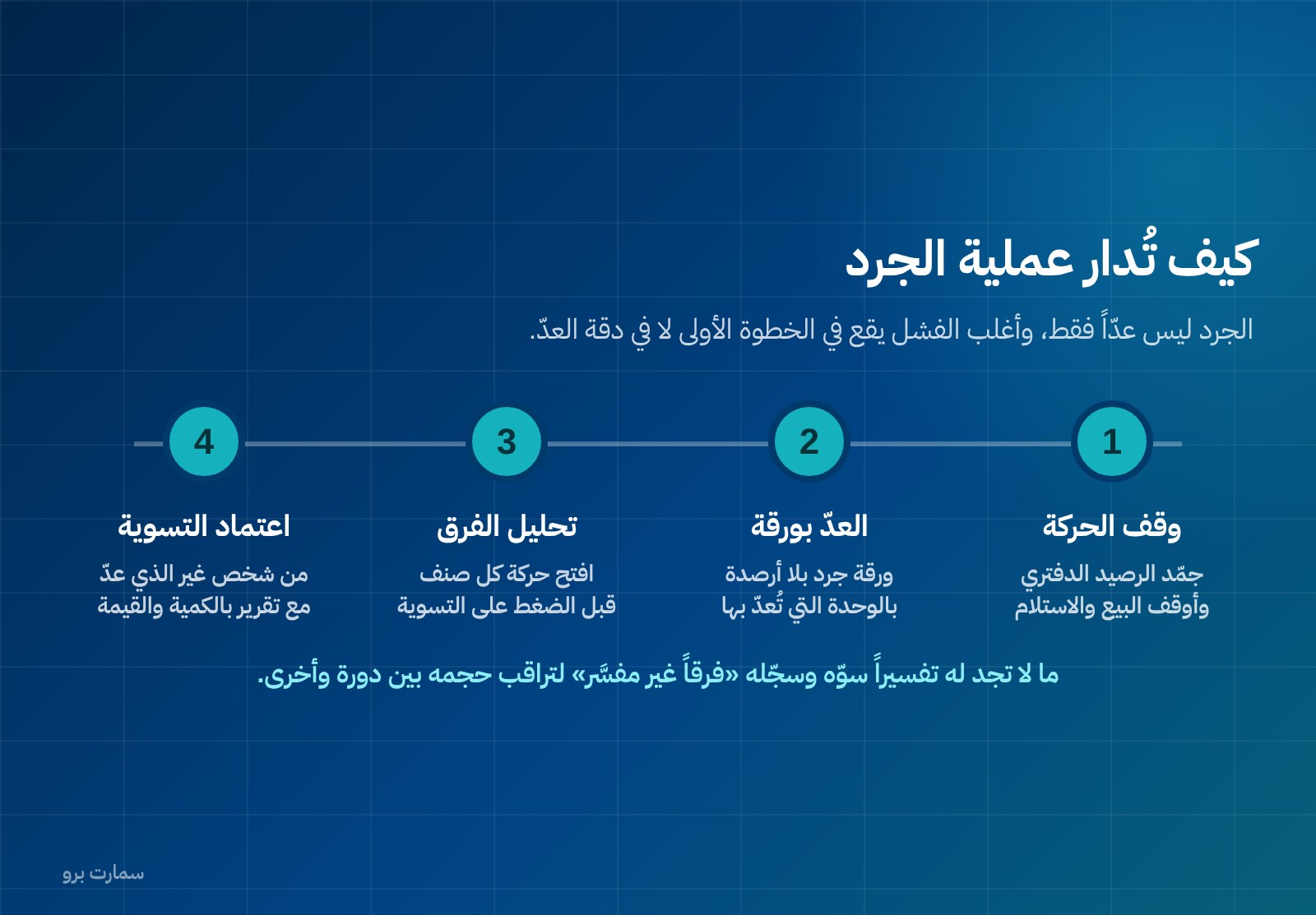
A stocktake is not just counting; it is three steps, and most fail at the first one:
Cut-off. You set a point in time at which the book balance is frozen, after which sales and receiving stop until counting is finished. Any movement during the count must be logged on a separate list and processed after closing. Without a clear cut-off, any variance you find is meaningless, because you are comparing a count at one time with a balance at another.
Count on a sheet. Print a count sheet with item names, codes and units, without showing the book balance. Showing the balance to the counter pushes them to confirm it rather than count. Record the actual quantity in the unit actually counted, and let the system convert it to the base unit.
Analyse the variance before adjusting. This is the step everyone skips. Before pressing the adjust button, open the movement history of every item with a large variance and look for the cause: an unposted invoice, a transfer with no receipt, a pending return, or a unit mix-up. Adjusting immediately hides the problem and guarantees it recurs at the next count. Whatever you can't explain, adjust and record as an "unexplained variance" so you can track its size from one cycle to the next.
Before buying, ask the system for a report that compares physical and book quantities, shows the variance in both quantity and value, and allows the adjustment to be approved by someone other than the person who counted.
What types of system are available, and which fits your case?
The options on the market fall into three categories, each with clear limits:
Standalone inventory system. Handles item movements well but creates no accounting entries. It suits a business with an external accountant that accepts periodic reconciliation, and becomes a burden once you have several branches.
POS system with basic inventory. Reduces the balance on sale and is enough for retail with one unit per item. It struggles with transfers, batches, and purchasing in multiple currencies or units. This category is covered in how to choose a POS system in Saudi Arabia.
Integrated solution linking inventory to accounting and e-invoicing. Highest upfront cost and lowest correction cost later; it is the realistic option for anyone with more than one branch or warehouse. To compare cost items and the hidden elements in them, see what ERP costs in Saudi Arabia.
To see what an integrated solution covers on the warehouse side specifically, you can review SmartPro's inventory module and the rules it applies to movements and valuation.
Our pricing is published: the Mini package is SAR 1,500 a year including VAT, with 1 user and the main branch; the Pro package is SAR 4,500 a year with 3 users and the mobile app; and the Max package is SAR 20,500 a year with 10 users plus Projects and Manufacturing. In every package only the main branch is included, and each additional branch costs SAR 1,000 a year. The rule when comparing is to count the users and branches you actually need, not the advertised price of the cheapest package. Full details are on the pricing page.
How is inventory linked to e-invoicing?
The link between inventory and the electronic invoice is direct: every sales invoice is a stock issue. Under Phase 2 of ZATCA e-invoicing (Fatoora), the invoice is issued as XML to the UBL 2.1 standard, with a cryptographic stamp, a counter that cannot be reset, a hash chain (each invoice carries a fingerprint of the previous one, so the sequence cannot be altered unnoticed), and a QR code on simplified invoices, which are reported within 24 hours of issue.
What this means for inventory: an invoice cannot be deleted or edited retroactively to correct a balance. A correction needs a credit note, and the credit note needs to return the quantity to the warehouse. Ask the vendor directly: what happens to the balance when a credit note is issued? If the answer is that the balance is adjusted manually, the problem of returns that never came back will repeat.
Which checklist should you run on your own items?
Don't accept a demo on ready-made data. Ask for ten of your real items to be entered and carry out these steps yourself:
- Add an item with three units of measure (carton/box/piece), buy by the carton and sell by the piece, then check the balance.
- Buy the same item twice at two different prices, then sell a quantity and open the calculated cost of sales.
- Transfer a quantity from one branch to another, then open the receiving branch and confirm there is a matching receipt document.
- Issue a sales invoice, then view the journal entry it created immediately.
- Issue a credit note against the same invoice and check the quantity returns to stock automatically.
- Set a minimum level and reorder point for one item, bring its balance below the minimum, and watch for the alert.
- Record two batches with different expiry dates and confirm the issue order and the alert before expiry.
- Run a cycle count on just three items: apply a cut-off, print the count sheet without balances, enter different quantities, and view the variance report in quantity and value before adjusting.
- Request a movement report for one item over a period: it should show every document that affected the balance and who created it.
- Ask about exporting all your data in a readable format if you decide to move to another system.
If even one of these ten steps fails, it is not a missing feature; it is a guaranteed source of stock variances later.
What is the official reference?
E-invoicing requirements and official deadlines are published by the Zakat, Tax and Customs Authority on its website: zatca.gov.sa. An important note when comparing: ZATCA does not approve or certify software; it publishes an indicative list of qualified solution providers. Any marketing phrase saying "ZATCA-approved" should be read in that sense only. For more on this, see our ZATCA e-invoicing guide.
Key takeaway: Choose the inventory management system that posts every stock movement to the accounts automatically and passes the ten-step test on your own items; that link, not the balance screen, is what keeps counts matching the books.
Read also
To run this checklist on your own items, start a free trial or book a demo with a SmartPro product expert.
Article visuals
Frequently asked questions
Why doesn't the physical stocktake match the book balance?
The recurring causes are specific: stock issued from the warehouse without a document, returns corrected on the invoice but never physically returned to stock, units of measure mixed between carton, box and piece, and branch transfers with no matching receipt document. Add to that stocktakes run without a cut-off, which compare a count at one time with a balance at another. The fix starts in the system's own settings, not in staff training alone.
What is the single most important criterion when choosing an inventory system?
That issuing stock creates an accounting entry automatically at the same moment. If it doesn't, cost of sales stays an estimate corrected by a year-end adjusting entry, and pricing and discount decisions all year rest on an unconfirmed cost. Test it by asking the vendor to issue a quantity in front of you and then open the entry it created straight away.
How do I calculate the reorder point?
The formula is average daily usage multiplied by supplier lead time, plus safety stock; the result is the balance at which you raise the purchase order, not the balance at which the item runs out. More important than the formula is that the system calculates it from actual sales movement and updates it for each item, because a seasonal item cannot be managed with a fixed number all year.
Does inventory need to be linked to e-invoicing?
Yes, because every sales invoice is a stock issue from the warehouse. Under ZATCA Phase 2, the invoice is issued as XML to UBL 2.1 with a cryptographic stamp, a counter that cannot be reset, a hash chain and a QR code on simplified invoices, which are reported within 24 hours of issue. In practice, a balance is not corrected by deleting an invoice but by a credit note, which should return the quantity to stock automatically.