
How to Choose Workshop Management Software in Saudi Arabia: A Practical Guide
A workshop sells spare parts and labour on one invoice. This guide to choosing workshop management software covers the job card, the margin on each side, estimates and approvals, and a demo checklist.
Author:سامي الحيدري
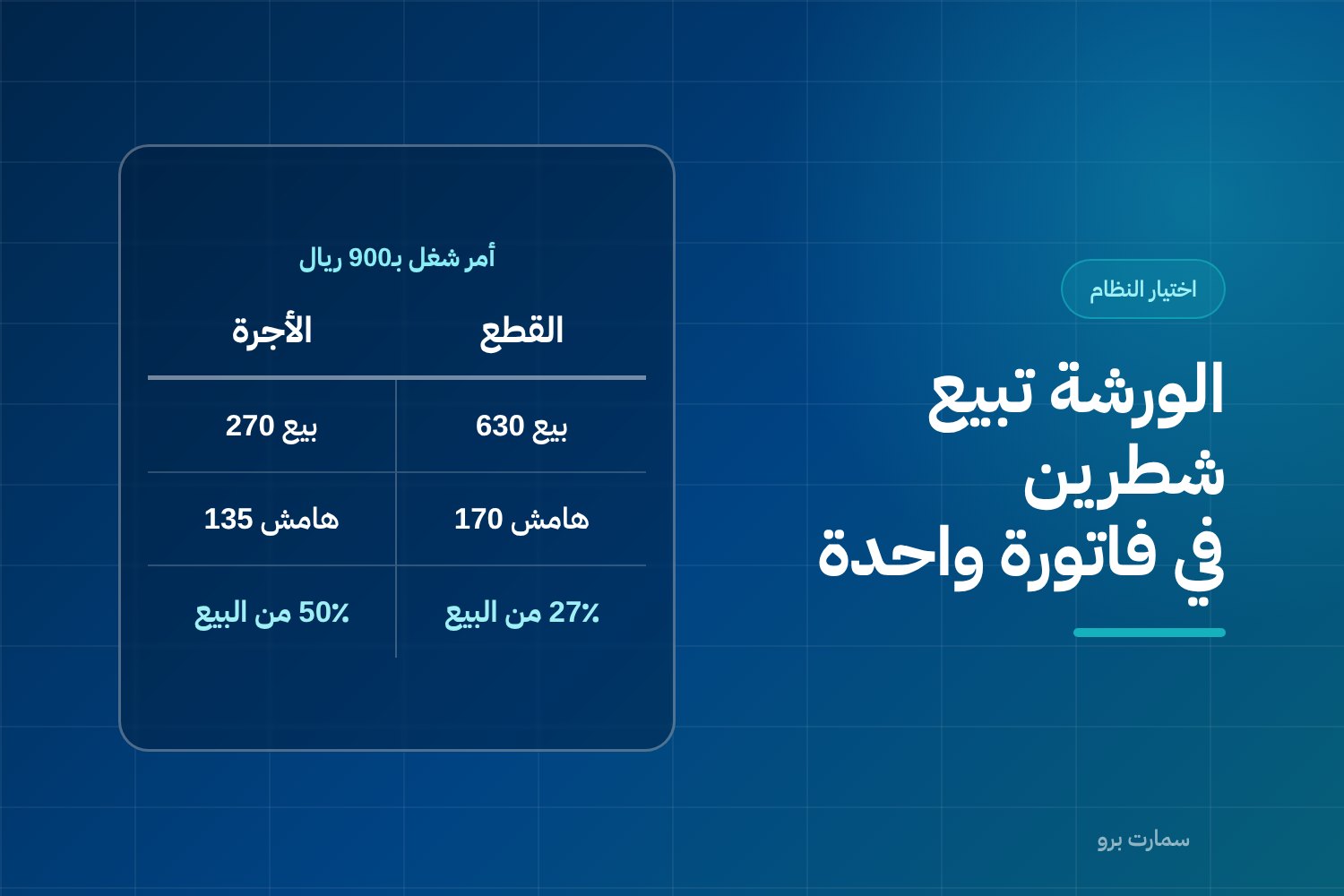
Choosing workshop management software usually fails for one reason. A workshop sells two different things on one invoice, and the system treats them as a single line. A service centre sells spare parts, which are goods with a purchase cost and a stock balance. It also sells labour, which is technician hours with a completely different kind of cost. When a job is recorded as one line, “Periodic service SAR 900”, you cannot tell which side makes money and which loses it. Every pricing decision after that is a guess.
This guide compares criteria, not product names. Every figure in it is hypothetical and only shows how the calculation works.
What does a service centre actually sell?
Picture one workshop. It might be a vehicle service centre, or a workshop that services equipment, generators and air conditioners. Ask yourself what leaves its gate in exchange for money.
- Parts, oils and consumables: stock items with a purchase cost, a balance and a location in the warehouse. Some are ordered specially for a single job.
- Technician labour hours: time that has a cost (salary and related costs divided by the hours actually available) and a selling price (the published hourly rate).
- External services: work sent to a specialist supplier, such as machining, auto electrics or bodywork. It is bought at a cost and resold on the invoice.
- Inspection and diagnosis: may be charged, or waived if the repair goes ahead.
These items differ in cost, in margin and in how they are accounted for. Merging them into one line hides the most important fact in this sector. Parts and labour do not earn the same percentage, and they do not always move in the same direction.
Why is the job card the backbone, not the invoice?
The invoice is the end result. The document that actually runs the workshop is the job card, the record that collects everything about one job on one vehicle or asset.
| What the job card holds | Why it must sit inside the job card, not outside it |
|---|---|
| Customer, vehicle or asset, and chassis or serial number | So the service history builds itself without double entry |
| Odometer reading or running hours at check-in | The basis for the next periodic service and for any dispute about condition |
| The customer's complaint in their own words, and the diagnosis | The gap between what the customer asked for and what was actually found |
| Parts lines with quantities, cost and price | So parts are issued from stock at cost, not at selling price |
| Labour hours per technician and per task | So labour is charged to the job at its real cost |
| The approved estimate and the date the customer approved it | The reference point if the final amount is disputed |
| Job status: open, awaiting part, awaiting approval, completed | So you know where work stopped and why |
The working rule: if a system cannot show you the parts margin and the labour margin separately on one job card, it is an invoicing system, not a workshop system. That is the core difference between general accounting tools and industry operating systems, a topic covered more broadly in accounting software or ERP for Saudi businesses.
A worked example on one job card
The figures below are hypothetical. They illustrate the method and do not represent market prices.
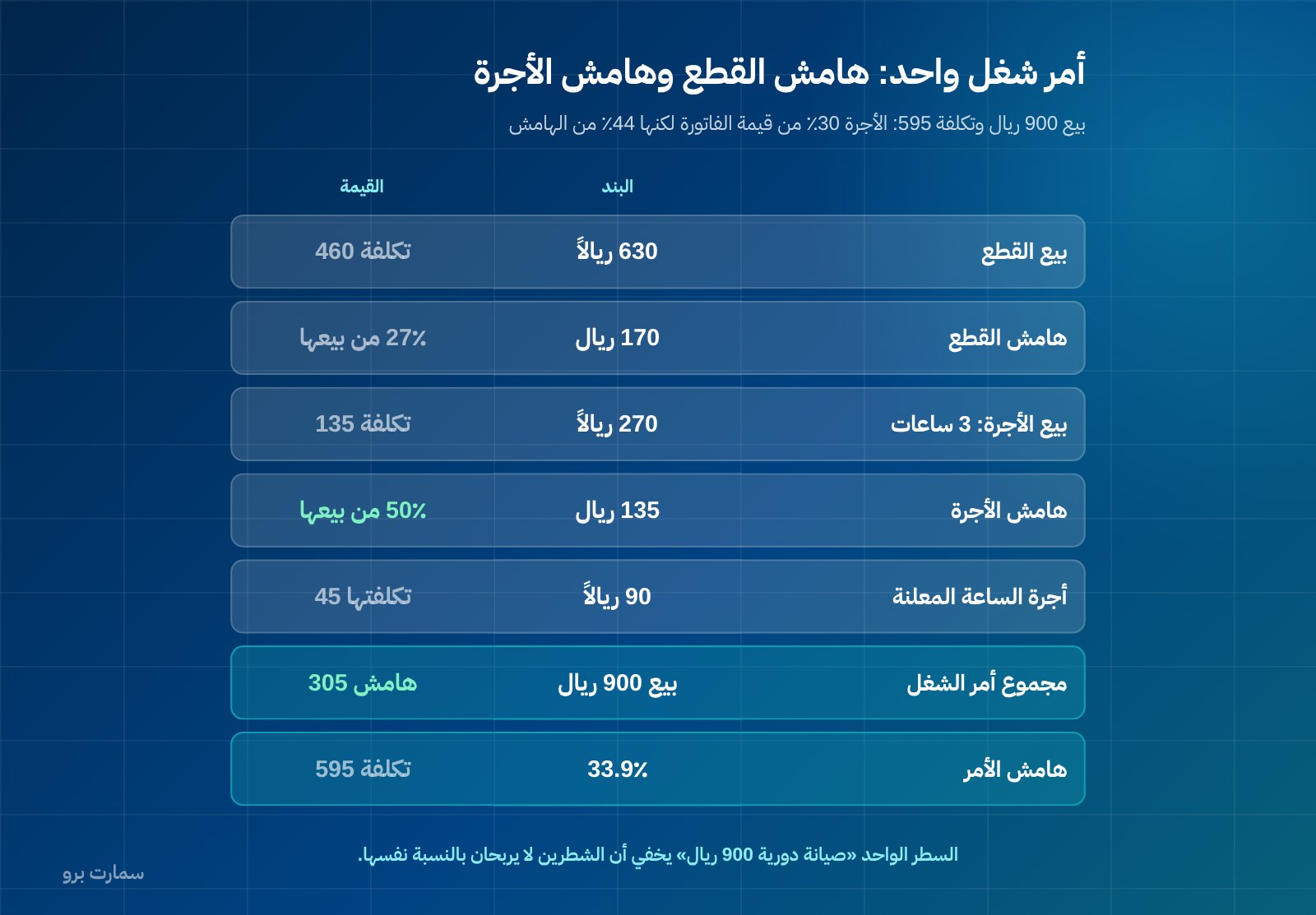
A job card for a periodic service plus a battery replacement. Parts side:
| Item | Qty | Unit cost | Unit price | Total cost | Total sale |
|---|---|---|---|---|---|
| Oil filter | 1 | 40 | 60 | 40 | 60 |
| Engine oil (litre) | 4 | 30 | 45 | 120 | 180 |
| Battery | 1 | 300 | 390 | 300 | 390 |
| Parts total | 460 | 630 |
Parts margin = 630 − 460 = SAR 170, which is 27% of parts sales.
Labour side: 3 labour hours at a published rate of SAR 90 an hour. The technician's internal hourly cost is SAR 45 (salary and related costs ÷ hours actually available).
| Item | Hours | Cost per hour | Price per hour | Total cost | Total sale |
|---|---|---|---|---|---|
| Technician labour | 3 | 45 | 90 | 135 | 270 |
Labour margin = 270 − 135 = SAR 135, which is 50% of labour sales.
Job card total: sales SAR 900, cost SAR 595, margin SAR 305 (33.9%).
Now read the two figures together. Labour is 30% of the invoice value but produces 44% of the margin. Looking at a single line reading “Periodic service SAR 900”, you would see none of this.
Separating the two has immediate practical consequences:
- Pricing: a 10% discount on the whole invoice eats more of the thin parts margin than of the labour margin. The right discount goes to the side that can absorb it.
- Where to focus: if most of your profit comes from labour, managing technician time matters more than expanding stock.
- Purchasing: a 10% cost increase from a supplier can wipe out a part's margin entirely if that margin was only 27% to begin with and the customer also gets a discount.
Item cost, stock balances and valuation methods, the logic behind the “Unit cost” column, are a separate subject covered in choosing an inventory management system in Saudi Arabia.
How should cost estimates and customer approval work?
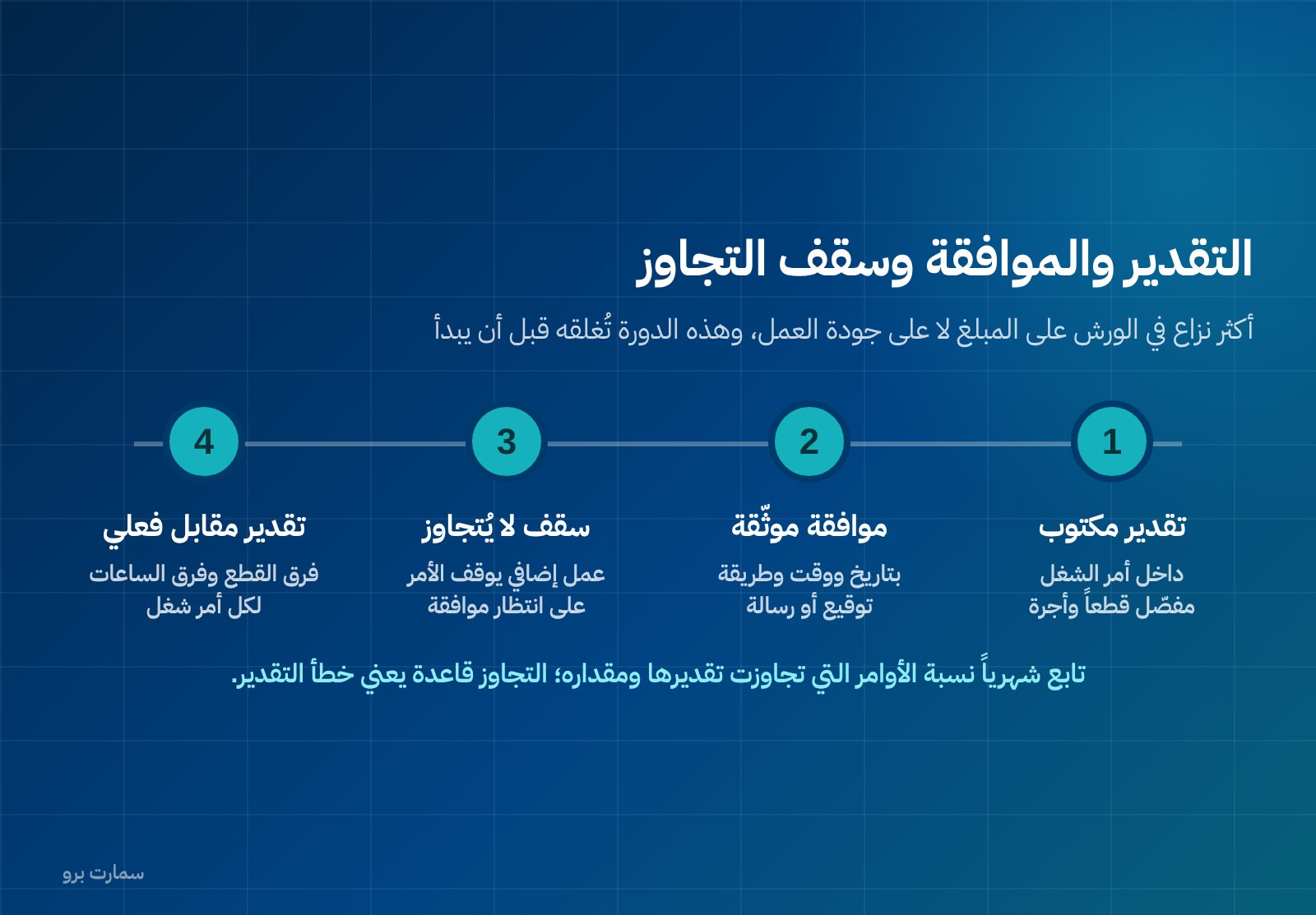
The most frequent dispute in workshops is not about the quality of the work but about the amount. The estimate is given verbally, the engine is opened, extra work appears, and the invoice arrives higher than the figure the customer remembers.
What the system should do here:
- A written estimate inside the job card, split into parts and labour, not one lump sum.
- Recorded customer approval of the estimate, with date, time and method (signature, message or app).
- A ceiling that cannot be exceeded without a second approval: if the technician finds extra work, the job moves to “awaiting approval”, a revised estimate is issued, and acceptance is recorded before work continues.
- Estimate versus actual at closing: the difference in parts and the difference in hours, for every job card.
The indicator worth tracking each month is the share of jobs that exceeded their estimate, and by how much. If overruns are the rule rather than the exception, the problem is how you estimate, not your customers.
Spare parts: three situations where a weak system breaks
Workshop stock is not retail stock. Three situations come up every week.
First: model compatibility. A part is not just “oil filter”. It is a filter for a specific make, year and engine. The system should link each item to the models it fits and block issuing an incompatible part to a job card for a vehicle it does not fit. Without that, the mistake is only found after fitting.
Second: returning unused parts. A technician is issued four parts and uses three. The fourth must go back into stock at its cost and be removed from the job card's cost at the same moment. If it stays charged to the job, you read a margin lower than the real one and carry a stock balance lower than reality.
Third: a part ordered for one specific job. It is bought from a supplier for a particular customer and may take days to arrive. It must be linked to the job card from the moment it is ordered. The system should know the job is “awaiting part”, not stalled for no reason, and charge the part's cost to that job alone on receipt, not to general stock.
If the job is cancelled after the special part is bought, the system needs a clear answer: does it go back to the supplier, or stay as slow-moving stock, and against whose name?
How should warranty work and rework be recorded?
Work redone under warranty consumes real parts and real hours with no revenue against it. The common mistake is to open a job card with a value of zero, so its cost disappears from the books.
The right way is to open a job card with a known reason: warranty rework linked to the original job card. Record its parts and hours at full cost, set the selling price to zero, and classify the line as warranty cost. You can then read three figures you cannot get any other way: monthly warranty cost, its share of workshop revenue, and how it splits across technicians and job types.
That figure turns “quality” from talk into a line in the income statement. Note that free rework does not cancel the stock movement: the part really did leave the stock balance.
What do corporate and fleet customers need?
A fleet account differs from an individual customer in almost everything:
- A monthly credit account rather than payment on collection, with a credit limit and receivables ageing.
- A standard tax invoice showing the customer's name, address and VAT registration number. This is required when the customer is a VAT-registered business, which is normally the case for corporate and fleet accounts. A simplified invoice with a QR code is not enough here. The data each invoice type needs is explained in the ZATCA e-invoicing guide.
- One job card per vehicle, one invoice combining the month's job cards, and a separate statement for each vehicle showing what was spent on it.
- Purchase orders and prior approvals from the customer before work starts, with the purchase order number linked to the job card.
The per-vehicle statement is what gets a fleet account renewed. A fleet manager does not ask “what is my invoice?” but “which vehicle costs me more than it returns?” A system that answers that question is hard to replace.
Why keep a history for every vehicle or asset?
Every closed job card should add a line to a permanent record for the vehicle or asset: the date, odometer reading, work done, parts replaced, technician and amount.
That record works in three ways:
- The next visit is faster: the technician knows what was fitted before and which alternative part was used, so diagnosis does not start from scratch.
- Periodic service is triggered by the system: the next service falls due by distance, date or running hours, and a reminder is created instead of waiting for the customer to call.
- Warranty can be proven: the replaced part and its date are on record, so a claim against the supplier can be supported.
Managing periodic maintenance, assets and their schedules systematically is what the SmartPro maintenance module covers when it is part of the same system rather than a side file.
Workshop management software: weighted selection criteria
Compare on criteria, not names, and give each criterion a weight before you see any demo:
| Criterion | Weight | What to check in practice |
|---|---|---|
| A job card that holds parts and labour together | 25% | A separate margin for each side on one job |
| Real spare-parts stock management | 20% | Model compatibility, returns to stock at cost, parts tied to a specific job |
| Estimates, approval and overruns | 15% | Itemised estimate, recorded approval, stop at the ceiling |
| E-invoicing compliance | 15% | XML in UBL 2.1, cryptographic stamp, counter that never resets, hash chain, QR on simplified invoices |
| Corporate and fleet accounts | 10% | Credit with a limit, standard invoice, statement per vehicle |
| Vehicle history and periodic maintenance | 5% | History built automatically when a job closes, due-date reminders |
| Warranty and rework tracking | 5% | Job linked to the original, cost recorded, zero sale |
| Support and training in Arabic | 5% | A clear channel, response time, included training hours |
Note that “number of screens” is not a criterion. A screen nobody opens adds no points.
How does e-invoicing apply in a workshop?
Three regulatory points affect workshops specifically. All of them are fixed, so do not improvise on any of them.
Invoice format and components. In Phase 2 e-invoicing, the invoice is issued as XML in the UBL 2.1 standard (a structured data format for electronic invoices), with a cryptographic stamp, a counter that never resets, a hash chain that links invoices to one another, and a QR code on simplified invoices.
Invoice type by customer. The standard tax invoice, with the buyer's name, address and VAT registration number, is required when the customer is a VAT-registered business, which is the usual case for corporate and fleet accounts. Simplified invoices are for individuals.
Tax point and corrections. VAT becomes due on the earliest of three dates: the date of supply, the date the invoice is issued, or the date payment is received. This is a sensitive point for workshops that take a deposit when opening a job card. An invoice cannot be edited after it is issued; corrections are made with a credit or debit note. That is why the job card must be closed and reviewed before the invoice is issued, not after.
One last point that is often stated wrongly: ZATCA (the Zakat, Tax and Customs Authority) does not approve software. The phrase “approved software” describes something that does not exist, and responsibility for the accuracy of what is issued stays with the business.
What should you test in the demo? A checklist
Do not watch a ready-made presentation. Ask for the controls, take one real job card from your workshop, and do the following yourself:
- Open a job card with a customer, vehicle, odometer reading and the complaint in the customer's words.
- Issue an estimate split into parts and labour, and record the customer's approval.
- Issue parts from the warehouse to the job, and check they left stock at cost.
- Return an unused part, and confirm it went back to stock and came off the job's cost at the same time.
- Log technician hours against a task inside the job, not against the whole job.
- Add extra work that exceeds the estimate, and watch: does the system stop the job and ask for a second approval?
- Ask for the parts margin and the labour margin for this job on one screen. If they do not appear separately, stop here.
- Issue a standard invoice to a corporate customer with full tax details, then a simplified invoice to an individual.
- Issue a credit note against the invoice, and watch its effect on the receivable and on VAT.
- Open a warranty rework job linked to the original job, with cost recorded and a zero sale.
- Pull the statement for one vehicle in a fleet, then its full service history.
- Call support during the demo with a real question, and time the response.
If steps 4, 6 or 7 stumble, the system is not right for a workshop, whatever its other features.
What is the full cost?
Count four items: the annual licence; setting up master data (customers, vehicles and assets, parts items and their opening balances, hourly rates); training measured in hours, not promises; and any integration or extra-user fees. Setting up parts items is the heaviest item in this sector, so ask about it directly before you sign.
SmartPro's prices are published: the Mini package costs SAR 1,500 a year including VAT, Pro SAR 4,500 and Max SAR 20,500. For a wider comparison of accounting tools on general criteria, see how to choose the best accounting software in Saudi Arabia.
Where is the official reference?
For e-invoicing requirements in both phases, the data required on standard and simplified tax invoices, and the rules on when VAT becomes due and on corrections through notes, the only authoritative source is ZATCA: zatca.gov.sa. Any regulatory claim you hear in a sales demo, check it there before you build an internal procedure on it.
Read also
- How to choose an inventory management system in Saudi Arabia
- ZATCA e-invoicing guide
- Accounting software or ERP? A practical choice for Saudi businesses
Key takeaway: Choose workshop software that runs on the job card and shows the parts margin and labour margin separately; if it cannot return parts to stock at cost or stop work at the estimate ceiling, it is not a workshop system.
To test these steps on your own job cards, start a SmartPro free trial or book a live demo.
Article visuals
Frequently asked questions
What is the difference between workshop management software and ordinary invoicing software?
Invoicing software records a single amount for a service, while a workshop system runs a job card with two separate sides: spare parts issued from stock at cost, and labour hours charged at the actual hourly cost. In practice, this lets you read the parts margin and the labour margin for each job separately, and the two are usually very different. If a system cannot show these two figures separately, it is an invoicing system, not a workshop system.
How should I handle an invoice that exceeds the estimate the customer approved?
The estimate should be written inside the job card, split into parts and labour, with the date of the customer's approval recorded. When extra work appears, the job moves to “awaiting approval”, a revised estimate is issued, and work does not continue until acceptance is recorded. Track each month the share of jobs that exceeded their estimate and by how much; if overruns are the rule rather than the exception, the problem lies in how you estimate.
What does the invoice need if the customer is a company or a fleet?
When the customer is a VAT-registered business, which is the usual case for corporate and fleet accounts, you need a standard tax invoice showing the buyer's name, address and VAT registration number; a simplified invoice with a QR code is not enough. Under ZATCA Phase 2, the invoice is issued as XML in the UBL 2.1 standard with a cryptographic stamp, a counter that never resets and a hash chain. It cannot be edited after issue; corrections are made with a credit or debit note.
How should free warranty rework be recorded?
Do not open it as a zero-value job without detail, because that hides its cost. The right way is a job card linked to the original job card, with parts and hours recorded at full cost, a selling price of zero, and the line classified as warranty cost. You can then read monthly warranty cost, its share of revenue, and how it is spread across technicians and job types.