
How to Choose Accounting Software for Retail Shops in Saudi Arabia
A practical guide to choosing accounting software for retail shops: variants and sizes, discounts and promotions, returns, branches, cycle counting and shrinkage.
Author:سامي الحيدري
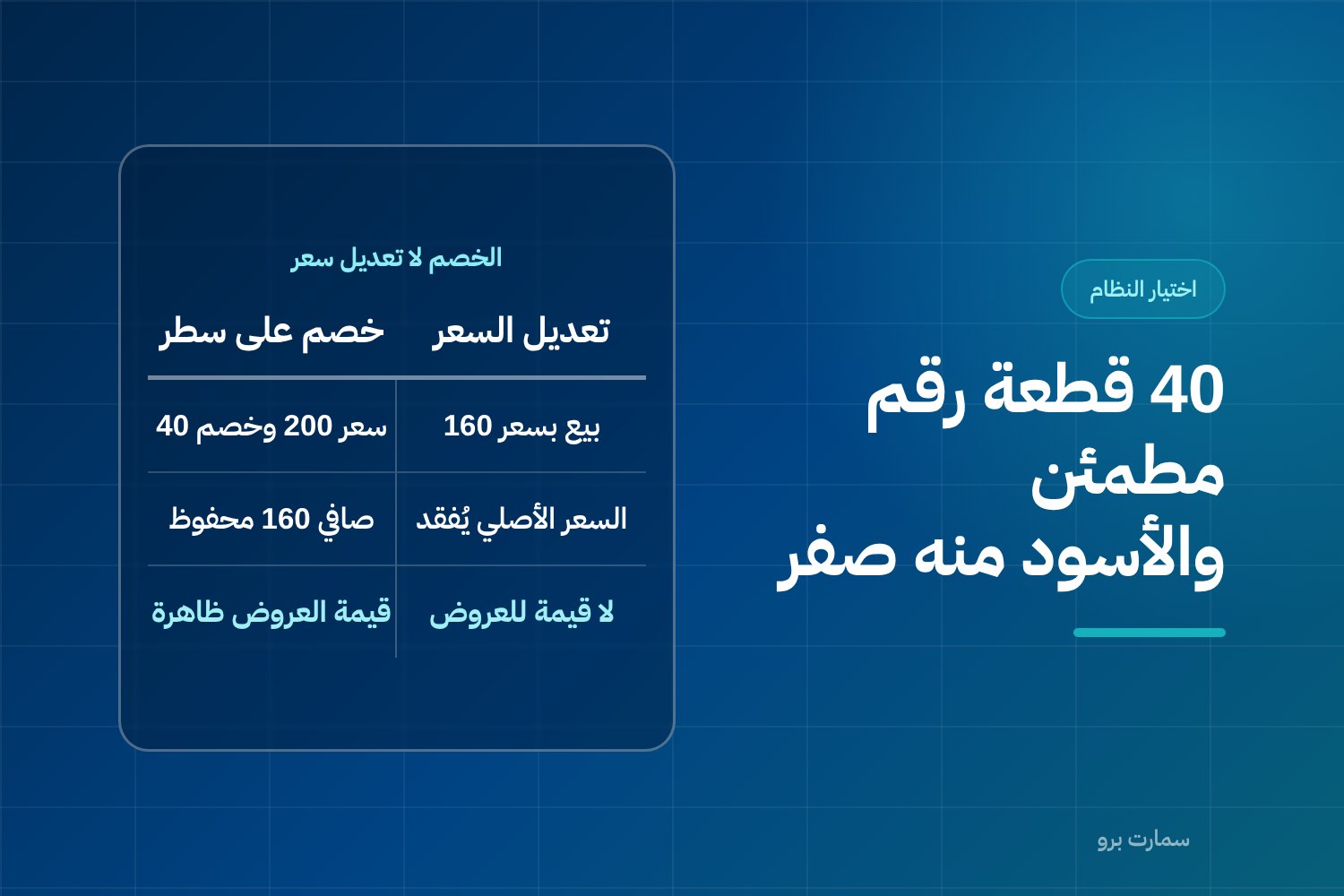
Choosing accounting software for retail shops starts with one question: what counts as an “item” in your shop? A shirt is not one item but dozens of variants that share a name and differ in size, colour and style. A system that does not track each variant turns your stock into a guess, and every purchasing and discount decision with it.
This guide compares types of systems and how they work, not product names. All figures in it are hypothetical and only illustrate the method. They are not market prices or industry benchmarks.
Why does general-purpose accounting break down in retail shops?
General accounting software is built on a simple equation: purchases minus sales equals stock. That works for a business selling ten clearly defined items at a fixed price.
A retail shop runs on different logic. Sales are fast, frequent and small. Customers exchange and return. Prices move with promotions, the same item sits in two branches in different quantities, and stock shrinks for reasons that have nothing to do with sales. When all of that is lumped into one account called “Inventory”, the most dangerous problem in retail appears: the book figure is arithmetically correct and practically wrong, and nobody knows until the count.
You can diagnose the symptoms before you buy. If your staff learn which sizes are missing from the shelf rather than the system, if discounts are recorded by overwriting the price at the till, if exchanges are handled by cancelling the invoice, and if a stocktake means closing the shop for a full day, you are running a shop on a system that was not built for shops.
What are variants, and why is one shirt not one item?
This is the core issue, and everything else branches from it. A variant is the real unit of sale and stock in a retail shop: not “cotton shirt” but “cotton shirt, blue, size M”.
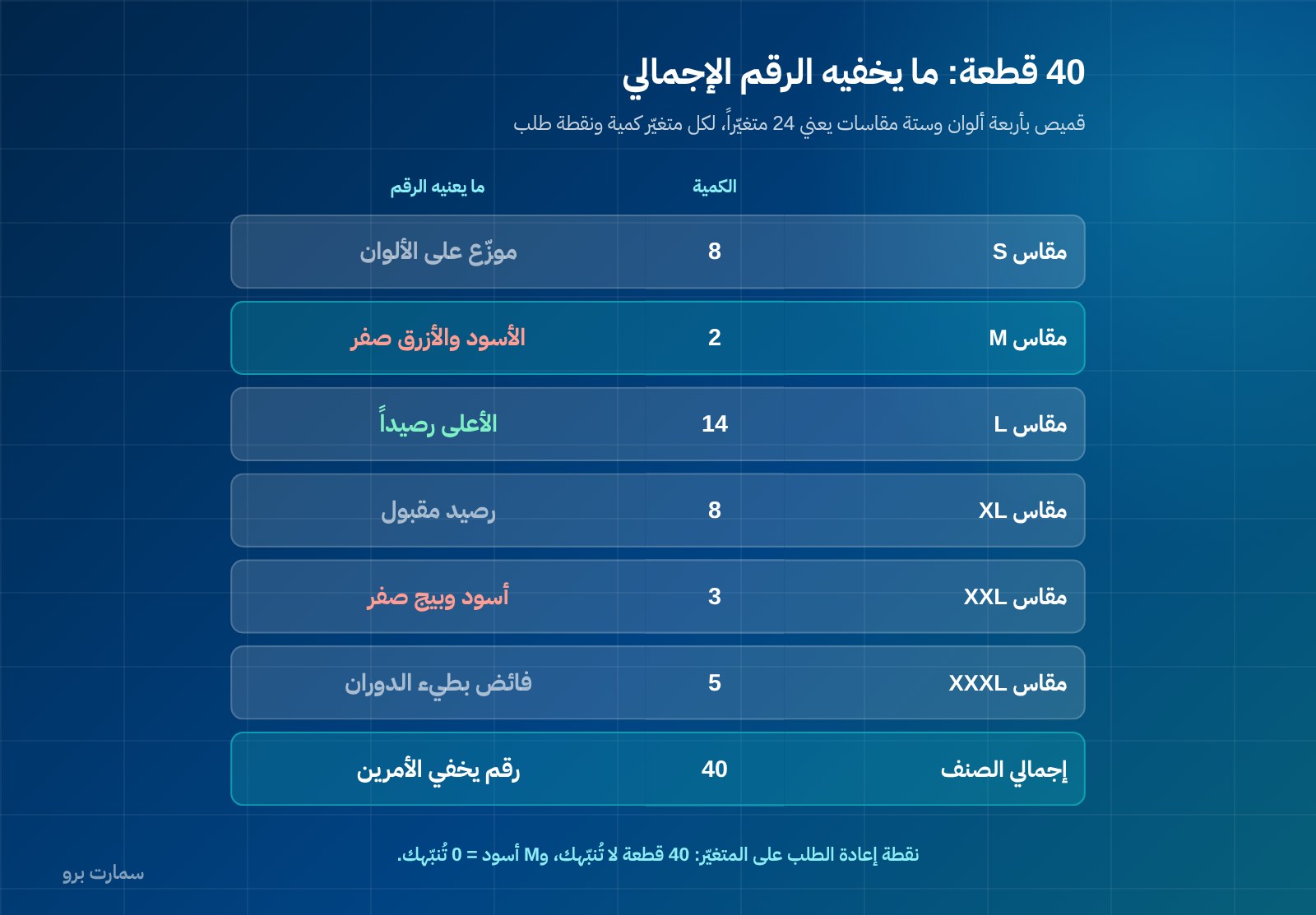
The following figures are hypothetical: one shirt in four colours and six sizes means 4 × 6 = 24 variants, each with its own barcode, its own quantity and its own reorder point.
| Size / Colour | White | Black | Blue | Beige | Size total |
|---|---|---|---|---|---|
| S | 3 | 2 | 1 | 2 | 8 |
| M | 1 | 0 | 0 | 1 | 2 |
| L | 4 | 3 | 5 | 2 | 14 |
| XL | 2 | 2 | 3 | 1 | 8 |
| XXL | 1 | 0 | 2 | 0 | 3 |
| XXXL | 2 | 1 | 1 | 1 | 5 |
| Colour total | 13 | 8 | 12 | 7 | 40 |
A system that does not understand variants will tell you: “Cotton shirt: 40 pieces.” A perfectly reassuring number. The truth is in the table: size M, usually the most requested, has only two pieces, and zero in black and blue. You are out of stock in what sells most, overstocked in XXXL, and the summary report hides both.
What this means in practice:
- Purchasing: the purchase order should be written as a colour × size matrix, not a total that the supplier splits however they like.
- Reordering: the reorder point sits on the variant. “40 pieces” will not alert you; “M black = 0” will.
- Barcodes: one barcode for all 24 variants means the cashier picks manually, and stock is deducted from the wrong variant dozens of times a day.
- Analysis: a report of which size sells in which branch is the basis for allocation. Without variants it cannot be produced at all.
- Margin: two variants may differ in cost and price. Merging them gives an average margin that describes neither.
If stock is a bigger problem for you than accounting, see how SmartPro handles warehouses, branches and barcodes in the Inventory system.
How should discounts and promotions be recorded?
A retail shop deals with three kinds of discount, and the system must tell them apart:
- Line discount: on a single item in the invoice, as a percentage or an amount.
- Invoice discount: on the total, and it must be allocated across the lines so each item's margin can still be calculated.
- Quantity promotion: buy two, get the third free, or a discount when buying three pieces.
Here is the mistake that costs more than all the discounts combined: recording a discount by overwriting the price at the till. On the surface the result is the same; the shop received the same amount. But what has been lost is the shop's most important data.
The following figures are hypothetical:
| Method | What the system records | What you can answer a month later |
|---|---|---|
| Changing the price from 200 to 160 | A sale at 160 | Nothing: 160 has become the “item price” in your history |
| A 20% line discount on a price of 200 | Price 200, discount 40, net 160 | Value of promotions, average discount, which items sell only on discount |
In the first case the original price disappears from the record. Three months later you will not know whether the item sells at full price or only moves on discount, what the Eid campaign actually cost, or whether margin fell because cost rose or because you are discounting more. Worse, the price history is contaminated, so comparisons between two periods measure on a different basis without saying so.
Quantity promotions have their own trap. If “buy two, get the third free” is recorded as a sale of two pieces, three pieces leave the shelf and two leave the system, and one piece falls into shrinkage for no reason. The correct treatment: record all three pieces and spread the discount across the line. Stock quantities stay correct and the true margin of the promotion stays visible.
The effect of a discount on the invoice value and the VAT calculated on it must appear on the invoice itself and in its journal entries, not in a side spreadsheet. For confirmation of any specific tax treatment, the official source is the reference.
How should returns and exchanges work?
In a retail shop a return is a daily transaction, not an exception. A system is judged on two questions.
The effect on stock. The returned piece goes back into quantity, but at what cost? It should return at its original cost, not the cost of the latest purchase batch, to the right branch and the right variant. The system must also distinguish between a sellable return and a damaged one: the first goes back on the shelf, the second goes to a “damaged” location and is treated as loss, not available stock. Merging the two means book stock that contains pieces that will never sell.
The effect on VAT. An invoice is not edited after it is issued; corrections are made with a credit note, a separate document that refers to the original invoice and reduces its value. A return is therefore neither a deletion of the original invoice nor an edit to it.
Exchanges expose weak systems quickly. Swapping size M for size L is two transactions, not one: a credit note against the original, and a new invoice for the replacement item, settling any price difference. A system that handles this by editing or cancelling the original invoice leaves a broken document chain and stock that moves without a supporting document. In the demo, ask for a complete exchange, then ask to see all three documents: the original invoice, the credit note and the new invoice.
What does a multi-branch shop need?
The first second branch exposes every shortcut in a system. What you need:
- Stock at branch level, not company level: quantity is not one number but a number per branch per variant. “Is blue size L in stock?” is a question about a specific branch.
- Inter-branch transfers: a transfer document with two states, dispatched and received, and an “in transit” quantity between them. A transfer is neither a sale nor a purchase and must not touch revenue or VAT.
- Price lists: a single list is simpler to manage; multiple lists are necessary if rent or price tier differs between locations. What matters is that this is your decision, not a limitation imposed by the system.
- Permissions: a branch manager sees their branch; management sees everything. An exceptional discount needs a permission, not good intentions.
- Reports: margin per branch, and sales per variant per branch. Without them you cannot move stock to where it sells.
We covered how the point of sale itself works, including the cashier, hardware and offline operation, in How to Choose the Right POS System for Your Business in Saudi Arabia.
How do you take stock in a busy shop without closing?
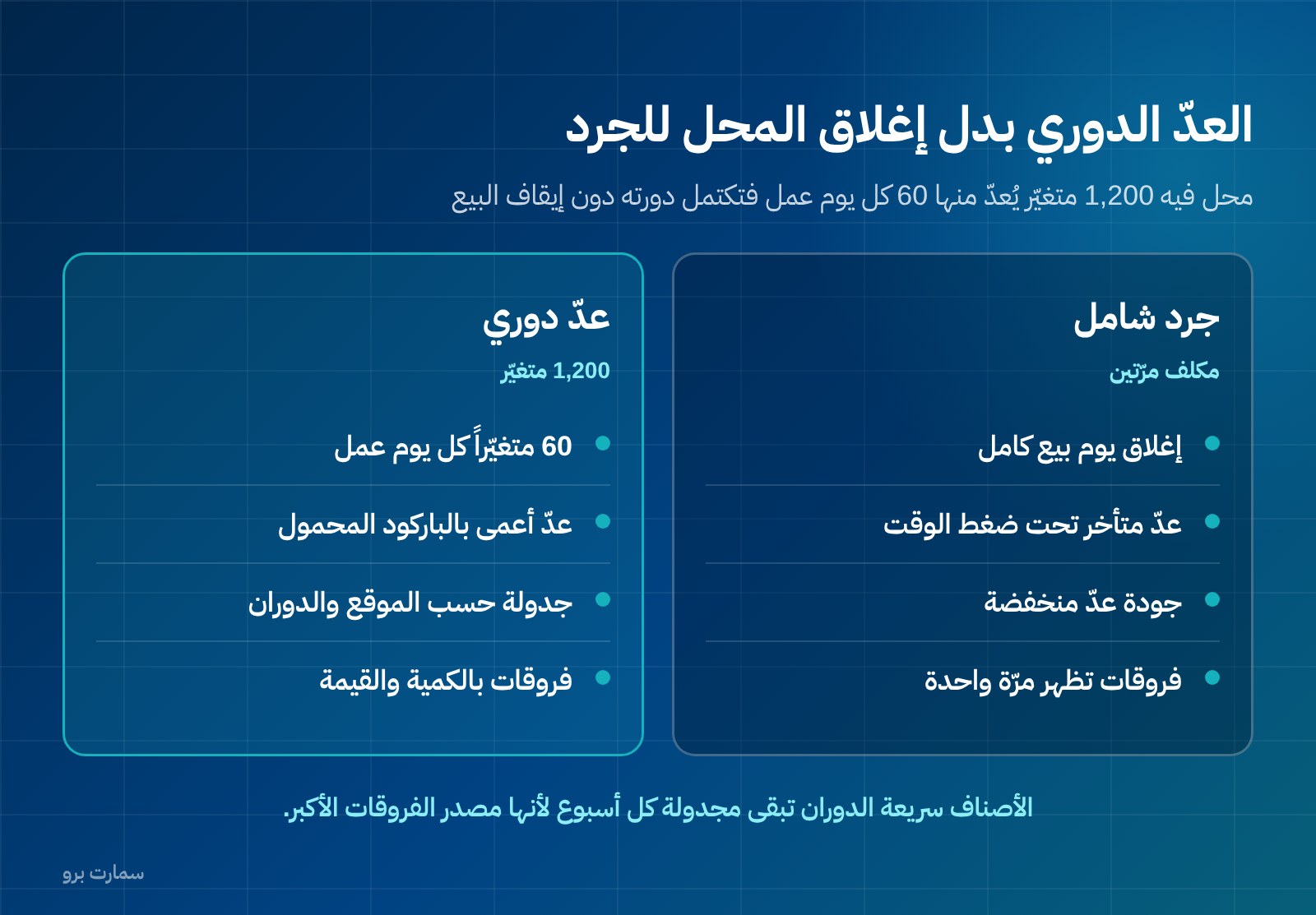
A full stocktake in a busy shop costs twice: once in a lost day of sales, and again in poor count quality, because counting happens late and under time pressure. The practical alternative is cycle counting: items are divided into groups, and one group is counted every day or every week, so the full cycle completes within a set period without stopping trade.
The following figures are hypothetical: a shop with 1,200 variants counts 60 of them each working day, completing the cycle in about twenty working days. Fast-moving items still stay scheduled for a weekly count, because they are the source of the largest variances.
What the system should provide for this:
- Count scheduling by location, group or turnover rate, not one long list.
- Barcode counting on a handheld device, because paper counts of near-identical variants are a source of error in themselves.
- Blind counting: the book quantity is not shown to the counter beforehand, otherwise they will simply write it down.
- Freezing movement on the counted items, or taking a snapshot of quantity at the moment of counting, so sales during the count do not mix into the variance.
- A variance report by quantity and value, followed by an adjustment entry with a documented reason and approval.
How do you detect shrinkage and theft?
Shrinkage is not an entry you make; it is a result you calculate. It is the difference between what the system says is there and what the count actually found. That is why no report can detect it, however good the system: it only shows up through counting.
Because its sources differ, a single number labelled “shrinkage” is not useful. Variances need coded reasons. The following figures are hypothetical:
| Reason for variance | Quantity | Value at cost (SAR) | What it means in practice |
|---|---|---|---|
| Likely theft (small items near the entrance) | 14 | 1,120 | Rearrange the display and monitoring |
| Damage and breakage | 9 | 540 | A packaging or handling problem |
| Receiving error (supplier quantity below invoice) | 11 | 880 | Match receipts by barcode and review the supplier |
| Scanning error at the till (wrong variant) | 17 | 0 | Zero in value if costs are equal, but it corrupts size data |
| Total | 51 | 2,540 |
Note the last line before the total: a scanning error costs no money directly, but it destroys the most valuable thing you have, which is knowing which variant sells. That is one more reason for a separate barcode for each variant.
In the books, an approved variance is posted as an inventory adjustment that reduces stock value and appears as a shrinkage expense or within cost of sales, depending on the policy you adopt and apply consistently. You need two things from the system: it must not allow quantity changes without an entry, a reason and an approval, and it must keep the history of variances so you can compare branch with branch and month with month.
How does e-invoicing work in a retail shop?
Most retail sales are simplified tax invoices, and some are standard tax invoices for a customer who asks for their VAT number to be recorded. The difference is not cosmetic; our ZATCA e-invoicing guide explains it.
What must be settled in the system before you buy:
- ZATCA Phase 2 e-invoicing requires invoices to be issued in XML format following UBL 2.1, with a cryptographic stamp, a counter that never resets, a hash chain linking invoices, and a QR code on simplified invoices.
- Simplified invoices are reported within 24 hours of issue and do not need prior clearance.
- No edits after an invoice is issued; corrections are made with a credit note.
- VAT (15%) becomes due on the earliest of three dates: the date of supply, the date the invoice is issued, or the date payment is received. This means a deposit to reserve a piece, or an advance payment on a special order, creates a VAT liability when it is received, not on delivery.
- ZATCA does not approve or certify software; it publishes an indicative list of qualified solution providers. Any offer that says “approved software” is using an inaccurate word.
What criteria should you use to choose accounting software for retail shops?
| Criterion | Why it matters in retail | How to test it in the demo |
|---|---|---|
| Variants | The real stock unit is colour × size | Enter an item with four colours and six sizes and ask for a quantity report as a matrix |
| Barcodes | A barcode per variant is required for correct stock deduction | Print barcodes for two variants and scan them at the till |
| Discounts | Line, invoice and quantity discounts instead of price overrides | Apply a line discount and an invoice discount and ask for a discount value report |
| Returns and exchanges | A double effect on stock and VAT | Run a complete exchange and ask for the three documents |
| Multiple branches | Quantity is a number per branch, and a transfer is not a sale | Transfer stock between two branches and watch “in transit” |
| Price lists | Price differences between locations are a choice, not a constraint | Create two price lists and link each branch to one |
| Cycle counting | Closing the shop for a full stocktake is an unnecessary cost | Ask for a count schedule for one group with blind counting |
| Shrinkage and its causes | A total cannot be managed; a cause can | Enter variances with four reasons and ask for a report by value |
| E-invoicing | Correct issuing and reporting from the POS itself | Issue a simplified and a standard invoice and check the QR code and counter |
| Permissions | Discounts, adjustments and cancellations are points of risk | Give a user sales-only rights and try to grant a discount |
| Offline operation | A network outage should not stop the till | Disconnect, issue two invoices, then reconnect |
| Data export | Your data is yours, and leaving must be possible | Ask to export items, movements and invoices |
What should you test in the demo? Use your items, not theirs
Do not judge a system on ready-made demo data. Pick ten items from your shop and enter them yourself:
- Enter one item with four colours and six sizes, and check that it produced 24 variants, each with a barcode.
- Enter a purchase order as a colour × size matrix, and receive it partially.
- Set a reorder point on two variants and ask for the items-to-reorder report.
- Issue an invoice with a line discount and an invoice discount, then ask for the margin on each line.
- Apply a “buy two, get the third free” promotion and check that three pieces left stock.
- Return one piece from the invoice, ask for the credit note, and check that the quantity came back at its original cost.
- Exchange one size for another with a price difference.
- Transfer five pieces from one branch to another and ask for the “in transit” report.
- Create a cycle count schedule for one group, and enter blind-count variances with four different reasons.
- Issue a simplified invoice and a standard invoice for a customer with a VAT number, and check the QR code and the counter sequence.
- Ask for a margin report per variant per branch for one month.
- Ask to export all your data. If you cannot take your data with you, you are locked in, not subscribed.
If step one fails, there is no need for the rest: the system was not built for retail shops, and nothing said afterwards about reports will fix what broke in the definition of an item.
How should you budget? Count the full cost, and the cost of staying as you are
Compare the full cost, not the licence price alone: the annual licence, entering existing items and variants and printing barcodes, cashier devices, scanners and printers if needed, and training your cashiers, not only the accountant. Then add the cost of staying where you are: lost sales because the requested size was missing and nobody alerted you, shrinkage with no known cause, a day closed for stocktaking, and a margin you cannot calculate because discounts disappeared into prices.
SmartPro's prices are published on the pricing page and include 15% VAT: the Mini package is SAR 1,500 a year with one user, Pro is SAR 4,500 a year with three users and the mobile app, and Max is SAR 20,500 a year with ten users for larger businesses. Only the main branch is included, and each additional branch costs SAR 1,000 a year. You can explore the retail solution and test variants, promotions and returns on your own items before any commitment.
Where is the official reference?
For e-invoicing requirements, tax invoice rules and the indicative list of qualified solution providers, the only authoritative source is the Zakat, Tax and Customs Authority (ZATCA): zatca.gov.sa. Any regulatory claim you hear in a sales pitch, whether about software “approval”, reporting deadlines or the treatment of discounts and returns, should be checked there before you base a decision on it.
Read also
- How to Choose the Right POS System for Your Business in Saudi Arabia
- SmartPro Inventory: warehouses, branches and barcodes
- How to Choose the Best Accounting Software in Saudi Arabia: A Practical Framework
Key takeaway: The right retail system treats each colour-and-size variant as its own item, records discounts as discounts, and handles returns, branches and cycle counts with proper documents. Test it on your own items before you sign.
Start a free trial or book a demo to run this checklist on your own stock.
Article visuals
Frequently asked questions
What makes accounting software for retail shops different from general accounting software?
The key difference is how an item is defined. General software treats an item as one thing with a price and a quantity, while a retail shop's real unit is the variant: colour, size and style. Retail shops also need line and invoice discounts, daily returns and exchanges, separate stock for each branch, and cycle counting that does not stop sales.
Why is recording a discount by changing the price a mistake if the amount collected is the same?
Because the amount collected is not the whole picture. When the price is overwritten, the original price disappears from the record and the reduced price becomes the item's history, so you can no longer see the value of promotions, the average discount or which items only move on discount. A discount recorded as a discount keeps both the original price and the reduction, so your margin history stays readable.
How are returns and exchanges handled under e-invoicing?
An invoice is not edited after it is issued; corrections are made with a credit note linked to the original invoice. A return is a credit note that reduces the invoice value and puts the quantity back into stock at its original cost. An exchange is two transactions, not one: a credit note for the returned item and a new invoice for the replacement, settling any price difference.
How is shrinkage or theft detected in a shop, and how is it recorded in the books?
Shrinkage does not appear in any report because it is not a transaction you enter; it is the difference between book quantity and counted quantity, so only counting reveals it. That is why cycle counting by group is more effective than an annual full stocktake that closes the shop. In the books, an approved variance is posted as an inventory adjustment that reduces stock value and appears as a shrinkage expense or within cost of sales, and each variance should carry a coded reason and an approval so it can be managed.