
CSID Compliance Certificate: What It Is, How to Get It and When It Expires
The CSID compliance certificate is what allows your system to stamp invoices and send them to Fatoora. How it is issued, how the compliance and production certificates differ, and when it expires.
سامي الحيدري
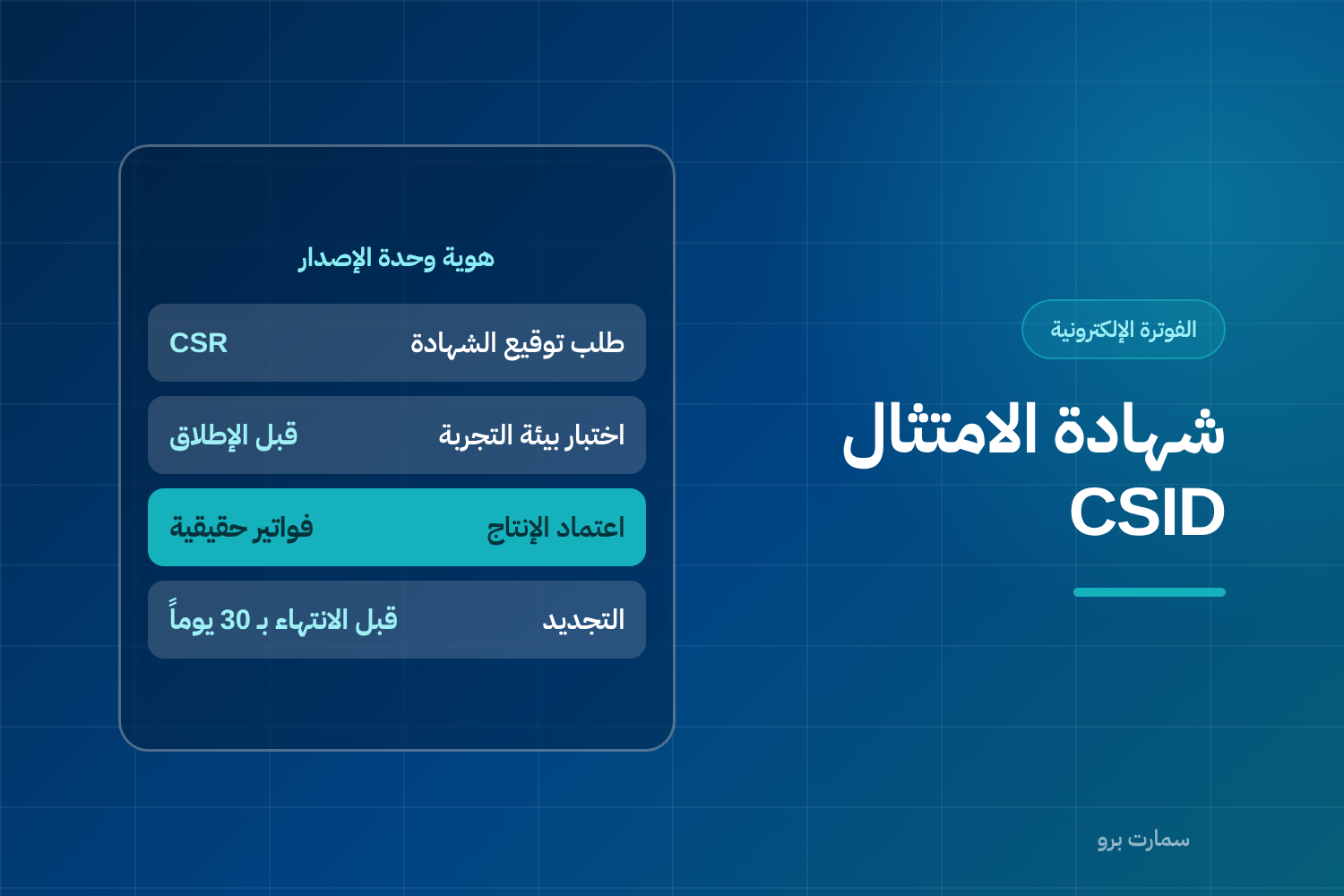
The CSID compliance certificate is the digital identity of your invoicing unit. Without it, your system cannot stamp invoices or send them to the Fatoora platform. With it, every invoice carries a signature proving it was issued by a device registered to your business. CSID stands for Cryptographic Stamp Identifier, the certificate ZATCA issues for this purpose.
Put simply: your VAT number identifies your business, while the certificate identifies the device or system that issues invoices inside your business.
Why is a CSID compliance certificate issued for each invoicing unit?
Because the goal is to trace exactly where each invoice came from. An invoicing unit is any device or system that issues invoices, such as a POS terminal or an accounting system. If you have three branches, ten cashier terminals and an accounting system that issues B2B invoices, those are multiple invoicing units, and each has its own certificate, its own counter and its own hash chain.
A hash chain links each invoice to the one before it through a digital fingerprint, so any gap or alteration shows up. This explains a question that comes up often: why can't I copy one device's settings to another? Because copying means two devices carry the same identity and increment the same counter, so the chain breaks and invoices are rejected.
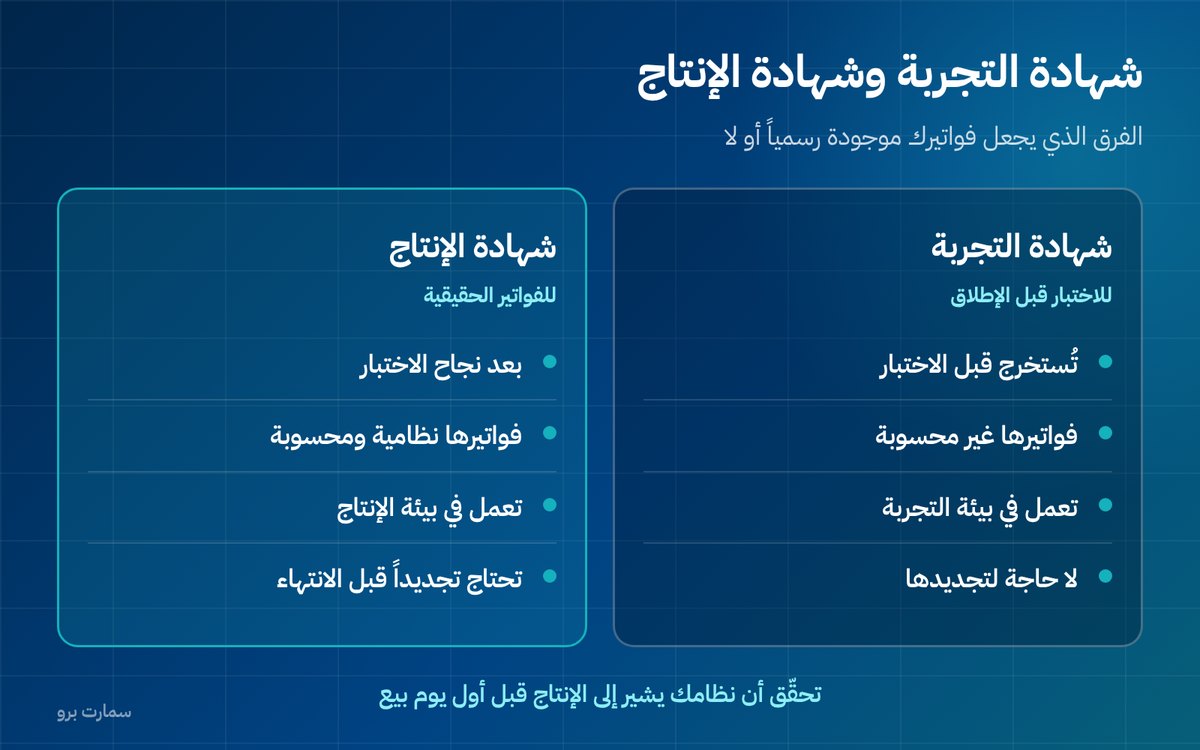
What is the difference between the two types of certificate?
| Aspect | Compliance certificate (testing) | Production certificate |
|---|---|---|
| Purpose | Testing invoice format | Issuing real invoices |
| Environment | Testing environment | Production environment |
| Invoices issued with it | Not counted | Counted and legally valid |
| When it is issued | Before testing | After testing succeeds |
| Renewal | Not needed | Required before expiry |
Many businesses think they have finished onboarding after the first certificate, then discover their invoices never actually arrived because they are still in the testing environment. Always check that your system points to the production environment before your first day of sales.
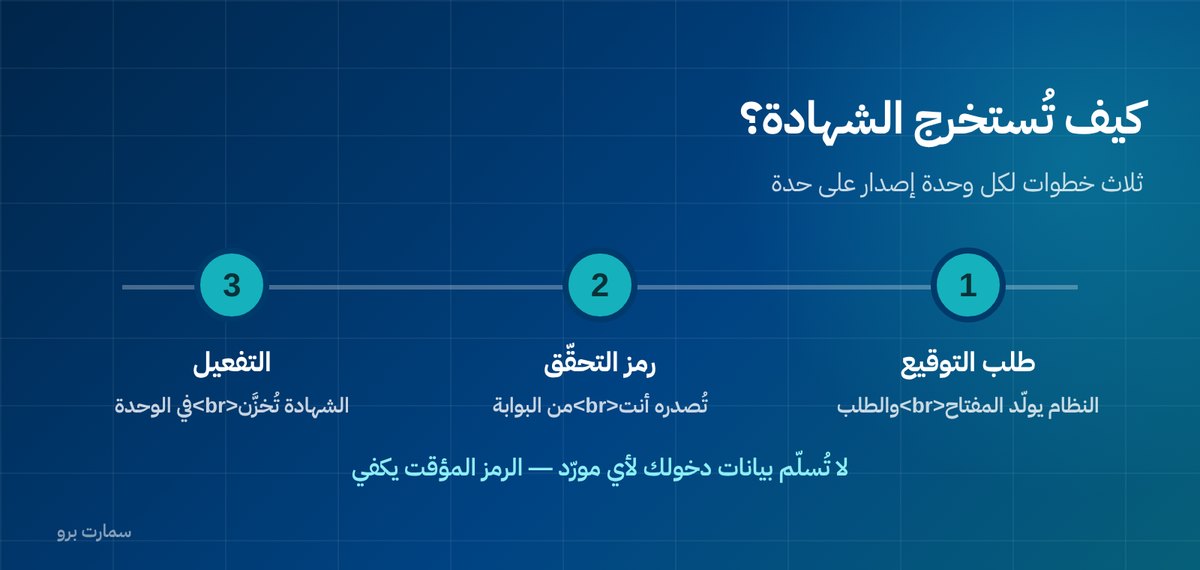
How is the certificate issued? Three steps
- Create a certificate signing request (CSR): a CSR is a request file sent to obtain a certificate. The system generates a private key that stays with it, plus a request carrying the invoicing unit's and the business's details.
- Get a verification code from the portal: you log in to the Fatoora portal with your account and generate a one-time code for the invoicing unit. This code is what proves the request comes from you.
- Receive and activate: the request is sent together with the code, the certificate comes back, and the system stores it linked to the invoicing unit.
Security warning: never hand your Fatoora portal login details to any vendor. You generate the one-time code yourself and share only that; it has a limited purpose and expires after use.
When does the certificate expire, and what happens then?
The certificate has a set validity period, and when it expires, stamping and sending stop. In practice, invoicing stops. This is the worst kind of failure because it is sudden and happens during business hours.
Three actions prevent it:
- Know the expiry date of every invoicing unit and record it somewhere that does not depend on anyone's memory.
- Ask the system for an alert at least 30 days in advance. If it does not support this, put a reminder in the finance manager's calendar.
- Renew early, not on the last day. Renewal is quick, but discovering it late on a busy day is not.
What are the five most common certificate mistakes?
- Copying the settings file between two devices to speed up installation. The result: counter conflicts and a broken hash chain.
- Reinstalling the system without a backup of the certificate and key, so the invoicing unit's identity is lost and everything starts from scratch.
- Creating a new invoicing unit for every problem instead of fixing the cause, so unused units pile up and invoices become hard to trace.
- Staying in the testing environment without noticing, so invoices appear successful but do not officially exist.
- Not documenting who issued the certificate and when, so when the vendor or employee changes, nobody knows anything.
What if you change your system or vendor?
The certificate is tied to the invoicing unit, not the vendor, but the private key stays inside the system that created it. So when moving to a new system:
- Do not try to move the certificate to the new system. Create a new invoicing unit and issue its certificate.
- Retire the old unit in an orderly way after confirming all its pending invoices have been sent, and do not leave it running in parallel.
- Keep the old system's invoice archive in XML format; it remains your responsibility even if you no longer have the system.
- Do not start selling on the new system until you have confirmed that the counter and hash chain started correctly in the new unit.
What trips businesses up most when changing vendor is not the certificate but the archive. Write into the contract from day one your right to export every XML file at no extra charge.
What should you record for each invoicing unit?
Keep a simple table with: the unit's name and location, issue date, expiry date, who issued it, and the counter number at the last review. This table saves you hours during any fault or vendor change.
Certificate requirements, registration steps and validity periods are published in the official guides of the Zakat, Tax and Customs Authority (ZATCA), which is the reference whenever it differs from what a vendor tells you. For the wider picture, see our ZATCA e-invoicing guide.
A common question: does the certificate cost anything?
ZATCA does not charge a fee for issuing the certificate itself through the platform. However, some vendors charge for installing an invoicing unit or for each additional device. Ask about this item explicitly before signing, and find out what it will cost to add a new device or branch a year from now.
This is one of the items cheap offers hide: a low monthly subscription, then fees for each additional invoicing unit that appear as you expand.
Read also
- Fatoora onboarding step by step
- Phase 2 e-invoicing: what integration means
- Clearance vs reporting: the difference between the two paths
Key takeaway: Every invoicing unit needs its own production CSID, so track each expiry date, renew early and never copy settings between devices.
To see how Fatoora onboarding works in practice, start a free SmartPro trial or book a demo.
Frequently asked questions
What is a CSID compliance certificate?
It is the digital identity of the invoicing unit that issues invoices in your business. With it, the system stamps invoices and sends them to the Fatoora platform. It identifies the specific device or system, not the business as a whole.
Do I need a certificate for every device?
Yes. Every invoicing unit, whether a cashier terminal or a system that issues invoices, has its own certificate, counter and hash chain. Copying one device's settings to another causes counter conflicts and breaks the chain, so invoices are rejected.
What is the difference between the compliance (testing) certificate and the production certificate?
The testing certificate is used to test invoice format in the testing environment, and invoices issued with it are not counted. The production certificate is issued after testing succeeds, and with it invoices become real and legally valid. Check that your system points to the production environment before your first day of sales.
What happens if the certificate expires?
Stamping and sending invoices stop, which in practice means invoicing stops. Know the expiry date of every invoicing unit, set an alert at least 30 days in advance, and renew early rather than on the last day.