
Fatoora Integration Step by Step: From Certificate Request to Your First Approved Invoice
Fatoora integration in six clear steps: preparation, certificate request, testing, production approval, launch and monitoring, plus what usually goes wrong at each step.
سامي الحيدري
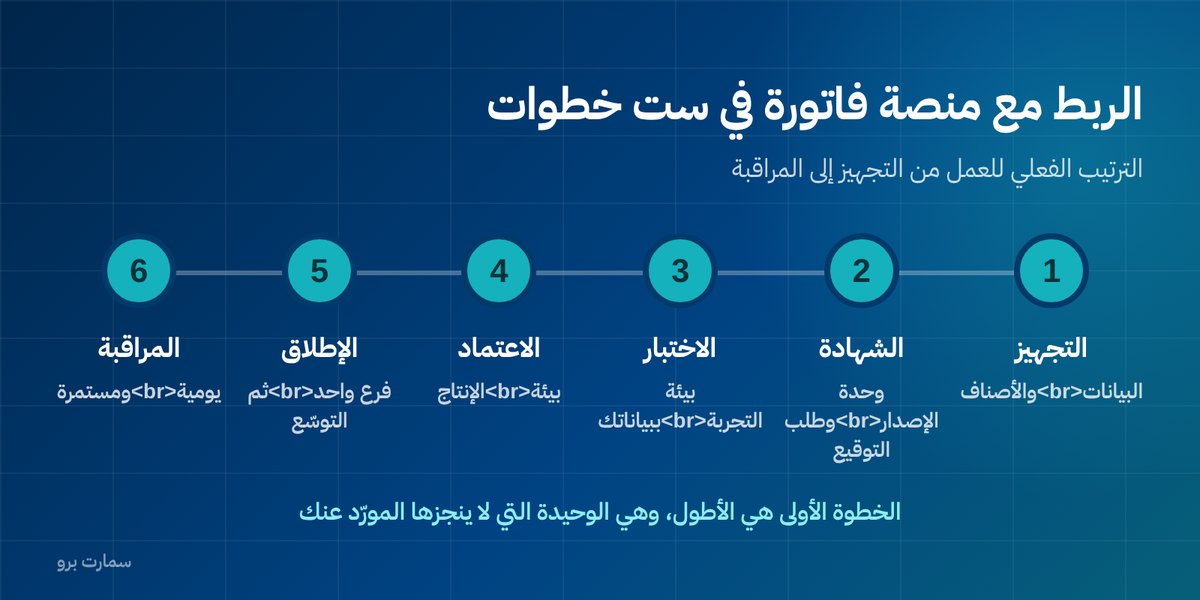
Fatoora integration looks complicated until you see it broken down. In reality it is six clear steps: preparation, certificate request, testing, production approval, phased launch and daily monitoring. What takes the time is not the technical work. It is the preparation that comes before it.
This guide explains the actual order of work, who is responsible for each step, and what typically holds it up.
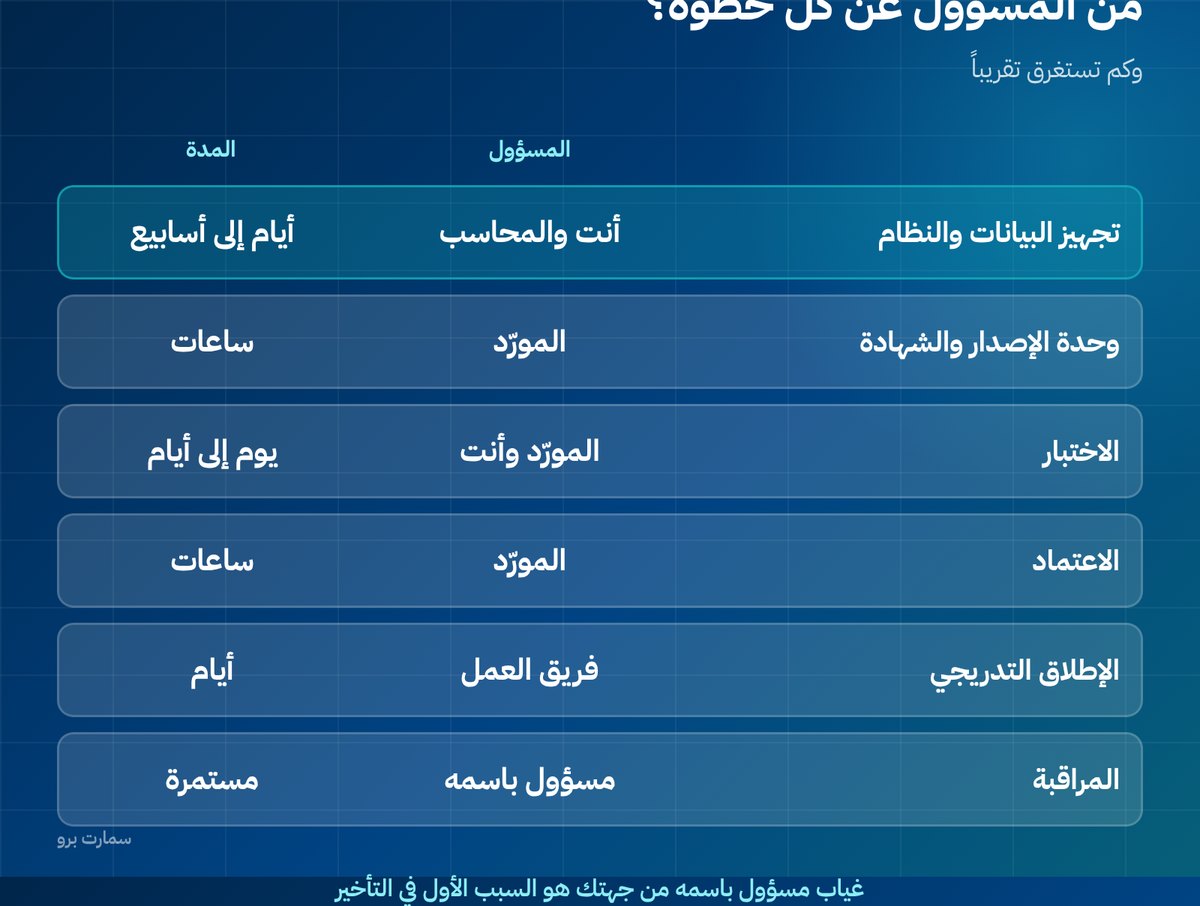
What are the six steps of Fatoora integration?
| # | Step | Owner | Approximate time |
|---|---|---|---|
| 1 | Prepare data and system | You + your accountant | Days to weeks |
| 2 | Create the issuing unit and request the certificate | Technology provider | Hours |
| 3 | Test in the sandbox environment | Provider + you | One day to several days |
| 4 | Approval in the production environment | Provider | Hours |
| 5 | Phased launch | Your team | Days |
| 6 | Daily monitoring | A named person | Ongoing |
Notice that step one is the longest, and it is the only one your provider cannot do for you.
Step 1: What should you prepare before anything technical?
Before you request the certificate, make sure of four things:
- Your business's VAT number is correct and matches what is on the ZATCA portal, and your registration certificate is valid.
- Data for your business customers: the VAT number and national address of every customer you issue a tax invoice to. This is the item that eats up weeks.
- Your item and tax list: every item has the correct VAT rate and the correct category. Exempt and zero-rated items must be classified properly, not mixed in with standard-rated ones.
- A clear decision: how many issuing units do you need? One branch with one device is very different from three branches with ten cashier terminals.
Step 2: How do the issuing unit and certificate request work?
Every device or system that issues invoices is registered as a separate issuing unit with its own identity. The system generates a certificate signing request (CSR), a digital request asking the platform to issue a certificate for that unit. It is sent to the platform, which then issues a compliance certificate used in the testing stage.
Your provider usually handles this step, but you need access to the Fatoora portal to generate the required verification code (OTP), a one-time code that authorises the request. Never hand over your full login details to anyone. Generate the code yourself and pass it on: it is temporary and limited in purpose.
Step 3: How should you test in the sandbox environment?
Do not skip this step, however ready everything looks. Test with data that resembles your real data, not the provider's sample examples:
- A tax invoice for one of your actual customers, with their real items and prices.
- A simplified invoice from the point of sale.
- An exempt item and a zero-rated item, if you have them.
- A credit note against an earlier invoice.
- An invoice with a discount, and another with more than one VAT rate.
Every case that passes in testing is a case that will not fail in front of a real customer.
Step 4: What happens at production approval?
Once testing succeeds, the production certificate is issued and the issuing unit is activated for real. From that moment, invoices are genuine and counted, and any mistake must be corrected with a note, not by deleting the invoice.
Before this step, confirm that the invoice counter starts from the correct number and that nobody will renumber invoices later, because the counter is never reset.
Step 5: How do you launch without disrupting sales?
Do not go live on every branch on the same day. Start with one branch or one device for a full day and watch the acceptance rate. If the day passes without repeated rejections, expand.
Train the people who issue invoices on just three things: when an invoice should be a tax invoice, what to do if a rejection message appears, and what to do if the connection drops. These three cover most of what they will face day to day.
Step 6: Why does daily monitoring matter?
Integration is not a project that ends. Give one named person five minutes a day to open the pending and rejected invoices screen and act on it. Businesses that neglect this step discover a month later that hundreds of invoices never arrived.
The official guides, portal registration steps and the requirements for each step are published by the Zakat, Tax and Customs Authority (ZATCA), and that is the reference to rely on if you and your provider disagree. For a wider overview, see our ZATCA e-invoicing guide.
What should you check before you press "Go live"?
Go through these points with your provider and record a written answer for each:
- Does each invoice's status show clearly: sent, accepted, rejected, pending? In four different colours, not one?
- Does the system retry automatically when sending fails, and how many times, at what interval?
- Can you keep selling if the connection drops, and are the queued invoices sent when it returns?
- Where do I issue a credit note against an earlier invoice, and how many steps does it take?
- Where are the XML files stored, and for how long? Can I export them myself without going back to the provider?
- What happens if the certificate expires? Will the system warn me well enough in advance?
- Can I add a new branch or device myself, or does every addition need a technician visit?
The written answers here are worth more than any clause in the contract, because they reveal early what you would otherwise find out later the hard way.
Who should own the project on your side?
What delays integration most is not technical. It is the absence of one person in the business who follows up, answers the provider's questions the same day, and makes decisions. Appoint a named person, not "a department", and give them authority to decide on data and procedures.
If your business is small, let that person be you. The project does not need a technical background; it needs someone who knows how your business actually sells.
What are the three most common reasons integration is delayed?
- Incomplete customer data, so tax invoices are rejected one after another.
- Items with the wrong tax classification, so VAT category errors appear.
- Nobody in the business owns the project, so every question from the provider waits days for an answer.
Read also
- Phase 2 e-invoicing: what integration means
- Clearance vs reporting: the difference between the two paths
- Fatoora integration waves and timelines
Key takeaway: Fatoora integration is six steps, and the technical ones take hours to days. Clean customer and item data, real-world testing and one named owner are what decide how fast you go live.
SmartPro supports ZATCA (Fatoora) Phase 2 e-invoicing with Fatoora onboarding included at no extra charge, so you can start a free trial or book a demo to see the process on your own data.
Frequently asked questions
What are the steps of Fatoora integration?
There are six steps: preparing your data and system, creating the issuing unit and requesting the certificate, testing in the sandbox environment, approval in the production environment, a phased launch across branches, and daily monitoring of pending and rejected invoices.
How long does Fatoora integration take?
The technical steps take hours to days. Preparation, meaning cleaning up customer data and classifying items for VAT correctly, takes weeks, and it is the real reason most projects are delayed.
Do I need to give my provider my Fatoora portal login details?
No. You generate the required verification code yourself on the portal and hand it to the provider; it is a temporary code with a limited purpose. Never share your full login details with anyone.
Can I skip testing in the sandbox environment?
This is strongly discouraged. Test with data that resembles your own: a tax invoice, a simplified invoice, a credit note, an exempt item and an invoice with a discount. Every case that passes in testing is a case that will not fail in front of a real customer.