
The QR Code on an E-Invoice: What It Contains and Why It Gets Rejected
The QR code on an e-invoice is not a picture of a link. Here is exactly what it contains, why it gets rejected, and how to check it yourself before you discover the error too late.
سامي الحيدري
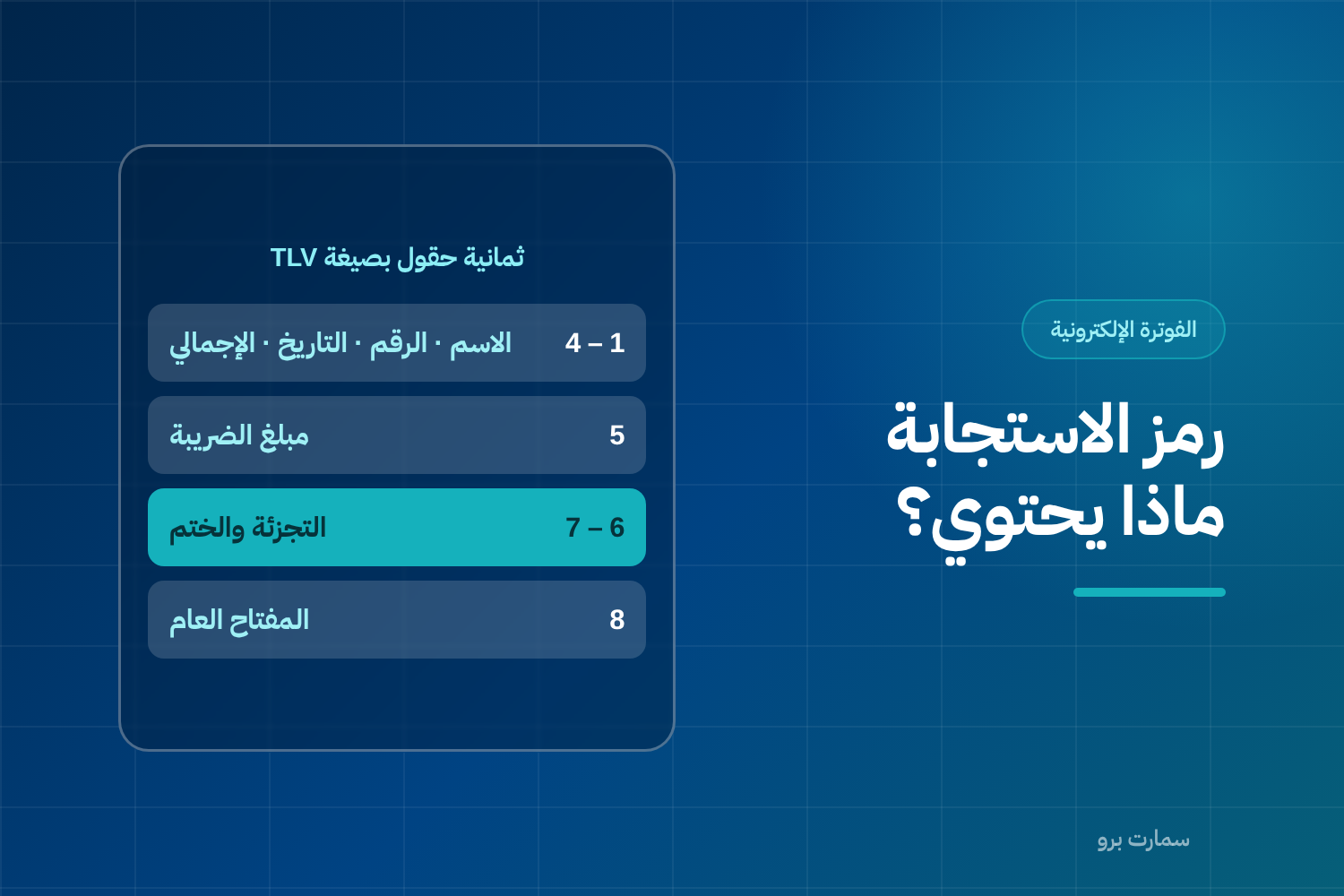
The e-invoice QR code is the most misunderstood element of Phase 2. Many people assume it carries a link or an invoice number, when it is in fact a container of data encoded in a specific format — and any departure from it makes the invoice unacceptable.
The code is what lets anyone, whether your customer or a field inspector, read and verify the invoice's core data without going back to your system.
What does the e-invoice QR code contain?
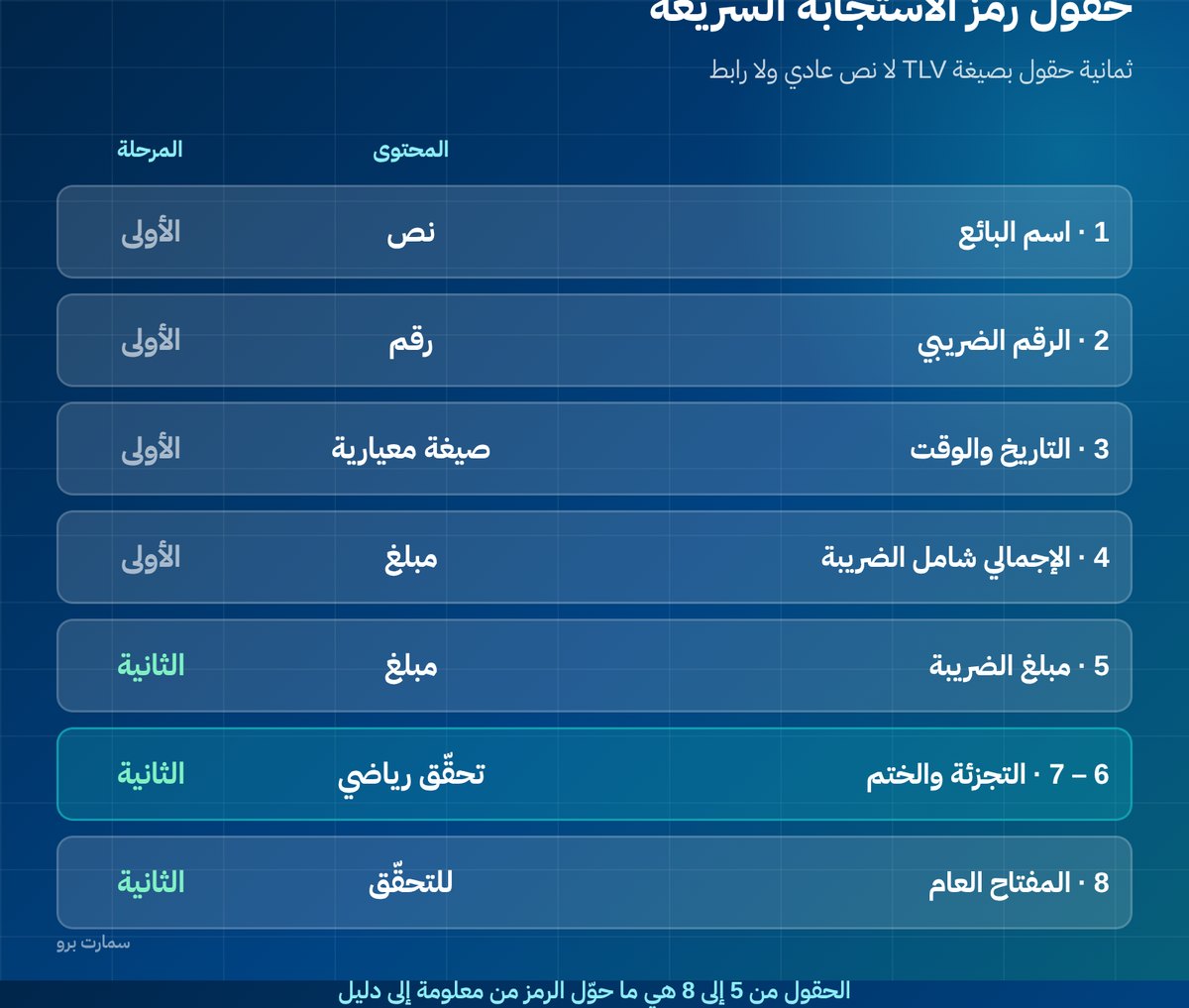
The code carries data arranged in TLV format, meaning each field is written in three parts: the field number (tag), then its length, then its value. This is what tells the reader where one field ends and the next begins, without any separators.
| Field | Content |
|---|---|
| 1 | Seller's name |
| 2 | Seller's VAT registration number |
| 3 | Invoice date and time |
| 4 | Invoice total including VAT |
| 5 | VAT amount |
| 6 | Invoice hash |
| 7 | Cryptographic stamp |
| 8 | Public key |
The first four fields have existed since Phase 1. Fields five to eight are what Phase 2 added, and they are what turn the code from displayed information into evidence that can be verified mathematically.
Why TLV encoding, and why won't plain text work?
If the data were written as text separated by commas, everything would break at the first business name that contains a comma. TLV encoding solves this because each field declares its length up front, so the reader never has to guess where it ends.
That is exactly why a code generated as plain text, or as a link to a web page, gets rejected, even if it looks fine to the eye and opens on a phone.
What are the five most common invoice QR code errors?
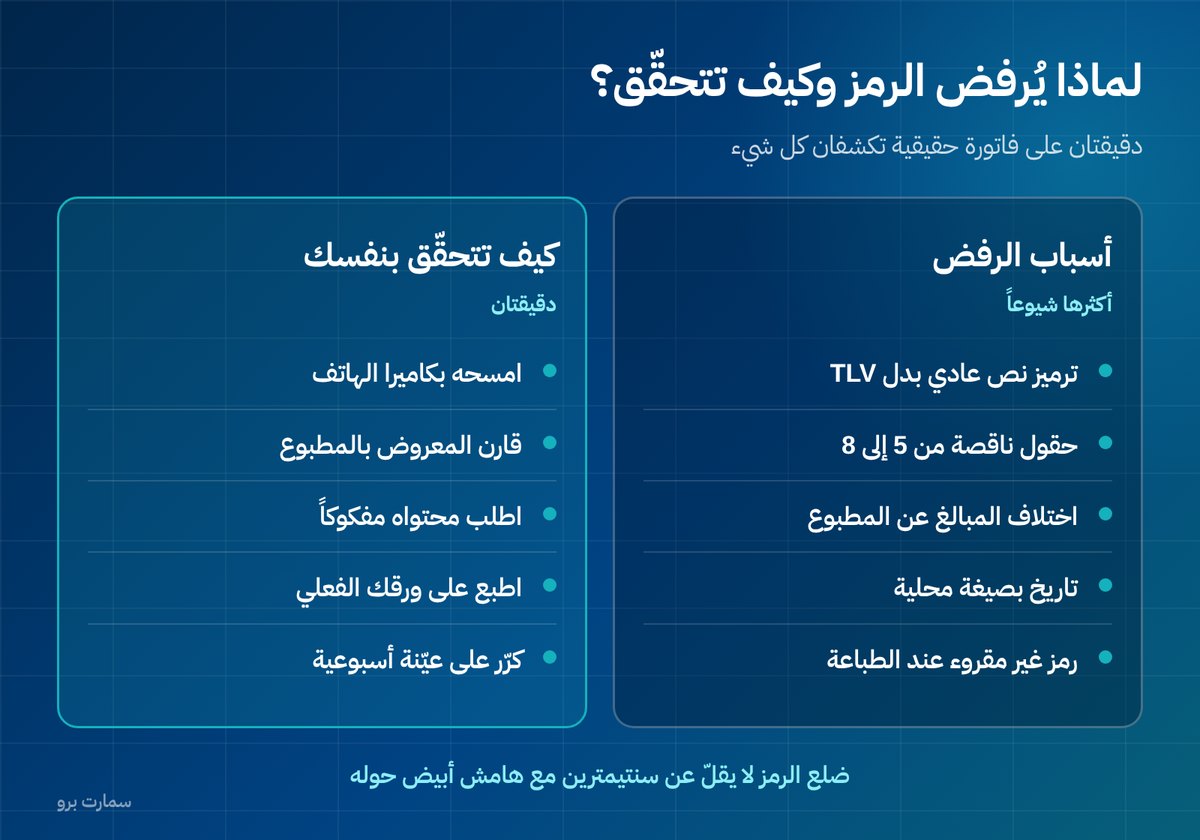
- Wrong encoding: the data is written as text or JSON instead of TLV. This is the most common reason for rejection.
- Missing fields: the code carries only four fields in the Phase 1 style, without the hash, the stamp and the public key.
- Mismatched amounts: the total in the code differs from the total printed on the invoice, usually because the system and the printout round differently.
- Date in a local format: the date must be written in the standard format with the correct time, not in the local display format.
- A code that can't actually be read: low print resolution, a size that is too small, or printing on faded thermal paper. A code that is technically correct but cannot be scanned does not do its job.
How can you check your QR code yourself in two minutes?
Don't wait for someone else to tell you. Run this simple test on a real invoice:
- Scan the code with your phone's ordinary camera. If it doesn't read at all, the problem is in the printing or the size before it is in the data.
- Compare what appears with what is printed: the name, VAT number, date, total and VAT. Any difference, even a single halala, means a rounding fault.
- Check that all eight fields are present, not just the first four. Ask your provider to show you the decoded content of the code.
- Print the invoice on the paper you actually use, not on an office printer. Many problems only show up on thermal paper.
Size and printing: the details people overlook
Make each side of the code at least two centimetres on thermal paper, and leave an empty white margin around it. The margin is not decoration: the scanner needs it to find the edges of the code.
Avoid printing the code over a coloured background or a logo, and keep an eye on the condition of the thermal printer head. A faded code that scans today may not scan a month from now.
What does it mean that the code is "verifiable"?
The first four fields are information anyone could write. The hash, the stamp and the public key are what make the code proof rather than a claim.
The idea, simply put: the system calculates a mathematical fingerprint (the hash) of the invoice content, then signs it with the private key held inside the issuing unit. Anyone reading the code can recalculate the fingerprint and verify the signature using the public key.
The practical result: if an amount on the printed invoice is altered after it is issued, the fingerprint will no longer match, and the tampering shows up immediately, without needing to check your system or the platform.
In which real-world situations is the code checked?
- A field inspection at the shop: the code is scanned from a random invoice and compared with what is printed. A match is what's required.
- A customer checking for themselves: some customers now scan the code to confirm that the seller is registered for VAT.
- Internal review: you can scan a weekly sample of invoices from each branch yourself. It is the fastest way to catch a device that has been set up wrongly before its invoices pile up.
Where does the code appear, and who needs it?
The code is mandatory on the simplified tax invoice, and it is the practical means of verification for consumers and inspectors. On the standard tax invoice, verification happens through the full clearance path via the platform, while the code remains required depending on the case.
The exact details of the fields, their order and formats are published in the technical guides of the Zakat, Tax and Customs Authority (ZATCA). That is the reference to rely on in any dispute with your provider over whether the code is compliant. For the wider picture of Fatoora and Phase 2 e-invoicing, see our ZATCA e-invoicing guide.
Key takeaway: A valid invoice QR code is TLV-encoded data with all eight fields, matching the printed invoice to the halala and printed clearly enough to scan. Test a real invoice on your own paper rather than assuming it is correct.
Read also
- Standard vs simplified tax invoice: which one should you issue
- Onboarding to the Fatoora platform step by step
- The CSID compliance certificate: obtaining and renewing it
To see how SmartPro issues Phase 2 invoices with the QR code generated the moment a sale closes, start a free trial or book a demo.
Frequently asked questions
What does the QR code on an e-invoice contain?
It contains the seller's name, VAT registration number, invoice date and time, the total including VAT and the VAT amount, plus the invoice hash, the cryptographic stamp and the public key. The first four fields date from Phase 1, and the last four were added in Phase 2.
Why does an invoice QR code get rejected?
The most common reason is wrong encoding: writing the data as plain text or a link instead of TLV format. Next come missing fields, amounts that differ between the code and the printed invoice because of rounding, and a non-standard date format.
How do I check that my invoice QR code is correct?
Scan it with your phone camera and compare what appears with what is printed: the name, VAT number, date, total and VAT. Then ask your provider to show you the decoded content of the code to confirm that all eight fields are present, not just the first four.
What size should the invoice QR code be printed at?
Each side should be at least two centimetres on thermal paper, with an empty white margin around it that the scanner needs to find the code's edges. Avoid printing it over a coloured background or a logo, and keep an eye on the printer head, because a faded code stops scanning over time.