
Trial Balance Excel Template, Ready to Download
A trial balance Excel template for 40 accounts: closing balances are calculated automatically, with three balance checks and an explanation of what the trial balance cannot reveal.
Author:سامي الحيدري

A trial balance Excel template lists the balances of all your accounts on a given date in two columns: debit and credit. When the two totals are equal, the trial balance is said to balance. This template works that out automatically, with three ready-made checks at the bottom of the file.
The template is free. It suits small and medium businesses that prepare a trial balance every month before producing their financial statements.
What does the trial balance Excel template include?
- User guide: the rules for filling it in and the closing-balance formula.
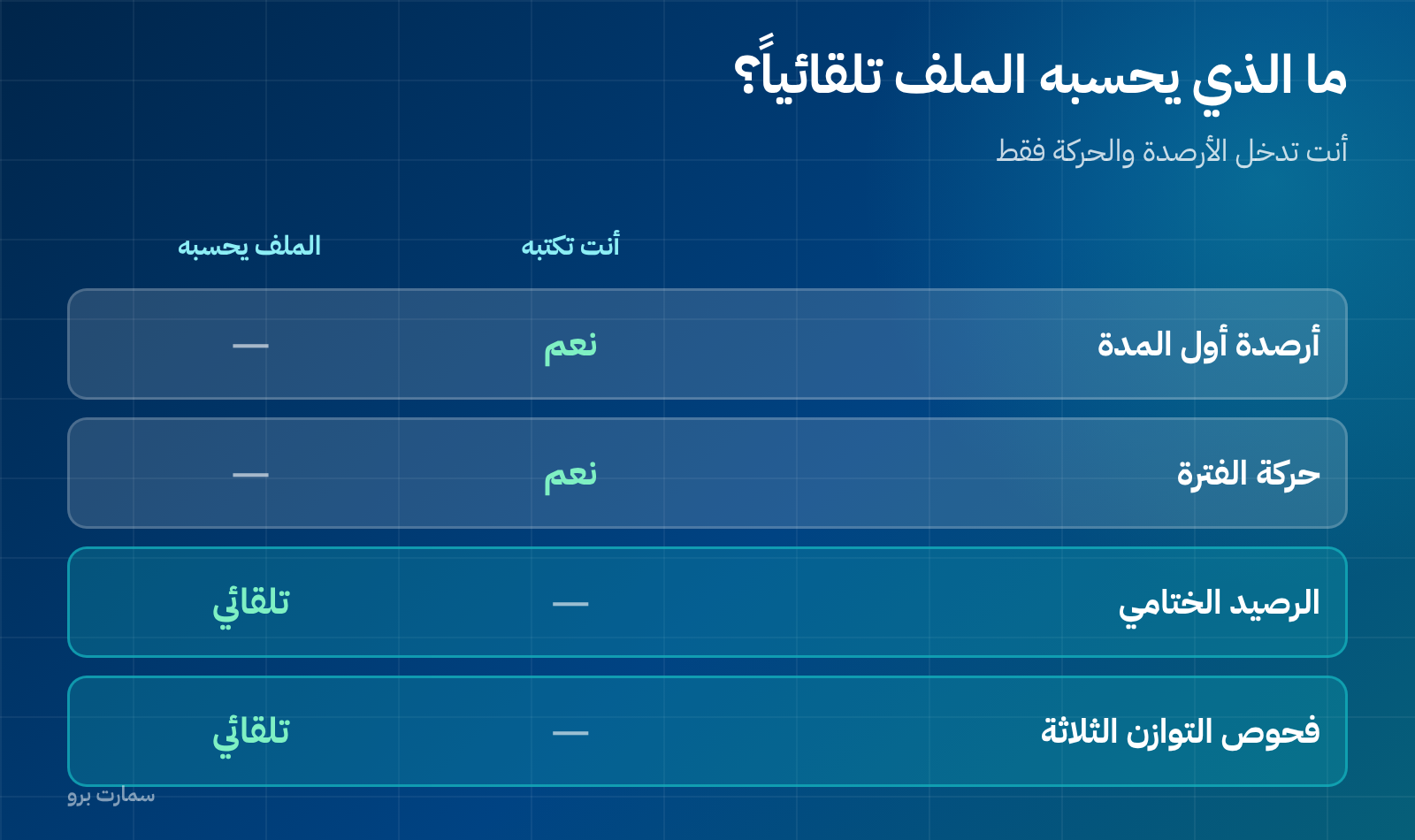
- Trial balance: 40 accounts with columns for opening balances and period movements, and the closing balance calculated for you.
- What the trial balance doesn't reveal: a separate sheet covering four errors that leave the trial balance perfectly balanced.
You only enter the account numbers and names, the opening balances and the period movements. Everything else is formulas.
How is the closing balance calculated?
Net account balance = (opening debit − opening credit) + (period debit − period credit).
If the result is positive, the balance appears in the debit column. If it is negative, it appears in the credit column. That is how every account lands on its correct side without any input from you.
The three checks at the bottom of the file
- Opening balances balance.
- Period movements balance.
- Closing balances balance.
Each check either says "Balanced" or shows the exact amount of the difference. That tells you where to look: in the opening balances or in the period's journal entries.
What does a trial balance reveal?
- An entry recorded on one side only.
- Different amounts on the two sides of the same entry.
- An error in carrying an account balance over to the trial balance.
- Transposed digits on one side, such as 5,400 instead of 4,500.
And what will it never reveal?
This is where the most dangerous misunderstanding in day-to-day accounting lies. A balanced trial balance does not mean your books are correct. It only means every entry was written with two equal sides. These four errors pass through without a trace:
- An entry that was never recorded. A supplier invoice left sitting in a drawer simply doesn't exist in the trial balance.
- An entry recorded twice in full. Both sides are equal, twice.
- A posting to the wrong account of the same type: an electricity expense booked to rent.
- An entry with the wrong amount on both sides: a SAR 5,000 sale recorded as 500 on both sides.
That is why the trial balance is no substitute for bank reconciliation, inventory stocktaking or reviewing customer and supplier statements.
How to read your trial balance in five minutes
- Compare each balance with the previous month and look for any jump with no operational reason.
- Match the bank balance to the bank statement.
- Make sure the output VAT and input VAT accounts reflect your VAT return.
- Check that clearing and adjustment accounts are at zero.
- Review accounts receivable and compare them with customer statements.
Signs your trial balance needs a review
- A negative balance in an account that shouldn't go negative, such as inventory with a credit balance.
- An "Other expenses" account among your five largest balances.
- Clearing accounts still open from a previous month.
- A small difference of the same amount recurring every month.
Before you enter the balances
The template is only as reliable as what you put into it. Three points prevent most problems:
- Enter opening balances in their own columns, not as part of the month's movements, or the opening figures will mix with the activity.
- Keep the same account names from month to month, because renaming an account breaks the comparison.
- Enter movements as gross amounts, not net. The template calculates the net and the closing balance itself.
If it doesn't balance: search in this order
Don't review every entry at random. Follow this sequence; it resolves most cases within minutes:
- Divide the difference by 2. If a familiar amount appears, an entry was probably recorded on the wrong side.
- Divide the difference by 9. If it divides with no remainder, it is probably a transposition error, such as 540 written as 450.
- Search for the difference itself as an entry amount. It may be an entry recorded on one side only.
- Review what was entered since the last time the trial balance balanced, not every entry for the month.
How to use the trial balance twice at month-end close
Prepare the trial balance once before adjusting entries and once after. The first run exposes recording errors, the second exposes errors in the adjustments themselves, and every difference between the two versions should be explained by a clear adjusting entry.
For the requirements on keeping books and accounting records in Saudi Arabia, and how long to retain them, refer to the Zakat, Tax and Customs Authority (ZATCA).
Can the template replace an accounting system?
No, but it is enough when you are starting out. The template suits a business with a limited number of accounts and one person responsible for data entry. Once several people are entering data, or you need the trial balance generated automatically from journal entries without copying and pasting, the file becomes a burden rather than a tool.
Key takeaway: A balanced trial balance only proves that every entry has two equal sides; it does not prove your books are correct, so pair it with bank reconciliation, stocktakes and statement reviews.
Read also
- Trial Balance: What It Reveals and What It Hides
- Adjusting Entries: The Journal Entries That Correct Your Profit
- The Accounting Cycle: From Invoice to Financial Statements
Try SmartPro the way you work
In an accounting system, the trial balance isn't a file you prepare; it is a report you open with one click at any moment, and every balance in it drills down to the journal entry and then the source document.
Request your free SmartPro trial and compare the trial balance it produces with the one you prepare by hand today.
Article visuals

Frequently asked questions
What is the difference between a trial balance and a balance sheet?
A trial balance is an internal report that lists every account, including revenue and expenses, and is prepared before adjusting entries. A balance sheet is a formal financial statement that shows assets, liabilities and equity on a specific date.
When should I prepare a trial balance?
Monthly, and before adjusting entries. An error found in February costs you minutes to fix; if it surfaces in December, it can mean reopening eleven months.
Does a balanced trial balance mean the books are correct?
No. Four errors pass through without upsetting the balance: an entry that was never recorded, an entry duplicated in full, a posting to the wrong account of the same type, and a wrong amount on both sides of an entry.
What is the difference between a balances trial balance and a totals trial balance?
A balances trial balance shows each account's net balance on one side only, which is the format this template uses. A totals trial balance shows the total movements on each side of every account before they are netted off.