
How to Choose Accounting Software for Contractors in Saudi Arabia
A practical guide to choosing accounting software for contractors: project costing, progress claims and percentage of completion, retention, change orders, and a checklist to run before you buy.
Author:سامي الحيدري
Choosing accounting software for contractors is not a bigger version of choosing accounting software for a shop. Contracting breaks general accounting in three specific places. Revenue is recognised as work progresses, not when cash arrives. Cost belongs to a specific project, not to the company. And part of the money you have earned stays with the client as retention for months. Any system that does not understand these three will push you into an external spreadsheet, and that spreadsheet will become your real system.
This guide compares types of systems and how they work, not product names. All the figures in it are hypothetical and only illustrate the method. They are not market prices or industry benchmarks.
Why does general accounting software break down in contracting companies?
General accounting software is built on one idea: a single profit centre called the company. Invoices go in, expenses go in, and an income statement comes out. That is enough for a shop that sells the same items every day.
A contractor works differently. Each project is a separate contract, with its own duration, cost, margin and cash flow. When all these projects are rolled into one income statement, the most dangerous thing in this sector happens: the company looks profitable while it is losing money on three projects without knowing it. Profitable projects quietly fund the loss-making ones, and the total keeps you reassured until the cash runs out.
You can diagnose the symptoms before you buy:
- Expenses posted to an "operating expenses" account with no project attached.
- Progress claims calculated in an external file, then entered as a single invoice.
- Retention that the project manager knows about but the accounts do not.
- Change orders carried out on site but never priced in the books.
If you are still deciding between standalone accounting software and an integrated system, that is a separate question, which we cover in accounting software vs ERP.
Why must cost be tracked by project, not by company?
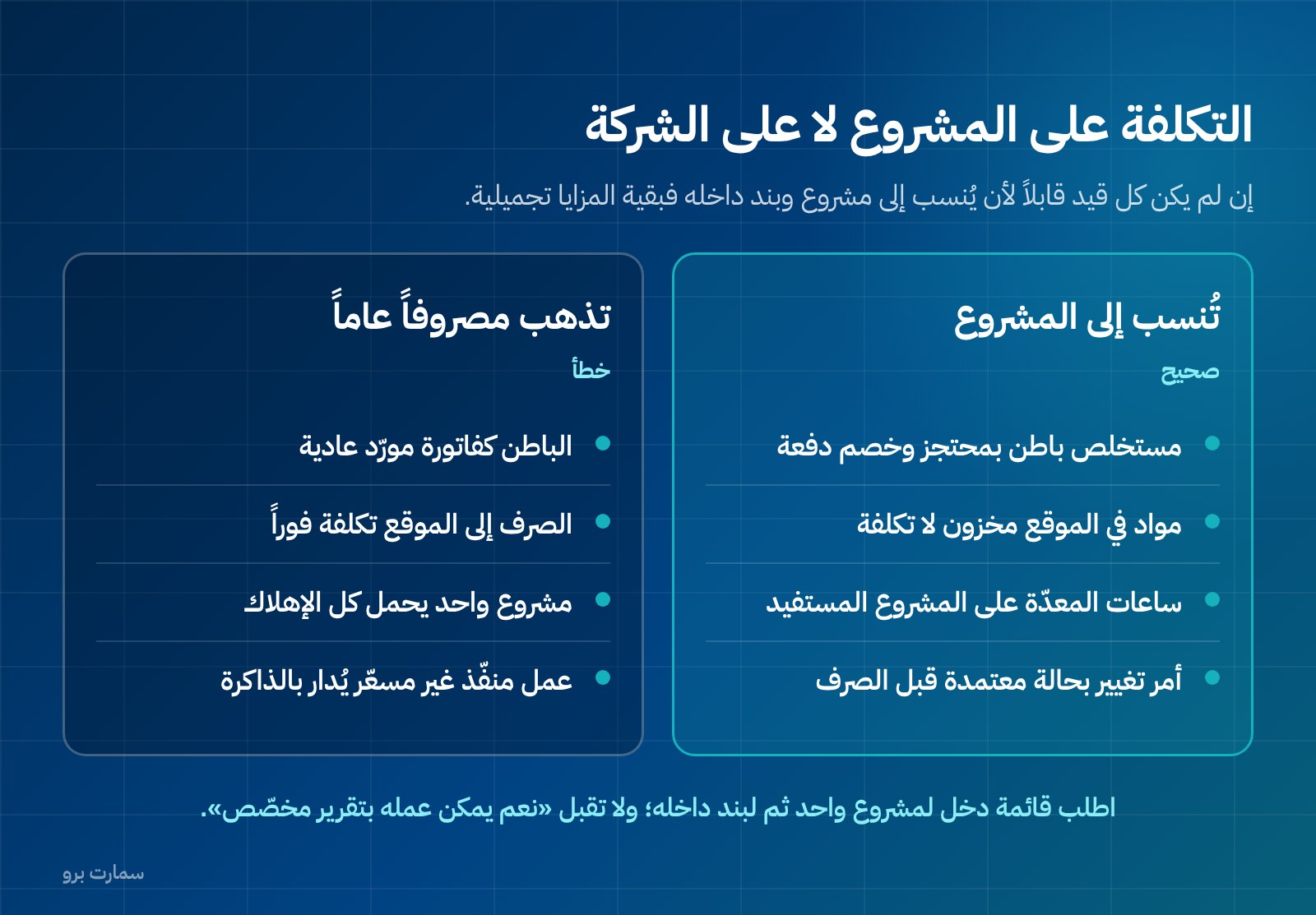
This is the backbone. If every entry in the system cannot be assigned to a project, and to a line item within that project, the rest of the features are cosmetic.
In practice, the supplier invoice, the purchase order, the subcontractor's progress claim, materials issued from the warehouse to site, equipment operating hours and allocated labour wages all carry the project number when they are entered, not in a month-end reallocation. A cost centre is simply a label that groups costs so you can report on them separately. Cost centres must work on at least two levels: the project, then the items within it (earthworks, concrete, electrical, finishes), so you know exactly where an overrun came from.
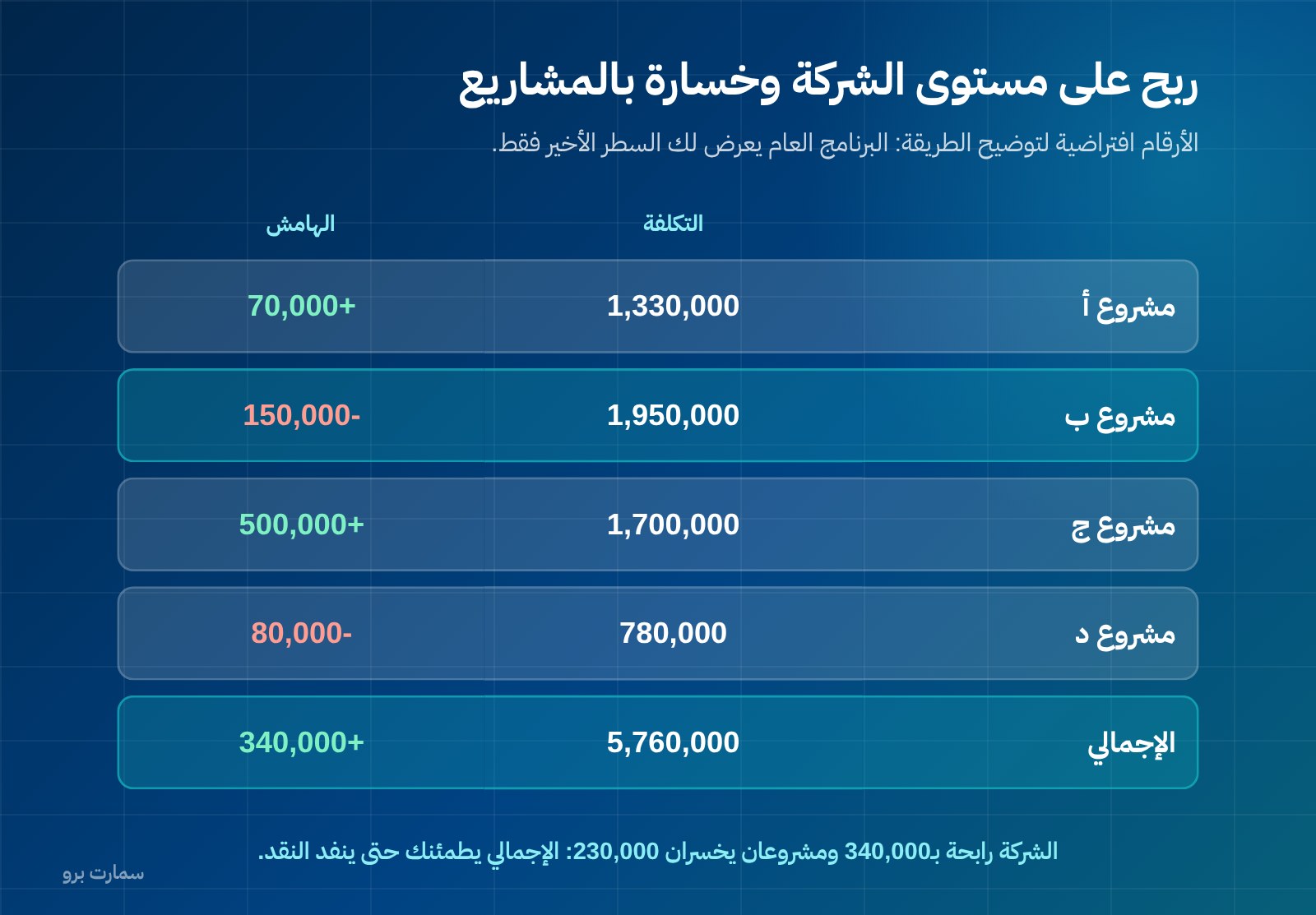
Look at this table. The following figures are hypothetical and illustrate the method only (SAR):
| Project | Contract value | Revenue recognised to date | Cost to date | Margin |
|---|---|---|---|---|
| Project A | 4,000,000 | 1,400,000 | 1,330,000 | +70,000 |
| Project B | 2,500,000 | 1,800,000 | 1,950,000 | -150,000 |
| Project C | 6,000,000 | 2,200,000 | 1,700,000 | +500,000 |
| Project D | 900,000 | 700,000 | 780,000 | -80,000 |
| Total | 13,400,000 | 6,100,000 | 5,760,000 | +340,000 |
At company level: a profit of SAR 340,000. At project level: two projects losing SAR 230,000 between them. General accounting software shows you only the last line. Without the first four lines, you will not know that Project B needs to stop bleeding now, or that your pricing for small projects like D does not cover their cost.
How should progress claims and percentage of completion work?
In contracting, revenue is recognised as the work progresses. Completed 35% of the contract? That is revenue you are entitled to, even if not a single riyal has reached the bank. A progress claim (mustakhlas) is the periodic statement of work completed that you submit to the client for approval and billing. This is where general systems struggle: most know "invoice for the full amount" or "invoice for a manual amount", but not "progress claim by percentage of completion against contract items".
What the system should do:
- Store the contract's bill of quantities with its items and rates, so the contract becomes a reference inside the system, not a file on someone's desktop.
- Issue a cumulative progress claim: percentage of completion per item, cumulative revenue, minus what was billed in previous claims, equals the amount due this period.
- Link the claim to the tax invoice and the journal entry automatically, without a second data entry.
- Track the claim through its statuses: submitted, partially approved, approved, invoiced, collected. Confusing these statuses causes most disputes between project teams and finance.
If the system does not calculate percentage of completion, the result is always the same: claims stay in Excel, and the accounting system becomes a place where results are copied. Every error in the external spreadsheet then flows into the books and into the VAT return.
How should the system handle retention?
Retention is a contractual arrangement: the client holds back part of each progress claim and releases it later according to the contract terms. The percentage, the period and the release conditions are set in the contract between you and the client, not in the software, and not by a general rule you hear in a sales pitch.
The common accounting mistake is to treat retention as a deduction from revenue, or to forget it altogether. It is neither. It is revenue you have recognised and an amount owed to you, but not collectable yet. Its proper place is a separate receivables account, under its own name, with debt ageing and an expected release date.
The following figures are hypothetical and illustrate the method only (using a contractually agreed retention of 10% as an example, SAR):
| Item | Amount |
|---|---|
| Cumulative approved progress claims | 1,400,000 |
| Cumulative retention (10% per contract) | 140,000 |
| Collectable from progress claims | 1,260,000 |
| Released to date | 0 |
| Retention balance in receivables | 140,000 |
A company with four similar projects might have half a million riyals held as retention, which is enough to explain why it looks profitable yet struggles to pay salaries. A good system gives you one report: outstanding retention per project, the release due date, and what is overdue.
Why are change orders the silent margin killer?
What eats contractors' margins most is not materials or labour, but work carried out before it was priced and approved. The owner asks for an addition on site, the engineer starts work to avoid a stoppage, and the price is negotiated two months later after the full cost has been spent.
What the system should provide:
- A change order register within the project, with clear statuses: requested, priced, approved, rejected, executed.
- A block on posting cost to an unapproved change item, or at minimum, that cost appearing in an "executed, unpriced work" report.
- An update to the contract value and bill of quantities on approval, so percentage of completion and progress claims move to the new value automatically.
- A variance report between the original and revised contract, so you know how much of your margin went to unpriced changes.
The question to ask in the demo: "Show me a report of the value of work executed but not approved on one project." If that report does not exist, you are managing change orders from memory.
What does a complete worked example on one project look like?
The following figures are hypothetical and illustrate the method only. They are not a reference for any market or sector (SAR):
| Item | Value | Calculation |
|---|---|---|
| Contract value (before VAT) | 4,000,000 | Approved bill of quantities |
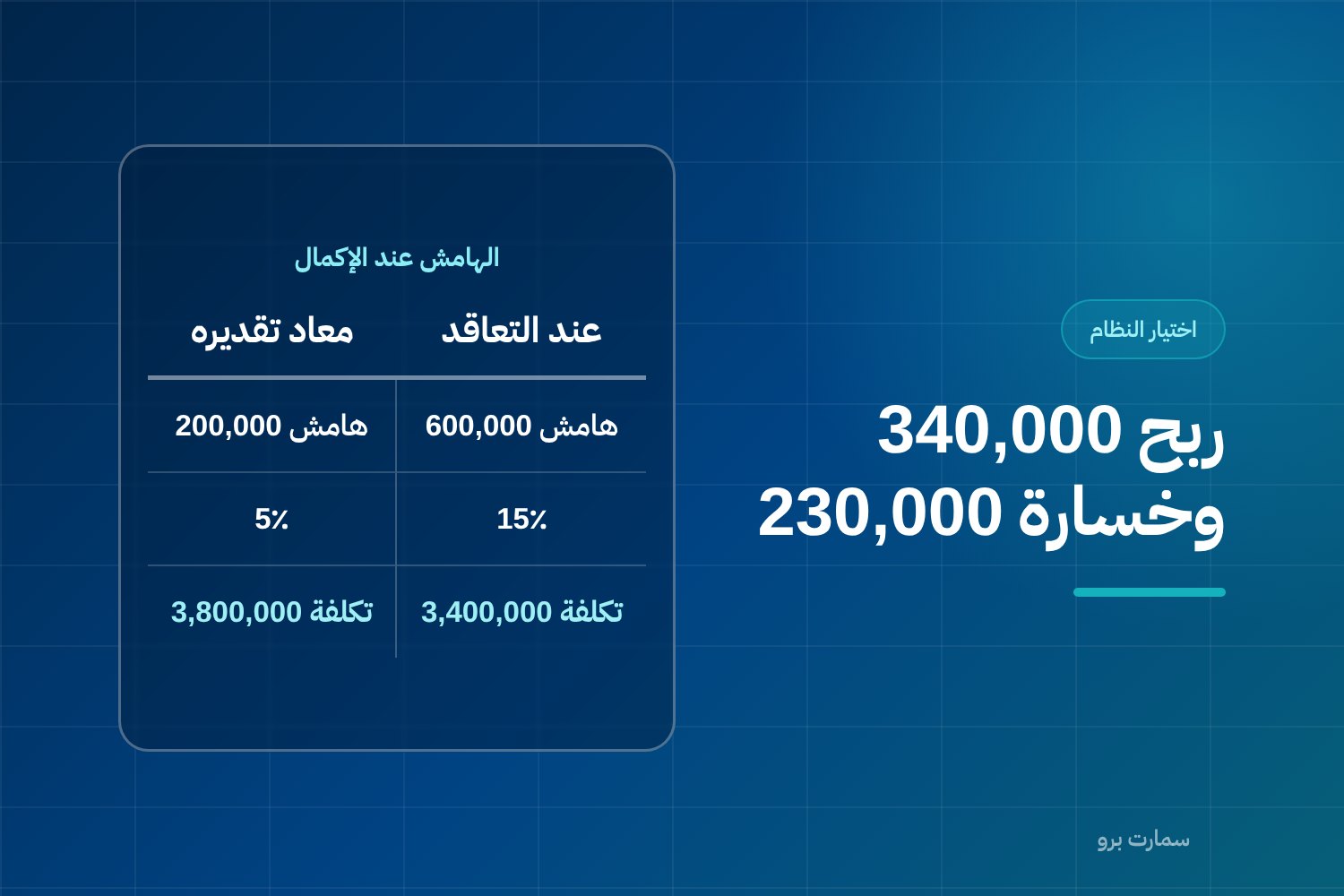
| Estimated cost at contract | 3,400,000 | Estimated margin 600,000 (15%) |
| Percentage of completion to date | 35% | Approved by the consultant |
| Revenue recognised | 1,400,000 | 4,000,000 × 35% |
| Previous progress claims | 900,000 | Claims 1 and 2 |
| Current period claim | 500,000 | 1,400,000 − 900,000 |
| Cumulative retention (10% per contract) | 140,000 | Receivable, not collectable yet |
| Actual cost to date | 1,330,000 | Materials + labour + subcontract + equipment |
| Planned cost for 35% | 1,190,000 | 3,400,000 × 35% |
| Overrun | 140,000 | 1,330,000 − 1,190,000 |
| Re-estimated total expected cost | 3,800,000 | After projecting the overrun rate |
| Expected margin at completion | 200,000 (5%) | Instead of 600,000 (15%) |
Read the last two lines. The project is still profitable on paper, but its margin has collapsed from 15% to 5% and you are only in the first half. That line is the whole difference between a system that protects your margin and one that records its funeral. It can only be produced if cost is assigned to the project, percentage of completion is held in the system, and planned cost is entered from the start.
Which criteria should you use to choose accounting software for contractors?
Use this table as one scoring sheet for each system you try. The last column is the question to put to the vendor, word for word.
| Criterion | Why it matters | Ask this question |
|---|---|---|
| Project costing and cost centres | Without it you cannot see which project is losing | Show me an income statement for one project, then for one item within it |
| Progress claims and percentage of completion | Revenue follows work, not cash | Issue a cumulative claim by percentage of completion against a bill of quantities |
| Retention | Revenue owed but not collectable yet | Show me the retention balance per project and the release date |
| Change orders | Unpriced work eats the margin | Show me the report of executed, unapproved work |
| Subcontractors | What you owe them is project cost, not overhead | Enter a subcontractor claim with retention and an advance-payment deduction |
| Inventory on site | Materials issued but not used are not cost yet | Move materials from the warehouse to a site and show me the site balance |
| Equipment and operating hours | Cost is charged by the hour to the project that benefits | Charge 20 equipment hours to a project and show me the effect |
| Cash flow by project | A profitable project can be cash-negative | Show me one project's receipts and payments over time |
Do not accept "yes, that can be done with a custom report". Ask to see it on screen with your own data.
What about subcontractors, site inventory and equipment?
Three areas that general systems neglect, and that cost more than you expect:
Subcontractors. A subcontractor's progress claim is not an ordinary supplier invoice. It has a percentage of completion, retention that you hold back from them, an advance-payment deduction and possible delay penalties. It must be posted as cost to the project and the item, not as a general expense.
Inventory on site. Steel issued from the warehouse to site but not yet installed is not completed cost; it is inventory that has changed location. If the system treats it as cost when issued, your cost to date will look higher than it really is, and you will make pricing decisions on a wrong number.
Equipment. An excavator does not belong to a single project. The correct cost is an hourly or per-shift rate charged to the project that uses it. Without this, one project carries all the depreciation and maintenance, and the other projects look more profitable than they are.
How does the tax invoice work in contracting?
A point that costs contractors dearly: VAT becomes due on the earliest of three dates: the date of supply, the date the invoice is issued, or the date the consideration is received in full or in part. In contracting, this means an advance payment you receive before doing any work creates a VAT liability when you receive it. Anyone who treats advance payments purely as cash deposits files late.
Your clients are usually VAT-registered businesses, which requires a standard tax invoice showing the buyer's name, address and VAT registration number. The system should hold these details in the customer file and print them on every invoice without manual entry.
Under Phase 2 of ZATCA e-invoicing (Fatoora), the invoice is generated in XML following the UBL 2.1 standard, with a cryptographic stamp, a counter that cannot be reset, and a hash chain linking each invoice to the one before it. Most important for contractors: an invoice cannot be edited after it is issued. Any correction to a progress claim or a change order is handled with a credit or debit note, not by editing the original invoice. Ask in the demo: "How do I reduce a progress claim that was invoiced by mistake?" The only correct answer is a credit note linked to the original invoice.
We explain what a standard tax invoice must contain, and how Phase 2 works, in our ZATCA e-invoicing guide.
Note: the Zakat, Tax and Customs Authority (ZATCA) does not approve or certify software; it publishes an indicative list of qualified solution providers. Any claim of "officially approved software" is a marketing description, not a regulatory approval.
What should you test before you buy?
Do not test the system on demo data. Pick one of your live projects and enter it in full during the trial:
- Enter the contract's bill of quantities with items and rates, plus the contract value and estimated cost.
- Enter one real week of costs: a supplier invoice, a materials issue, wages, equipment hours. Check that all of them appear against the project and the item.
- Issue a cumulative progress claim by percentage of completion, and check that previous claims are deducted automatically.
- Convert the claim into a standard tax invoice and check that the client's name, address and VAT number appear.
- Apply the contractual retention percentage, then request the retention report: it must appear as a receivable, not as a revenue deduction.
- Issue a credit note against the claim and watch its effect on revenue, VAT and receivables.
- Enter an unapproved change order, post cost to it, and request the unpriced work report.
- Enter a subcontractor claim with retention and an advance-payment deduction.
- Request a project income statement, then a planned-versus-actual cost report, then the expected margin at completion.
- Request a cash flow report for that project alone.
- Ask to export all your data. If you cannot take your data with you, you are locked in, not subscribed.
If step 9 fails, what you are looking at is not accounting software for contractors; it is general accounting software with a "project" field added.
How should you budget: one year or three?
Compare the full cost, not the licence price: the annual licence, setup and entry of existing contracts and bills of quantities, training for project engineers and not just accountants, and any integration fees. Also count the cost of staying as you are: hours spent on external spreadsheets, a forgotten retention, and a project whose loss was discovered three months late.
SmartPro publishes its prices, all including 15% VAT: the Mini package at SAR 1,500 a year, Pro at SAR 4,500, and Max at SAR 20,500, which adds the Projects and Manufacturing systems to the core for factories, contracting companies and project-based businesses. You can explore the contracting and projects management system and test it on one of your real projects before committing.
For a broader method of estimating the cost of an integrated system and its components, see ERP cost in Saudi Arabia.
Where is the official reference?
For e-invoicing requirements, tax invoice rules and the indicative list of qualified solution providers, the only authoritative source is the Zakat, Tax and Customs Authority: zatca.gov.sa. Any regulatory information you hear in a sales pitch, about retention, payment dates or software "approval", should be checked there before you base a decision on it.
Read also
- Accounting software vs ERP
- ERP cost in Saudi Arabia
- How to choose the best accounting software in Saudi Arabia
Key takeaway: Accounting software for contractors must treat the project as the unit of measurement, with progress claims, retention and change orders built in. Test it on one real project, and if it cannot show you that project's expected margin at completion, keep looking.
To see how this works on your own project, book a demo or start a free trial.
Article visuals
Frequently asked questions
What is the difference between accounting software for contractors and general accounting software?
General accounting software is built around a single profit centre, the company, so it only shows a consolidated income statement. Contracting software makes the project the unit of measurement: every cost and every revenue item is assigned to a project and to a line item within it, so you can see each project's margin separately. In practice, a company can look profitable overall while losing money on several projects, and only project costing reveals this.
How should the system handle retention?
Retention is a contractual arrangement between you and the client, and its percentage, period and release conditions are set in the contract, not in the software. In accounting terms it is revenue you have recognised and an amount owed to you, but not collectable yet, so it belongs in a separate receivables account under its own name, with debt ageing and an expected release date. The common mistake is treating it as a deduction from revenue or dropping it from the books entirely.
When is VAT due on an advance payment in a contracting project?
VAT becomes due on the earliest of three dates: the date of supply, the date the invoice is issued, or the date the consideration is received in full or in part. So receiving an advance payment before any work is done creates a VAT liability on receipt. Anyone who treats advance payments purely as cash deposits files late, so the system should link receipts to the VAT liability automatically.
How do I correct a progress claim that was invoiced for the wrong amount?
An invoice cannot be edited after it is issued; the correction is made with a credit or debit note linked to the original invoice. This matters in contracting because percentages of completion and change orders are often revised after invoicing. In the demo, ask the vendor to issue a credit note against a progress claim and watch its effect on the project's revenue, VAT and receivables.