
How to Choose Accounting Software for Factories in Saudi Arabia
A practical guide to choosing accounting software for factories: bills of materials and production orders, unit cost, scrap rates, work in progress, and a checklist to run before you buy.
Author:سامي الحيدري
Choosing accounting software for factories is different from choosing software for a trading business. A trader buys an item and sells the same item, so its cost sits on the purchase invoice. A factory buys raw materials and sells something no purchase invoice contains. The real cost is created during that conversion, or invented if the system cannot represent it.
This guide compares types of systems and how they work, not product names. Every figure in it is hypothetical and only illustrates the method. None of them are market prices or industry rates.
Why isn't trading software enough for a factory?
Trading accounting or inventory software is built on one equation: quantity in at a price, quantity out at a price, and the difference is margin. That works for a warehouse that sells what it bought.
A factory breaks this equation in four places:
- The item sold was never purchased. It is assembled from several purchased items.
- Part of the material becomes waste, not product. Waste is a real cost that the product has to carry.
- There is unfinished stock: materials that have left the store but have not yet become product.
- Cost does not stop at materials. Direct labour and overheads (indirect costs such as electricity, maintenance and supervision) must be spread across the units.
You can spot the symptoms before you buy:
- Unit cost lives in an outside spreadsheet that one person updates.
- Large, unexplained stock variances appear at the end of every period.
- Half-made stock shows up in no report.
- Selling prices rest on an old cost estimate.
If you are still deciding between standalone accounting software and an integrated system, we cover that separately in accounting software vs ERP.
What are a bill of materials and a production order?
A bill of materials (BOM) describes one unit of the product: what goes into it, in what quantity and in which unit of measure. A production order carries out that BOM for a batch of a set quantity. Together they are the backbone of factory accounting.
When a production order is closed, the system should:
- Issue materials from the store at the BOM quantities multiplied by the batch quantity.
- Charge direct labour and machine hours to the order.
- Charge the order its share of overheads at a known absorption rate. An absorption rate is the rule for spreading indirect costs over units or hours.
- Receive the finished product into the store at its calculated cost, not at a price the user types in.
The deciding test: in the demo, ask to receive a finished product into stock at a cost the user types by hand. If the system allows it without a production order, you are looking at trading software with a “manufacturing” field added.
The BOM also has to handle real conditions:
- Several versions of the same product.
- Substitute materials.
- Different units for buying and using, such as buying by the tonne and issuing by the kilo.
- Multi-level BOMs, where one component is a semi-finished product with its own BOM.
How is unit cost calculated? A worked example
Unit cost = direct materials + direct labour + share of overheads. The figures below are hypothetical and only illustrate the method.
Take a batch of 1,000 units:
| Cost item | Batch total | Per unit |
|---|---|---|
| Direct materials | 42,000 | 42.00 |
| Direct labour | 9,000 | 9.00 |
| Overheads (electricity, maintenance, supervision) | 15,000 | 15.00 |
| Total | 66,000 | 66.00 |
Most generic systems miss the next point. Direct materials and labour move with quantity, but much of the overhead is fixed.
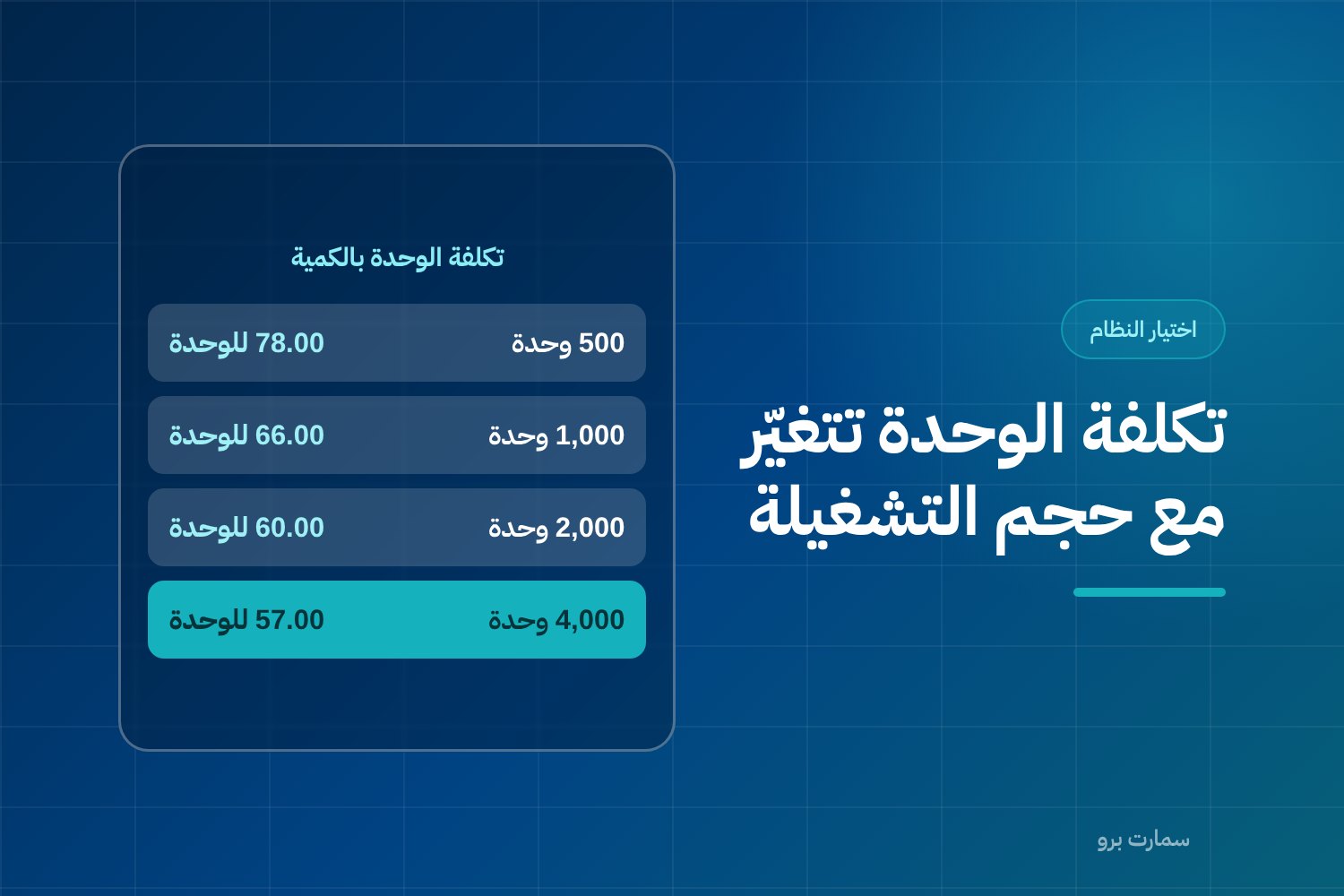
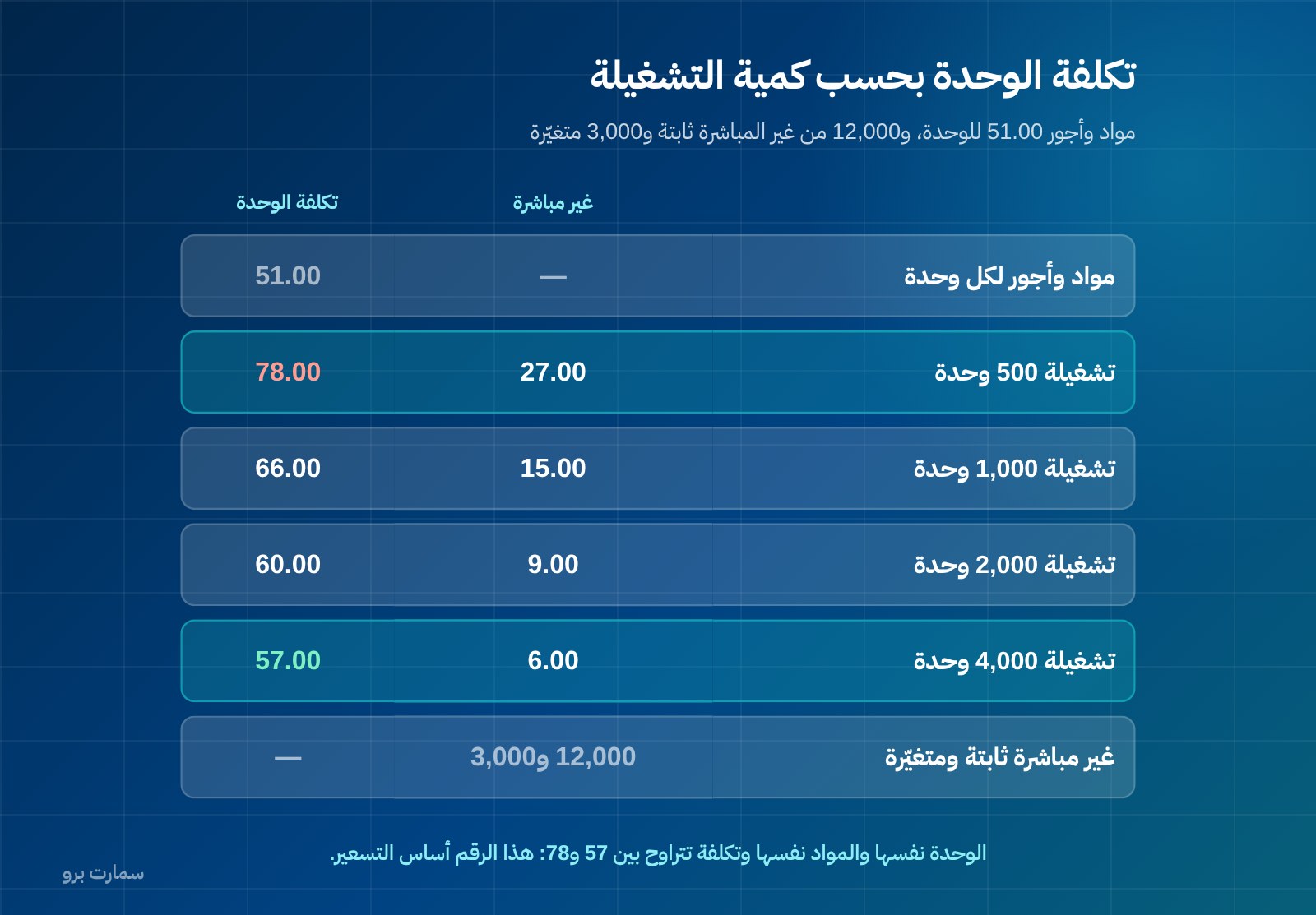
Here is the same batch at different quantities, assuming 12,000 of the overheads are fixed and 3,000 are variable:
| Batch quantity | Materials and labour per unit | Total overheads | Overheads per unit | Unit cost |
|---|---|---|---|---|
| 500 | 51.00 | 13,500 | 27.00 | 78.00 |
| 1,000 | 51.00 | 15,000 | 15.00 | 66.00 |
| 2,000 | 51.00 | 18,000 | 9.00 | 60.00 |
| 4,000 | 51.00 | 24,000 | 6.00 | 57.00 |
The unit and the materials stay the same, yet the cost ranges from 57 to 78. This is the number behind your pricing and your decision to accept a customer order. A system that keeps one fixed unit cost cannot tell you when a small order at a given price is a loss.
Where should scrap and waste be recorded?
Every manufacturing process produces waste: offcuts, evaporation, drying loss and units rejected at inspection. The practical question is not whether waste exists. It is where you record it.
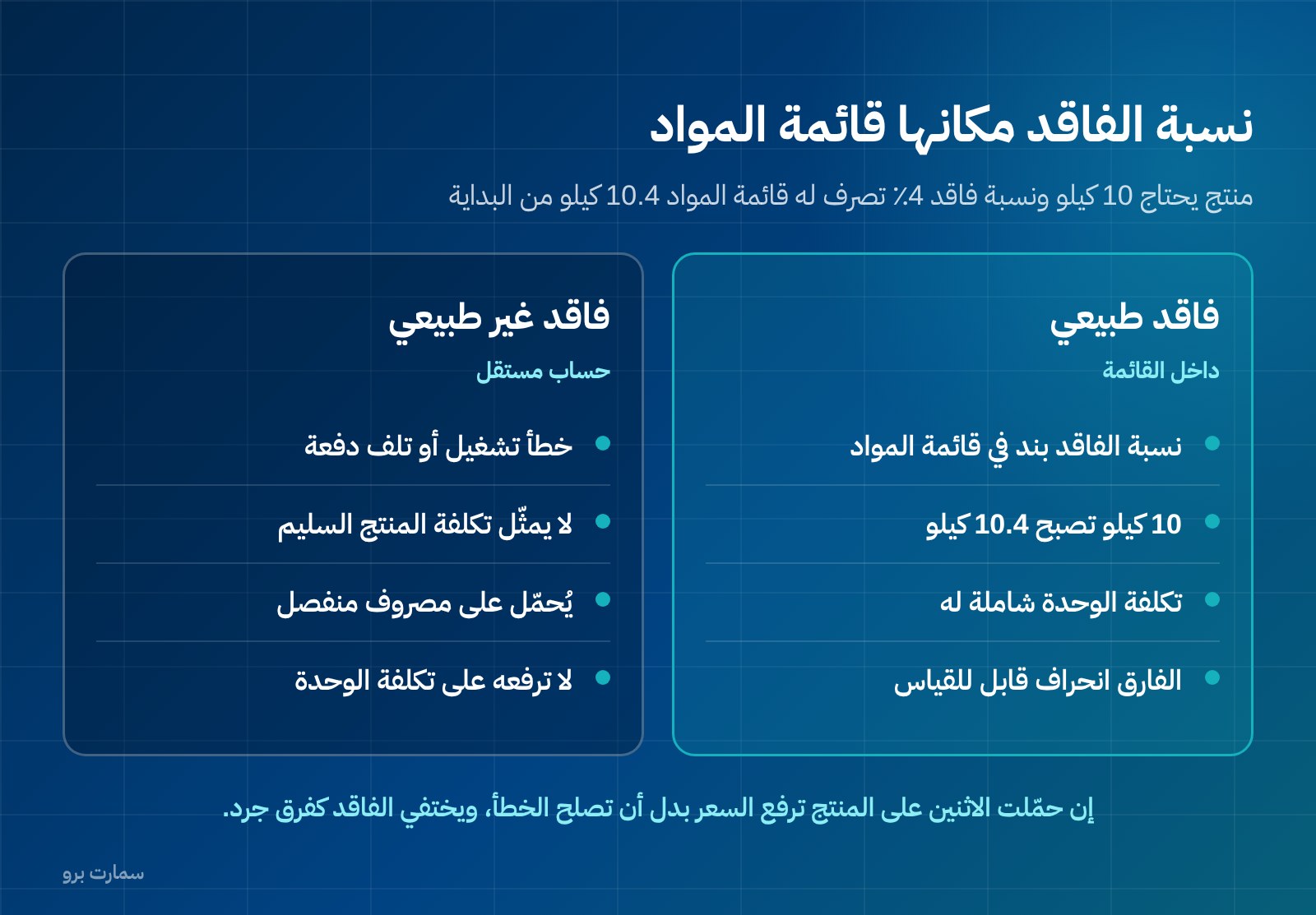
The common mistake: the BOM assumes ideal, theoretical consumption. Two months later the gap appears as a stock variance and is cleared with a “stock variances” entry that teaches nobody anything.
The right way: the scrap rate belongs inside the BOM. Suppose a product needs 10 kg of raw material and the usual scrap rate is 4%. The BOM then issues 10.4 kg. Unit cost includes expected scrap from the start, and any gap between expected and actual scrap becomes a measurable variance, not a surprise.
The system also has to separate two kinds of scrap:
- Normal scrap is expected, and the product carries it.
- Abnormal scrap, such as an operating error or a spoiled batch, goes to a separate expense account because it is not part of the cost of a good product.
If you load both onto the product, unit cost rises every time operations get worse. You end up raising the price instead of fixing the problem.
Controlling material movements needs a solid inventory foundation as well. See what that looks like in inventory management.
What are work centres and work in progress?
A factory does not turn materials into product in one step. It moves through stages such as mixing, forming, treatment, assembly and packing. Each stage runs in a work centre, which has its own capacity and an hourly cost.
This has an important accounting result. At any moment you hold stock with real value that is neither raw material nor finished goods: work in progress (WIP). That means materials issued and labour charged on a product that is not yet complete.
Most generic systems cannot hold this stock. They know only two states: materials in the store, or finished product in the store. Users are left with two wrong workarounds:
- They receive the product as finished before it is complete.
- They leave materials in stock that have already been issued.
Either way, the factory's balance sheet is wrong, and you cannot see where production is getting stuck.
What to ask the system for:
- Defined stages and work centres, with an hourly cost for each centre.
- Completed and rejected quantities recorded at the end of each stage, not only when the order closes.
- A report of WIP value by stage on any date.
- A clear accounting trail: issued materials move from the materials account to a WIP account, then to finished goods on completion.
Standard cost vs actual cost: why does the variance matter?
Standard cost is what a unit should cost according to the BOM and approved prices. Actual cost is what it really cost. The gap between them is the most important report in a factory. The total tells you little, but a detailed variance shows exactly where the problem is.
The figures below are hypothetical and only illustrate the method. The example is a batch of 1,000 units:
| Item | Standard | Actual | Variance | Likely explanation |
|---|---|---|---|---|
| Material quantity (kg) | 10,400 | 11,250 | -850 | Higher-than-usual scrap or a machine calibration fault |
| Material price per kg | 4.00 | 4.35 | -350 | Supplier price increase or an urgent purchase at a higher price |
| Direct labour hours | 180 | 215 | -35 | Stoppages or reworking rejected units |
| Good finished units | 1,000 | 940 | -60 | Higher rejection rate at inspection |
Keep quantity variance and price variance apart. The first belongs to production. The second belongs to purchasing.
A system that only reports “cost higher than expected” without separating the two causes leaves the problem without an owner. A system that automatically resets standard cost to equal actual cost wipes out the variance, and with it your ability to find the problem.
How should software handle joint products and by-products?
Some processes produce more than one output from a single input: a main product, a saleable by-product, and scrap that still has some sales value.
You need only two things from the system:
- It should spread the batch cost across more than one output using a known basis, such as relative sales value or quantity.
- It should let you receive scrap into stock at a verifiable value that reduces the cost of the main product.
If the system allows only one output per production order, every other output is treated as waste. The main product then looks more expensive than it really is.
Criteria for choosing accounting software for factories
| Criterion | Minimum acceptable | Warning sign |
|---|---|---|
| Bill of materials | Multiple versions, substitutes, multi-level BOMs, dual units of measure | One fixed BOM with no versions |
| Production order | Automatic material issue, finished goods received at calculated cost | Product cost can be entered by hand |
| Scrap | Scrap rate in the BOM, normal separated from abnormal | Appears only as a stock variance |
| Stages | Work centres with hourly cost and completed quantities per stage | A single stage only |
| Work in progress | Account, stock and value report on any date | Not available |
| Costing | Standard and actual cost with a detailed variance report | One average cost |
| Multiple outputs | Cost split across joint products and by-products | One output per order |
| Invoicing | Standard tax invoice, credit and debit notes | Invoices edited after issue |
| Data | Full export of your data | No export |
How does e-invoicing work in a factory?
Factory customers are usually VAT-registered businesses. That requires a standard tax invoice showing the buyer's name, address and VAT registration number. The system should keep these details on the customer record and print them on every invoice without manual entry.
Under Phase 2 of ZATCA e-invoicing (Fatoora), the invoice is generated in XML following the UBL 2.1 standard. It carries:
- A cryptographic stamp.
- A counter that is never reset.
- A hash chain that links each invoice to the one before it.
The most important rule for factories is this: an invoice cannot be edited once issued. This comes up often, because the delivered quantity may differ from the invoiced quantity after weighing or inspection. The correction is a credit or debit note linked to the original invoice.
Ask in the demo: “How do I correct an invoice that shipped with less than the invoiced quantity?” The only correct answer is a credit note.
Note that the Zakat, Tax and Customs Authority (ZATCA) does not approve or certify software. It publishes an indicative list of qualified solution providers. Any claim of “officially approved software” is a marketing description, not regulatory approval. We explain this in more detail in our ZATCA e-invoicing guide.
What should you test in the demo? A checklist using one of your own products
Do not test the system on demo data. Pick one of your actual products and carry out these steps yourself:
- Enter its full bill of materials, with real quantities and units of measure.
- Add the usual scrap rate for each material inside the BOM.
- Define its stages and work centres, with an hourly cost for each centre.
- Set the overhead absorption rate.
- Open a production order for 1,000 units and issue the materials.
- Close the first stage with a completed quantity lower than the input, and ask for the work-in-progress report.
- Charge labour and machine hours, then close the order with fewer finished units than planned.
- Ask for the unit cost broken down into materials, labour and overheads.
- Repeat the batch at 4,000 units and compare unit cost. It should fall.
- Ask for the standard vs actual cost report, with quantity and price variances shown separately.
- Issue a standard tax invoice for the product, then a credit note against it.
- Ask for a full export of your data. If you cannot take your data with you, you are locked in, not subscribed.
If steps 6, 8 or 10 fail, what you are looking at is not a factory system.
What should your budget include besides the licence?
Count the full cost, not just the licence price:
- The annual licence.
- Setting up your existing bills of materials, which is the largest effort item in a factory.
- Training production supervisors, not only accountants.
- Any connection to weighing scales or barcode readers.
Set against that the cost of staying as you are. That means a product sold below cost for months, unexplained stock variances, and pricing decisions built on an old number.
SmartPro publishes fixed prices, all including VAT:
- Mini: SAR 1,500 a year.
- Pro: SAR 4,500 a year.
- Max: SAR 20,500 a year, for factories, contracting companies and project-based businesses.
You can explore SmartPro's manufacturing and production management and test it on one of your real products before you commit to anything.
For a broader method of estimating the cost of an integrated system, and what goes into it, see ERP cost in Saudi Arabia.
Where can you check the official rules?
ZATCA is the only authoritative source for e-invoicing requirements, the rules on standard tax invoices, and the indicative list of qualified solution providers: zatca.gov.sa. Check any regulatory claim you hear in a sales pitch there before you act on it, whether it is about invoice format or software “approval”.
Further reading
- Accounting software vs ERP
- Inventory management
- Best accounting software in Saudi Arabia: selection criteria
Key takeaway: Factory accounting software must calculate cost from the bill of materials, track work in progress and report variances. Test it on one of your own products before you buy.
To see it with your own data, start a free trial or book a demo with a SmartPro product expert.
Article visuals
Frequently asked questions
What is the difference between accounting software for factories and trading accounting software?
Trading software assumes the item you sell is the same item you bought, so its cost comes from the purchase invoice. A factory sells a product that appears on no purchase invoice. Its cost is calculated from the bill of materials, direct labour and a share of overheads. That is why a factory needs production orders, stages and work-in-progress stock, which trading systems do not keep.
Why should the scrap rate be included in the bill of materials?
If the bill of materials assumes ideal consumption, scrap surfaces later as a stock variance cleared by an entry that explains nothing, and unit cost is understated for the whole period. Putting the usual scrap rate in the BOM builds it into cost from the start. Any gap between expected and actual scrap then becomes a measurable variance. Normal scrap, which the product carries, should still be kept separate from abnormal scrap, which goes to a separate expense account.
What is work in progress, and why do many systems fail to handle it?
Work in progress is real stock: materials have been issued and labour charged, but it is not yet a finished product. Generic systems know only two states, materials in the store or finished goods. Users are forced either to receive the product before it is complete or to leave issued materials in stock. Either way, the balance sheet is wrong and you cannot see where production is getting stuck.
How do I correct a factory invoice when the shipped quantity differs from the invoiced quantity?
Under ZATCA Phase 2 e-invoicing, an invoice cannot be edited after it is issued. The correction is made with a credit or debit note linked to the original invoice. This happens often in factories, because the delivered quantity can change after weighing or inspection. In the demo, ask to issue a credit note against a sales invoice and check its effect on stock, revenue and receivables.