
Restaurant Accounting Software: The Recipe Is the Foundation of Cost
What a restaurant actually needs: a recipe for every menu item that deducts stock, waste control, correct handling of delivery-app commissions and compliant simplified invoicing. A practical guide to choosing before you buy.
Author:سامي الحيدري
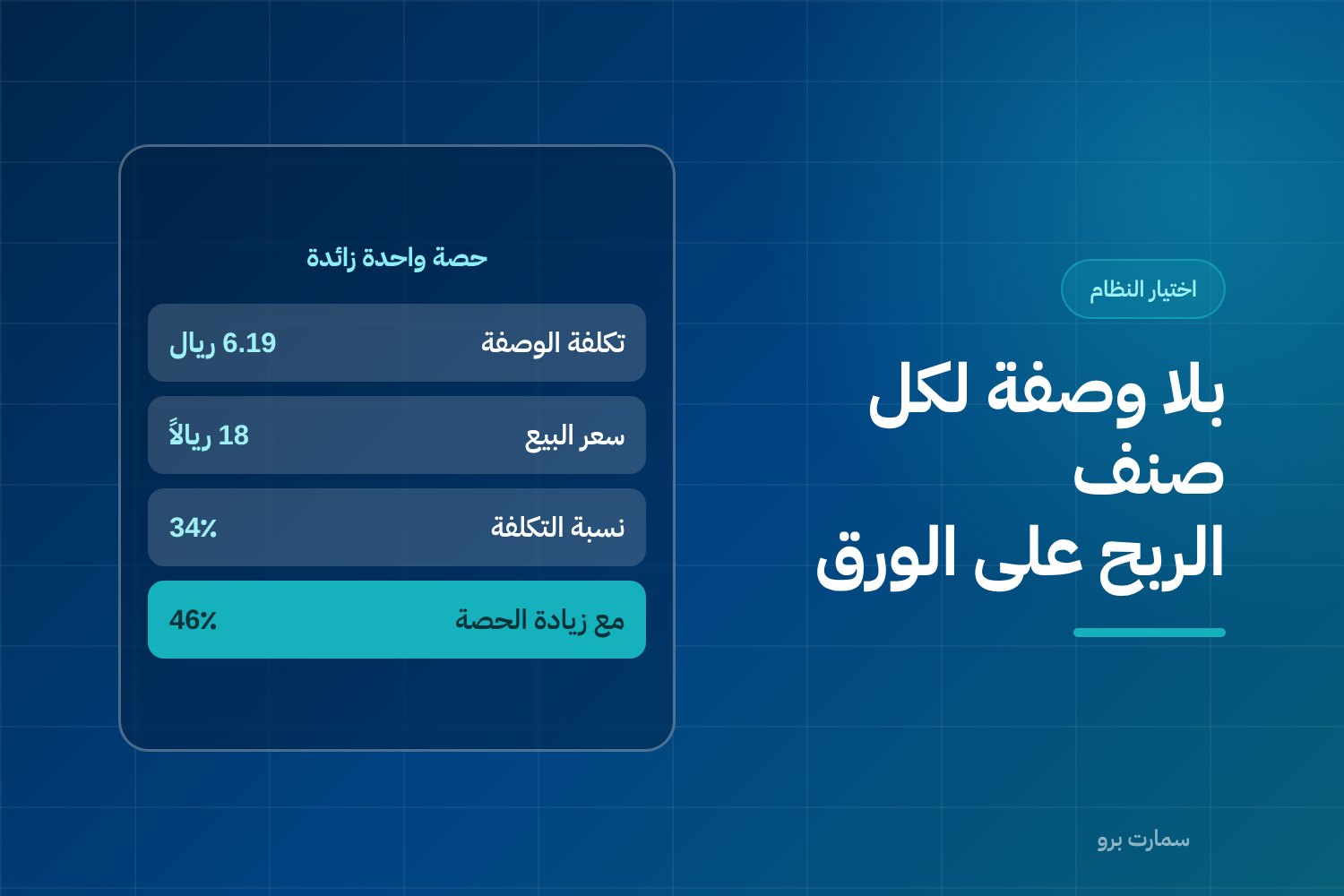
Good restaurant accounting software links every menu item to a recipe that deducts its ingredients from stock the moment it is sold. A recipe is a defined list of ingredients and quantities for one dish. Without recipes, you cannot know the true cost of a dish, see waste or measure over-portioning, so profit on paper rarely matches cash.
A restaurant is not a shop that sells what it buys as it is. You buy a kilo of meat, a carton of bread and a gallon of oil, then you sell a sandwich. Between buying and selling there is a kitchen, and in the kitchen ingredients turn into menu items in set quantities.
Any software that does not understand this transformation will show you profit on paper and losses in the cash drawer. A generic program records your sales and purchases perfectly correctly, but it does not know that selling one sandwich should deduct one bun, 120 grams of meat and a spoonful of sauce from stock. That specific knowledge is the difference between running a restaurant and guessing its results.
This guide explains the capabilities to look for and gives you a way to test them on your own menu before you pay a single riyal.
Why isn't generic accounting software enough for a restaurant?
Generic accounting software is built on one idea: an item is bought, stored and sold. That idea works in a spare-parts shop or a pharmacy. In a restaurant it breaks down for three reasons:
- What you sell is not what you buy. Your menu has 120 items and your stock has 80 raw materials. There is no one-to-one relationship between them.
- Stock moves without an invoice. Waste, spoilage, staff meals and complimentary meals are all real movements out of the store with no sales document behind them.
- Your cost percentage changes daily. Today's price for a kilo of tomatoes is not last week's, and the cost of the same dish changes with it. Without a system that recalculates cost automatically, your pricing rests on an old number.
The practical result: you close the month with an accounting profit, then the stocktake tells you stock is far lower than it should be, and nobody knows where the difference went. It went to waste and over-portioning, two items that only show up if you have a recipe for every menu item.
What is a recipe, and why is it the backbone of restaurant accounting software?
A menu-item recipe (or bill of ingredients) is a written definition inside the system that says: this dish is made of these ingredients in these quantities. Example: “Shawarma sandwich” = 1 bun + 120 g meat + 20 g sauce + 15 g pickles + packaging.
When the cashier sells this item, the system does two things at the same moment:
- It records revenue at the selling price.
- It deducts every ingredient from stock in the quantity set in the recipe.
Everything else you need follows from these two actions:
- Actual cost per dish, calculated from ingredient purchase prices, not from an estimate.
- Food cost percentage for each item separately, meaning ingredient cost as a share of selling price, so you know which dishes carry the rest of your menu and which ones drain it.
- Expected stock that can be compared with the physical count. The difference between them is waste and over-portioning, and it becomes a number you see instead of something you sense.
- Calculated purchasing needs based on expected sales, not on what the storekeeper remembers.
Without recipes, the software tells you total purchases and total sales only. With recipes, it tells you which specific item is causing the problem. That is the dividing line between a restaurant system and a generic accounting system with a cashier screen bolted on. The difference between the two is covered in more detail in the difference between a restaurant POS and an ERP.
Worked example: how do you build a dish's cost from its ingredients?
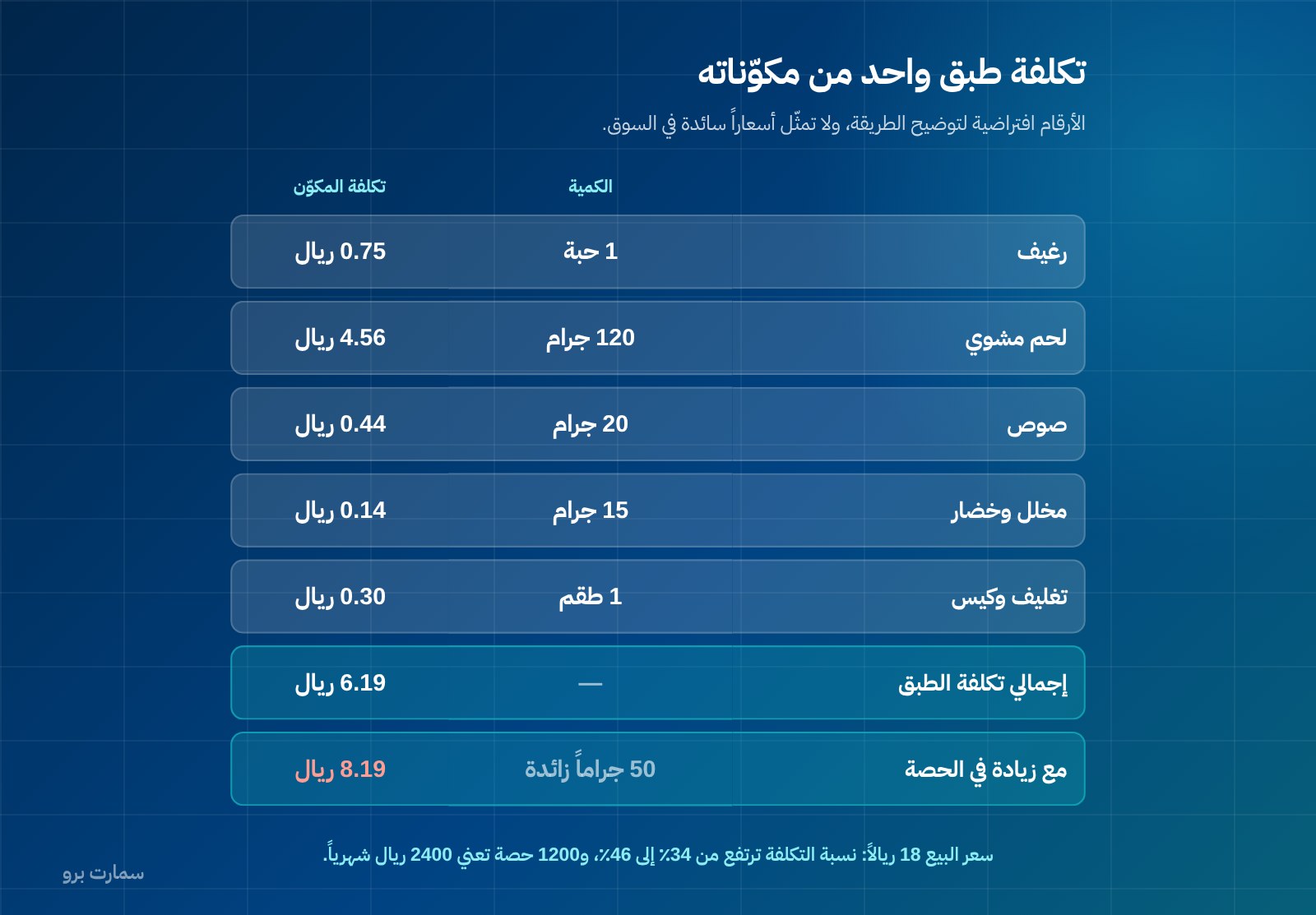
The figures below are hypothetical, to illustrate the method, and do not represent prevailing market prices.
| Ingredient | Quantity in recipe | Purchase unit price | Ingredient cost |
|---|---|---|---|
| Bun | 1 piece | 75 halalas per piece | SAR 0.75 |
| Grilled meat | 120 g | SAR 38 / kg | SAR 4.56 |
| Sauce | 20 g | SAR 22 / kg | SAR 0.44 |
| Pickles and vegetables | 15 g | SAR 9 / kg | SAR 0.14 |
| Packaging and bag | 1 set | SAR 0.30 | SAR 0.30 |
| Total | SAR 6.19 |
If the selling price is SAR 18, ingredient cost is roughly 34% of the selling price (6.19 ÷ 18). The rest covers rent, salaries and electricity, and whatever remains is profit.
Now the important part. Suppose the chef adds an extra 50 grams of meat and a bit more sauce, so the actual cost becomes SAR 8.19 instead of SAR 6.19: two extra riyals nobody notices on the plate. What does that mean?
- The food cost percentage rises from 34% to about 46%.
- Across 1,200 portions a month: 1,200 × 2 = SAR 2,400 a month, or SAR 28,800 a year from a single menu item.
No invoice in the system carries the name of this loss. It does not appear in purchases, because you bought a normal quantity, and it does not appear in sales, because you sold at the listed price. It only appears when you compare expected stock from recipes with actual stock from the count. That is exactly what generic software cannot do.
How should a restaurant record waste and spoilage?
Stock leaves a restaurant every day without a sale: vegetables that spoiled, a dish that was remade, a staff meal, a quantity past its expiry date, an item cancelled after it was prepared. If the system has no screen to record these movements with their reasons, all of it ends up in an unexplained “stocktake variance”.
What you need in practice:
- Waste entry by quantity and reason, at raw-material or finished-item level.
- Clear categories that separate spoilage, internal consumption, hospitality and post-preparation cancellations, because each one is treated differently in the accounts and calls for a different management decision.
- A report comparing waste with sales for each branch and each shift, because repeated waste in one shift is not an ingredients problem but an operations problem.
How do you account for delivery-app commissions correctly?
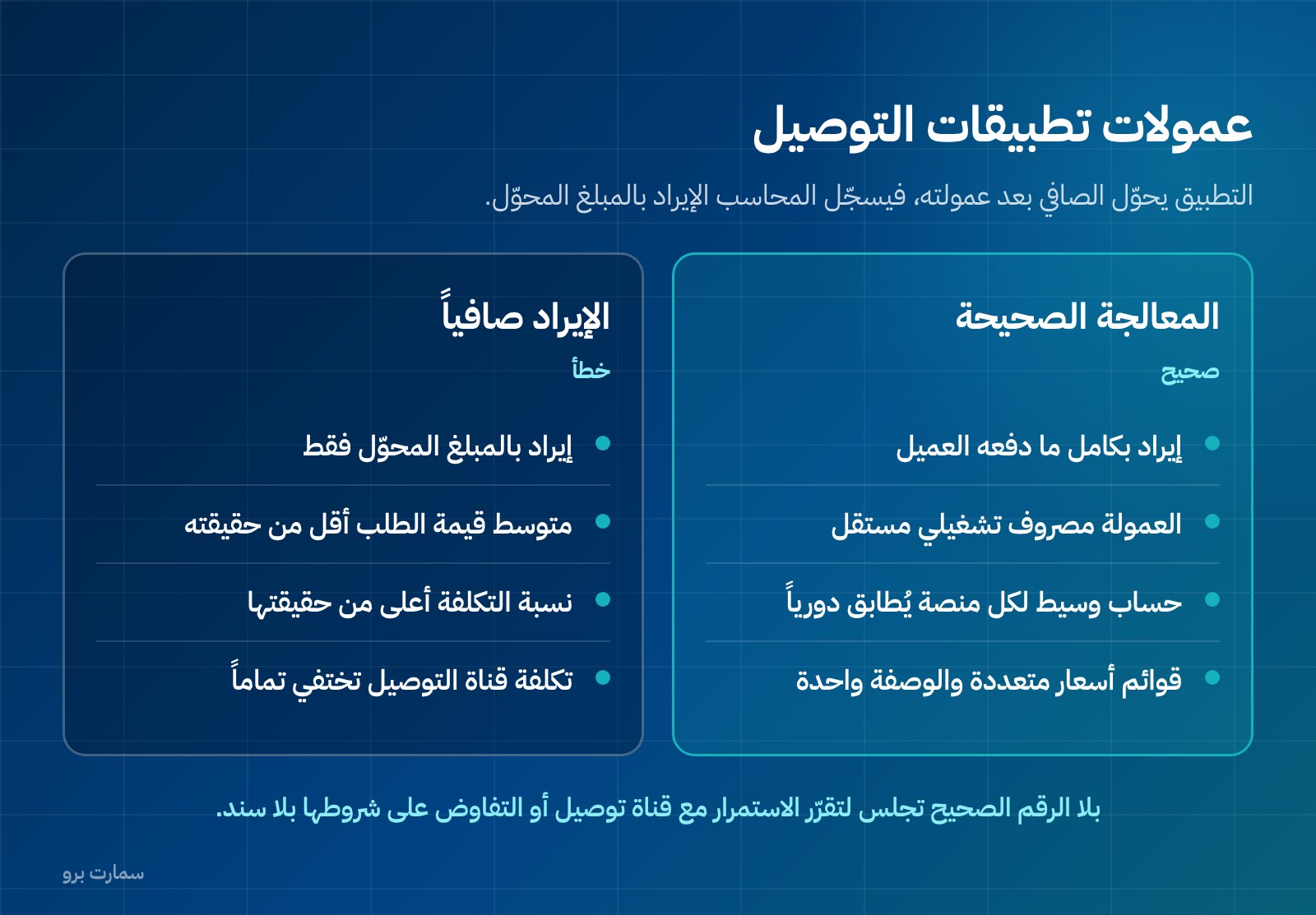
This is the mistake we see most often in restaurant books. The app transfers the net amount after deducting its commission, so the accountant records revenue at the transferred amount. The correct treatment is different:
- Revenue is recorded at the full amount the customer paid for the order, because that is the actual selling price.
- The commission is a separate operating expense, not a reduction of revenue. The app provided you with a service and issued you a document for it.
- The difference between the gross amount and the transferred amount is settled through a clearing account for each platform, which is reconciled regularly against the payout statement.
Why does this matter? Because recording revenue net spoils all your indicators at once: average order value looks lower than it is, the food cost percentage looks higher than it is (the numerator is right but the denominator is short), and the cost of delivery channels disappears from the expense list entirely. The result is that when you sit down to decide whether to stay with a delivery channel or renegotiate its terms, you do not have the number the decision should rest on.
On top of that, menu prices on the apps often differ from dine-in prices. So the system must support multiple price lists for the same item by channel, while the recipe stays the same. The cost does not change with the channel; the margin does.
Why do purchase units and consumption units matter?
You buy oil by the gallon and use it by the millilitre. You buy bread by the carton and issue it by the piece. You buy cheese by the kilo and put it in the recipe in grams. If the system has no unit conversion table for each ingredient, you face two bad options: manual conversion on every purchase invoice, or recipes written in purchase units, which makes the numbers meaningless.
What should be in place:
- A purchase unit, a stock unit and a consumption unit for each ingredient, with a defined conversion factor.
- Automatic update of unit cost with every purchase invoice, using a consistent valuation method stated inside the system.
- Automatic recalculation of recipe costs when ingredient prices change, not manual entry.
What changes with multiple branches, a central kitchen and combo meals?
If you have more than one branch, extra needs appear: inter-branch stock transfers as documents with balances and tracking, separate stock for each branch with consolidated reports, and a comparison of cost percentages between branches for the same item. The difference between them is a direct operational indicator.
A central kitchen adds another layer: a semi-finished item produced centrally (dough, sauce, marinated meat) and then distributed to branches. This means a recipe inside a recipe: a recipe for the sauce from its ingredients, then the sauce used as an ingredient in the dish recipe. A system that supports only one level of recipes will not serve you.
Combo items and meals need the same logic: a “meal” that includes a sandwich, a drink and a side at a lower price than the sum of its parts. The system must deduct the ingredients of each component in the meal and allocate the revenue in a way that keeps item profitability analysis meaningful. The same goes for add-ons and modifications: “no onion”, “extra cheese”. Each one is a change to the recipe, not just to the price.
How should the system handle shifts and cash differences?
A restaurant runs on shifts and a lot of cash. What you need from the system here is simple and decisive: opening and closing a shift under a named user, a cash count at closing against what the system recorded, the difference logged with its amount and reason, and clear permissions for who may void, discount and reprint, with a log that cannot be erased. Without that log, every discussion about a cash difference becomes a discussion about memories. We covered the operational details of the cashier screen itself in choosing a POS cashier system in Saudi Arabia.
Which selection criteria should you check?
Use this table as a direct list of questions for the vendor, and ask to see every item on screen, not in a slide deck.
| Criterion | What you should actually see | If it's missing |
|---|---|---|
| Recipes and stock deduction | A recipe for every item, automatic ingredient deduction on sale, and recipe-within-recipe | Dish cost is a guess and losses are invisible |
| Waste and spoilage | An entry screen by quantity and reason, and a waste report per branch and shift | All losses go to an unexplained “stocktake variance” |
| App orders and commissions | Gross revenue, commission as an expense, a clearing account per platform, and payout reconciliation | Understated revenue, misleading cost percentages, and channels with no known cost |
| Branches and central kitchen | Stock transfers with documents, stock per branch, and semi-finished production | Pooled stock nobody is accountable for |
| Shifts and cash differences | Open and close by user, cash count, log of voids and discounts | Cash differences with no source and no one responsible |
| Combo items and meals | Ingredient deduction for each component, meal revenue allocation, and add-ons that modify the recipe | Item profitability can't be read |
| Units of measure | Purchase unit, consumption unit and conversion factor for each ingredient | Manual conversion on every invoice and accumulating errors |
| Simplified invoicing with QR code | A simplified invoice with a QR code, and integration with the platform | Operational stoppage and a violation |
What does e-invoicing actually require in a restaurant?
A restaurant's customer is usually an end consumer, so the simplified tax invoice is the default in your daily work. That simplifies things considerably: simplified invoices are reported within 24 hours of issue and do not need clearance before they are handed to the customer, so the cashier never stops to wait for a response.
What ZATCA Phase 2 e-invoicing requires from the technical solution: invoices issued as XML following the UBL 2.1 standard, a cryptographic stamp, a sequential counter that never resets, a hash chain that links each invoice to the one before it, and a QR code on simplified invoices.
Two important operational points:
- No editing after issue. An issued invoice cannot be edited or deleted. Corrections are made with a separate credit note. This means cashier voids and corrections need a clear procedure and a defined permission.
- ZATCA does not approve software. There is no “approved software” in the sense it is sometimes marketed; what the authority publishes is an indicative list of qualified solution providers. The right question for a vendor is not “Are you approved?” but “Show me a simplified invoice issued from your system and successfully reported.”
The two invoice types, and when you need each one, are explained in our ZATCA e-invoicing guide.
What should you test during a demo?
Do not watch a ready-made demo with the vendor's items. Ask them to enter your items, and run these steps in order:
- Enter three items from your menu: one simple, one combo (a meal), and one that uses a semi-finished ingredient.
- Enter each item's recipe with real quantities, in consumption units, not purchase units.
- Enter a purchase invoice for one ingredient at a different price, and check that the recipe cost changed automatically.
- Sell an item from the cashier screen, then open the stock movement and confirm that every ingredient dropped by the correct quantity.
- Record waste with a quantity and a reason, then ask for the waste report.
- Enter an order from a delivery channel, and check that revenue was recorded gross and the commission appeared as an expense in a separate account.
- Close a shift with a cash count that differs from the system, and confirm the difference was recorded under the user's name.
- Issue a simplified invoice with a QR code, and ask for proof that it was reported.
- Ask for the food cost percentage per item report, sorted from highest to lowest.
- Ask: who enters the recipes at go-live, how long does it take, and who updates them when the menu changes?
The tenth point matters most in practice. The best system with recipes that were never entered is worth the same as the worst one. Ask about implementation and training in the same detail you ask about features.
What does it cost, and who needs what?
A single-branch restaurant with a limited menu needs recipes, waste tracking, simplified invoicing and shifts. With a second branch, stock transfers and cross-branch comparison reports become a necessity, not a luxury. With a central kitchen, semi-finished production and internal transfer pricing become the heart of the system.
SmartPro packages: Mini at SAR 1,500 a year including VAT, Pro at SAR 4,500 with three users included, and Max at SAR 20,500. Every package includes the main branch only; each additional branch costs SAR 1,000 a year. Choose based on your number of branches and the complexity of your menu, not the number of features in the table. For a broader comparison of accounting systems in the Saudi market, see how to choose accounting software in Saudi Arabia, and you can review SmartPro's solution for restaurants and cafés to see what it covers in practice.
Where is the official reference?
Details of e-invoicing, its technical requirements and the list of qualified solution providers are published on the authority's official website: Zakat, Tax and Customs Authority (ZATCA). Treat it as your primary source, and ask any vendor to show you their compliance in practice, on screen.
Read also
- The difference between a restaurant POS and an ERP
- Choosing a POS cashier system in Saudi Arabia
- ZATCA e-invoicing guide
Key takeaway: In a restaurant, cost starts with the recipe: choose software that deducts ingredients on every sale, records waste with reasons and books delivery commissions as expenses, and test all of it on your own menu before you buy.
To see it with your own menu items, start a free trial or book a demo with a SmartPro product expert.
Article visuals
Frequently asked questions
What is the difference between generic accounting software and restaurant accounting software?
Generic software handles an item that is bought and sold as it is, which does not describe a restaurant. In a restaurant you buy raw ingredients and sell dishes, so you need a recipe for every menu item that deducts its ingredients from stock when it is sold. Without recipes you will not know the cost of a dish, waste and over-portioning will stay hidden, and you will only discover the gap at the stocktake with no known cause.
How do I account for delivery-app commissions?
Record revenue at the full amount the customer paid, and record the app's commission as a separate operating expense. Use a clearing account for each platform and reconcile it regularly against the payout statements that reach your bank account. Recording revenue net of commission understates your reported revenue, inflates your food cost percentage on paper and hides the cost of the delivery channel completely.
Do I need a standard tax invoice in a restaurant?
A restaurant's customer is usually an end consumer, so the simplified tax invoice is the default in daily work. Simplified invoices are reported to ZATCA within 24 hours of issue, do not need clearance before being handed over, and carry a QR code. You still need standard tax invoices when selling to a VAT-registered business, so make sure the system issues both types.
How do I test restaurant accounting software before buying?
Do not watch a demo built on the vendor's items; ask them to enter three items from your own menu with their real recipes. Then sell an item from the cashier screen and open the stock movement to confirm every ingredient dropped by the correct quantity, and change one ingredient's price to check that the recipe cost updated automatically. Also test recording waste, closing a shift with a cash difference, and issuing and reporting a simplified invoice.