
How to Choose an Accounting System for Small Businesses in Saudi Arabia
A frank guide to choosing an accounting system for a small business: the non-negotiable minimum, what you don't need to buy yet, the three numbers that matter, and a checklist for the demo.
Author:سامي الحيدري
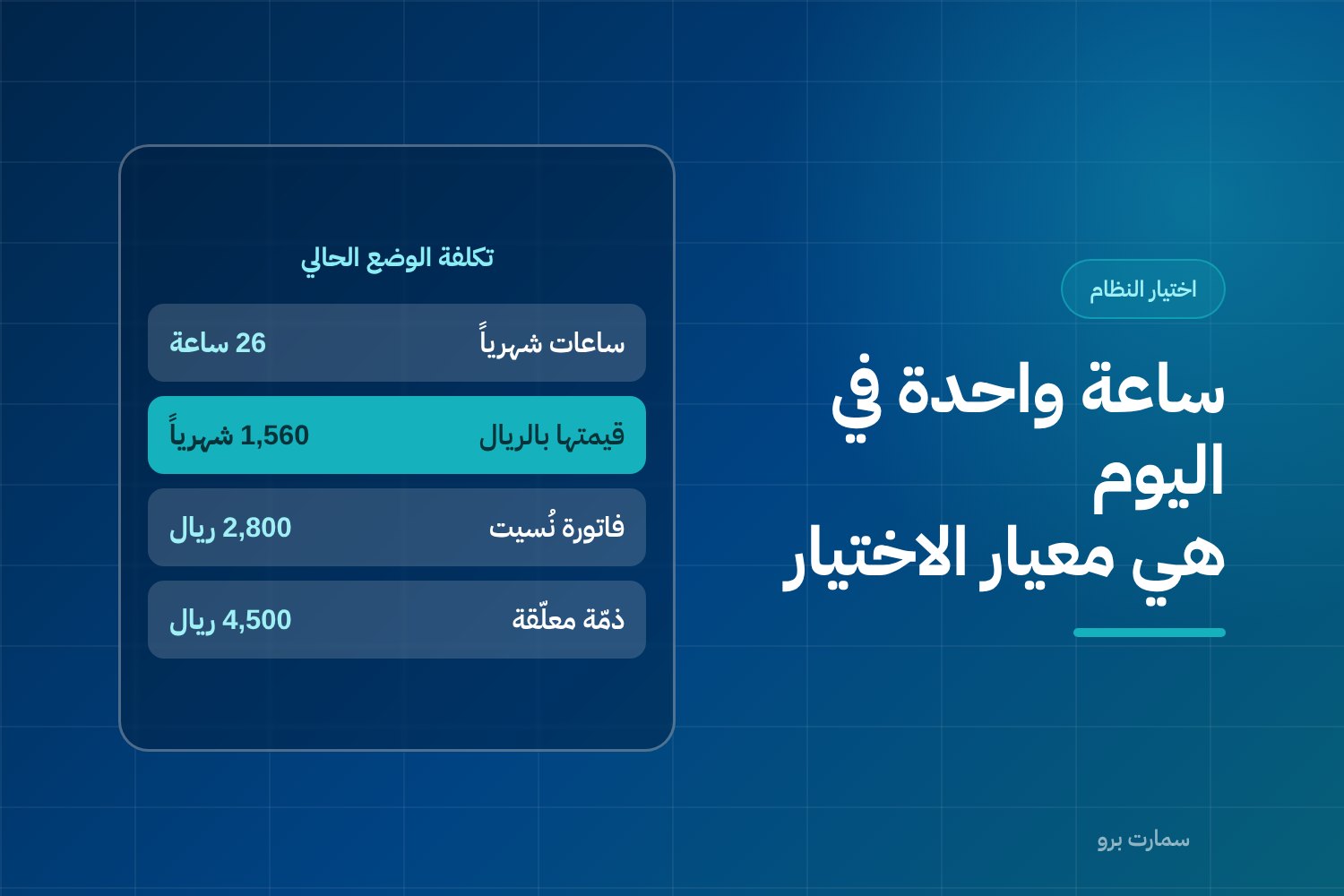
Choosing an accounting system for small businesses is not a scaled-down version of choosing one for a company with a finance department. In a small business the owner is the accountant, salesperson, buyer and debt collector at once. The system gets whatever hour is left at the end of the day. Any system that needs more than that hour will not be used.
That last hour comes after the shop closes or after the last customer visit. However long a system's feature list, if it asks for more time than that, within two months you will be back to a spreadsheet and a receipt book.
This guide compares types of systems and the criteria for choosing between them, not product names. Every figure in it is hypothetical, meant to show how to do the calculation, not to quote a price or a statistic.
What does a small business actually need from the system day to day?
A small business in Saudi Arabia is not a large company with pieces missing. It works differently:
- Nobody enters data on the owner's behalf, so every minute of data entry comes out of selling or delivering work.
- Financial decisions are made in the corridor or in the car, not in a monthly meeting over printed reports.
- Errors are not caught by an internal auditor; they surface late, as a cash shortfall or a tax claim.
- Cash matters more than accounting profit, because one late collection can stop you buying the next batch of stock.
That leads to the first rule of choosing: the right system for a small business is the one that completes the full daily cycle in a short, predictable time. Not the one with the most screens.
Should you buy modules you don't need yet?
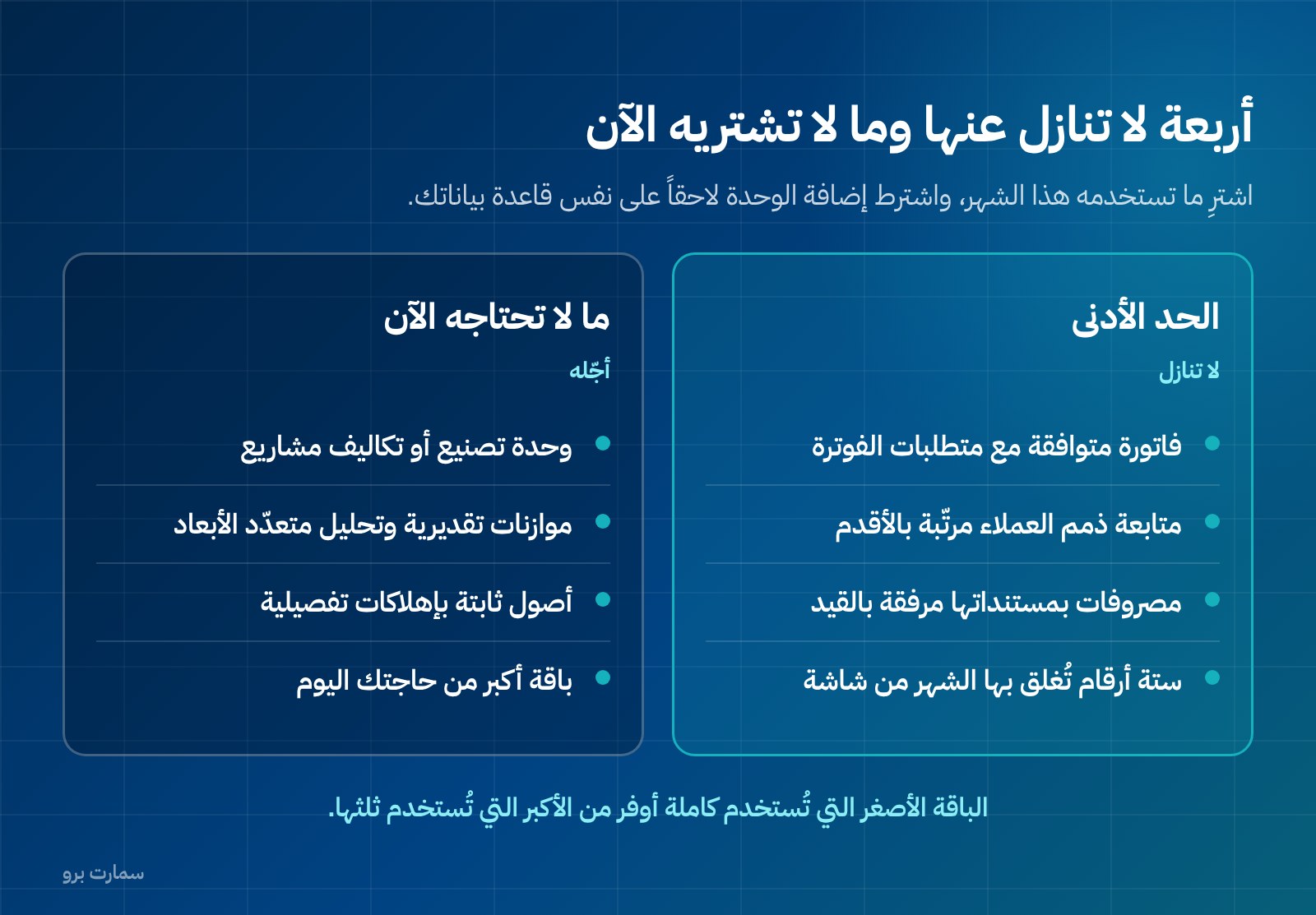
The thing small businesses pay for most needlessly is modules bought "for the future". They are paid for every month or every year, and their screens are never opened. The reason is simple: a module that doesn't serve today's work needs setup, master data and training, and an owner only has those three for what they actually use.
Put plainly: a small business rarely needs a manufacturing module or project costing on day one. A retail shop has no production orders, and a service office with three clients doesn't need to allocate indirect costs to cost centres. A cost centre is a label that groups income and expenses by department, branch or activity. The same goes for budgets, fixed assets with detailed depreciation, and multi-dimensional financial analysis reports. All are sound tools in the right place; in the wrong place they cost money, setup time and screens that confuse someone running the system alone.
The practical rule: buy what you will use this month, and insist that other modules can be added when needed without migrating your data to another system. The question to ask in the demo is: if I need inventory in a year, do I add it on the same database or start over?
What is the non-negotiable minimum in an accounting system for small businesses?
Four things only, with no compromise on any of them:
First: a compliant invoice. The invoice is the output your customer and the regulator see. If the system doesn't issue it correctly, the rest of its features are worthless.
Second: customer receivables tracking. Who owes money, how much, and since when. One list, sorted oldest first, that opens in seconds and can be printed or sent as a payment reminder. Receivables are the amounts customers owe you for sales already made.
Third: expenses with their documents. Every expense is recorded with a photo of its invoice or receipt attached to the entry itself, not kept in a separate folder on your phone. An expense without a document is a lost expense at audit time.
Fourth: the numbers you close the month with. Total sales, total purchases and expenses, VAT due, customer and supplier balances, and cash and bank balances. Six numbers, pulled from one screen or one report.
Anything less than these four is incomplete. Anything beyond them is measured by one question: does it reduce my time or add to it?
Which three numbers should a small business owner watch?
A small business owner doesn't read full financial statements every week. They read three numbers:
- Monthly profit: revenue minus costs and expenses for this month, compared with last month.
- Overdue receivables: amounts owed by customers, split by age of debt, with each customer's name.
- Available cash: what is in the cash box and the bank today, and what is expected to come in and go out this week.
A system that can't show these three in one minute on one screen is the wrong system, however accurate it is in everything else. Test it in the demo with a direct request: show me this month's profit, my oldest overdue receivable and my cash balance right now. And time it.
For a comparison of cloud and locally installed systems from exactly this angle, quick access to your numbers from your phone, see cloud vs on-premise accounting software in Saudi Arabia.
What must the system comply with by regulation?
These are not competitive features; they are requirements. The only authoritative source for them is the Zakat, Tax and Customs Authority (ZATCA):
- In Phase 2 of e-invoicing (the integration phase), the invoice is issued in XML format following UBL 2.1, and carries a cryptographic stamp, a counter that is never reset, and a hash chain that links each invoice to the one before it. A hash chain is a digital fingerprint of each invoice included in the next, so no invoice can be removed or altered unnoticed.
- A QR code is required on simplified invoices.
- Simplified invoices must be reported within 24 hours of issue.
- No editing an invoice after it is issued; corrections are made with a credit or debit note.
- VAT (15%) becomes due on the earliest event: supply of the goods or service, issue of the invoice, or receipt of payment.
- ZATCA does not approve or certify software; it publishes an indicative list of solution providers. Any vendor telling you their software is "officially approved" is describing something that doesn't exist.
What this means in practice for a small business owner: don't amend an invoice by blanking it out or reprinting it, don't delay issuing an invoice in the belief that VAT is tied only to collection, and don't rely on a side file outside the system. Any question about VAT registration or return deadlines is settled with ZATCA or a qualified tax adviser, not with the software vendor.
How do you turn hours into money before comparing prices?
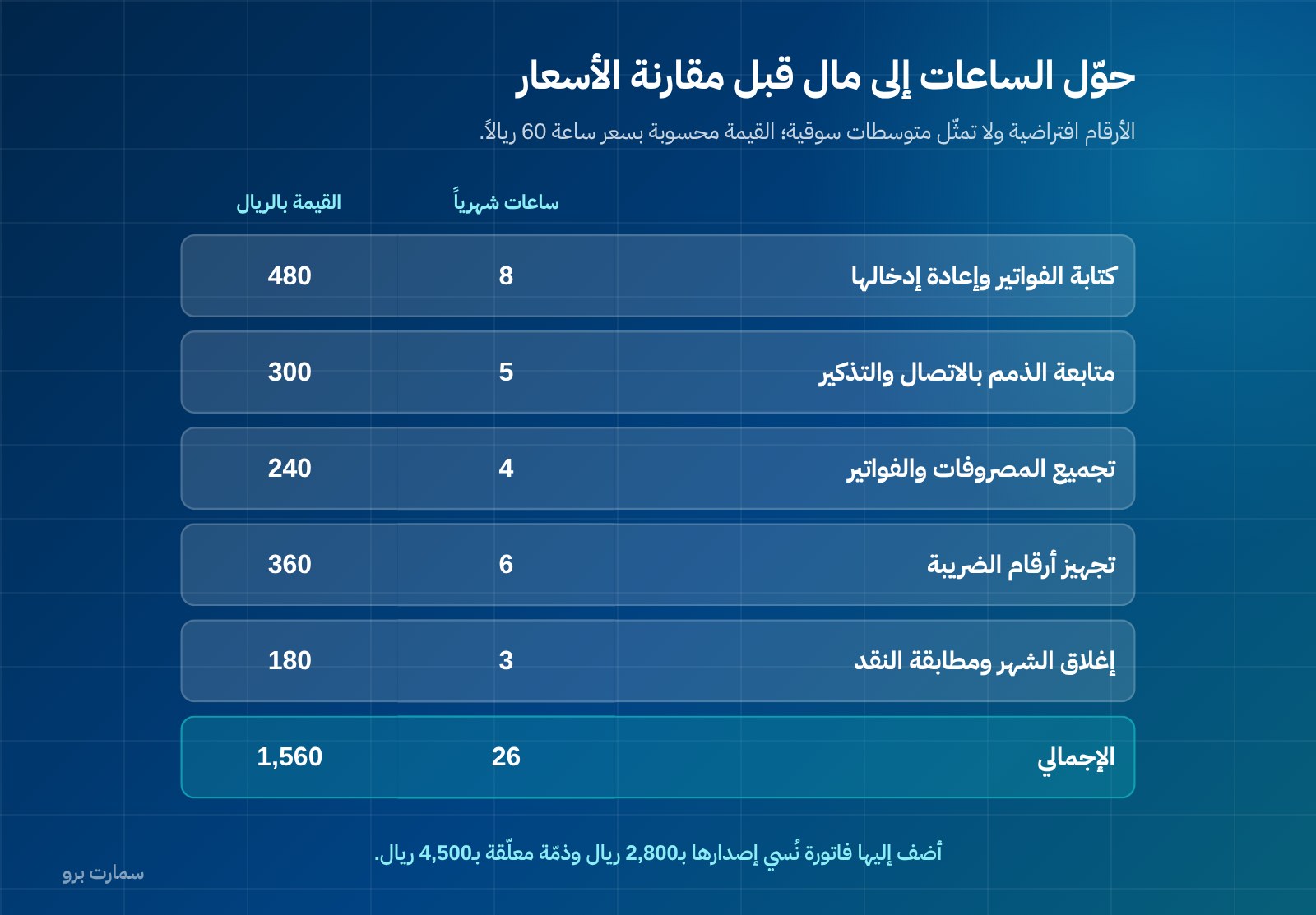
The difference between having a system and not having one isn't a line in your expenses; it's hours recovered and mistakes that never happen. The figures below are hypothetical, to illustrate the method, and are not market averages:
| Manual task | Hours per month | Value at SAR 60 per hour |
|---|---|---|
| Writing invoices and re-entering them in a file | 8 | 480 |
| Chasing receivables by phone and reminders | 5 | 300 |
| Collecting expenses and supplier invoices | 4 | 240 |
| Preparing VAT figures | 6 | 360 |
| Closing the month and reconciling cash | 3 | 180 |
| Total | 26 | SAR 1,560 per month |
Then add what doesn't show up in a table of hours:
| A single mistake | Hypothetical cash impact |
|---|---|
| Work completed but the invoice never issued | SAR 2,800 that never comes in |
| A customer debt never claimed until both sides forgot it | SAR 4,500 left hanging |
| An expense without a document, rejected at audit | Its value lost twice |
Compare the total of these figures with the system's annual cost. After that, the decision is arithmetic, not emotion. If you are starting from the idea of free solutions first, compare their real cost the same way: the hours they leave to you are part of the price.
How should a small business weight its selection criteria?
In a large company, the number of features and integration with other systems carry the weight. In a small business the weight goes to ease of use and support, because there is one user and nobody to back them up. The weights below are hypothetical, a model to start from and adjust:
| Criterion | Weight | What to check in practice |
|---|---|---|
| Everyday ease of use | 25% | Number of steps to issue an invoice and record an expense |
| Support and training in Arabic | 20% | Support channel, response time, training hours included |
| E-invoicing compliance | 20% | XML, UBL 2.1, stamp, counter, hash chain and QR |
| The three numbers on one screen | 15% | Profit, overdue receivables, available cash |
| Clarity of total cost | 10% | Published price, no hidden fees for setup or add-ons |
| Full export of your data | 5% | A file you can take with you whenever you want |
| Room to grow without migration | 5% | Adding a user, branch or inventory on the same data |
Notice that "number of modules" is not a criterion in the table. A module you don't use adds not a single point, and may cost you points on ease of use.
If you want a broader comparison using general criteria not specific to company size, see how to choose the best accounting software in Saudi Arabia.
When will you outgrow the basics and need more?
Don't wait for size; wait for the trigger. Each row in this table is a concrete event in your business, and next to it is what gets added to the system at that point, not before:
| The trigger | What it adds to the system |
|---|---|
| A second person working on the system | Multiple users, permissions, an edit log showing who made each change |
| Goods bought, stored and sold | Items, inventory costing, stocktakes, point of sale |
| A second branch or warehouse | Separate locations, transfers between them, reports per branch |
| Employees on fixed salaries | Payroll run, monthly obligations, automatic salary entry |
| Credit sales beyond what you can remember | Receivables ageing, credit limits, automatic payment reminders |
| Real projects or production orders | Project or production-order costing; this is the last thing you need, not the first |
The key criterion at this stage: can your current system absorb the addition, or does growth mean moving everything? The difference between an accounting system and an ERP on exactly this point is explained in accounting software or ERP for Saudi businesses. ERP (enterprise resource planning) is a single system that connects accounting with sales, inventory, purchasing, HR and operations.
What should you test in the demo?
Don't watch a ready-made demo on the vendor's data. Ask for the keyboard and do this yourself; you type and you click:
- Issue your invoice: a real invoice for a real customer, with your items and prices. Count the steps and the minutes.
- Check that the e-invoice elements appear on the output, and that the invoice cannot be edited after it is issued.
- Issue a credit note against that invoice, and watch its effect on the receivable and on VAT.
- Record your expense: an expense from a receipt on your phone, with its photo attached to the entry itself.
- Record a partial payment from a customer, then open their statement of account.
- Ask for the overdue receivables list sorted oldest first, and print it as a payment reminder.
- Close a day: enter a full day's sales and expenses, then pull that day's numbers: sales, expenses, cash and VAT.
- View the three key numbers on your phone while away from the office.
- Ask to export all your data as a file. If you can't take your data with you, you're locked in, not subscribed.
- Call support during the demo with a real question, and time the response.
If steps 1, 4 or 7 stumble, the system is not right for a small business, whatever its other features.
What does the system really cost in total?
Count four items, not one: the annual licence, setting up master data (customers, items, opening balances), training measured in hours rather than promises, and any integration or extra-user fees. Then set against them the cost of staying as you are, which you calculated in the table above.
A negotiating tip: don't buy a bigger package than you need today because it is "better value in the long run". A smaller package used in full is better value than a larger one used by a third.
SmartPro's prices are published, and all include 15% VAT. The Mini package is SAR 1,500 a year (1 user, 6 hours of training), Pro is SAR 4,500 a year (3 users, the mobile app, 12 hours of training), and Max is SAR 20,500 a year (10 users, with Projects and Manufacturing, 18 hours of training). Every package includes the main branch; each additional branch is SAR 1,000 a year. Full details are on the SmartPro pricing page.
Key takeaway: Choose the system that issues a compliant invoice, tracks receivables, files expenses with their documents and shows profit, overdue debts and cash in one minute; add everything else only when a real trigger appears.
Where is the official reference?
For e-invoicing requirements in both phases, the rules on standard and simplified tax invoices, when VAT becomes due, registration and returns, and the indicative list of solution providers, the only source to rely on is the Zakat, Tax and Customs Authority: zatca.gov.sa. Any regulatory claim you hear in a sales pitch, verify it there before building a decision or an internal procedure on it.
Read also
- How to choose the best accounting software in Saudi Arabia
- Accounting software or ERP? A practical choice for Saudi businesses
- Cloud or on-premise accounting software: a frank comparison
To run the demo checklist on your own invoices and expenses, start a free SmartPro trial or book a 30-minute demo.
Article visuals
Frequently asked questions
What is the minimum an accounting system for small businesses must provide?
Four things only: an invoice that meets e-invoicing requirements, customer receivables tracking by age, expenses recorded with their documents attached to the entry, and month-end numbers from a single screen. Anything less is incomplete, and anything more is an add-on measured by one question: does it save your time or cost you time? Start with these four and leave the rest until a real trigger calls for it.
Do I need an inventory or manufacturing module from the start?
A small business rarely needs manufacturing or project costing on day one, and modules bought "for the future" are paid for every year without being opened. An inventory module becomes necessary when you actually buy, store and sell goods, not before. The condition to set with the vendor is that the module can be added later on the same database, without migrating to another system.
What does the system have to do for e-invoicing?
In Phase 2, invoices are issued in XML following UBL 2.1, with a cryptographic stamp, a counter that is never reset and a hash chain linking invoices, plus a QR code on simplified invoices, which must be reported within 24 hours of issue. An invoice cannot be edited after issue; corrections are made with a credit or debit note. Note that ZATCA does not approve software but publishes an indicative list of solution providers, so "approved software" describes something that doesn't exist.
How do I know a system is right before I buy it?
Don't watch a demo on the vendor's data; take the keyboard and do three things yourself: issue a real invoice for a real customer, record an expense from a receipt on your phone with its photo attached, and close a full day and pull its numbers. Then ask for the three key numbers, monthly profit, overdue receivables and available cash, and time it. If any of these steps stumbles, the system is not right for a small business, however long its feature list.