
Deleting an E-Invoice: Is It Possible, and What Is the Correct Alternative?
You cannot delete an e-invoice once it has been issued, and trying to is a violation in its own right. Here is what happens technically when an invoice is deleted, and the correct alternative for every situation where you want to cancel one.
سامي الحيدري
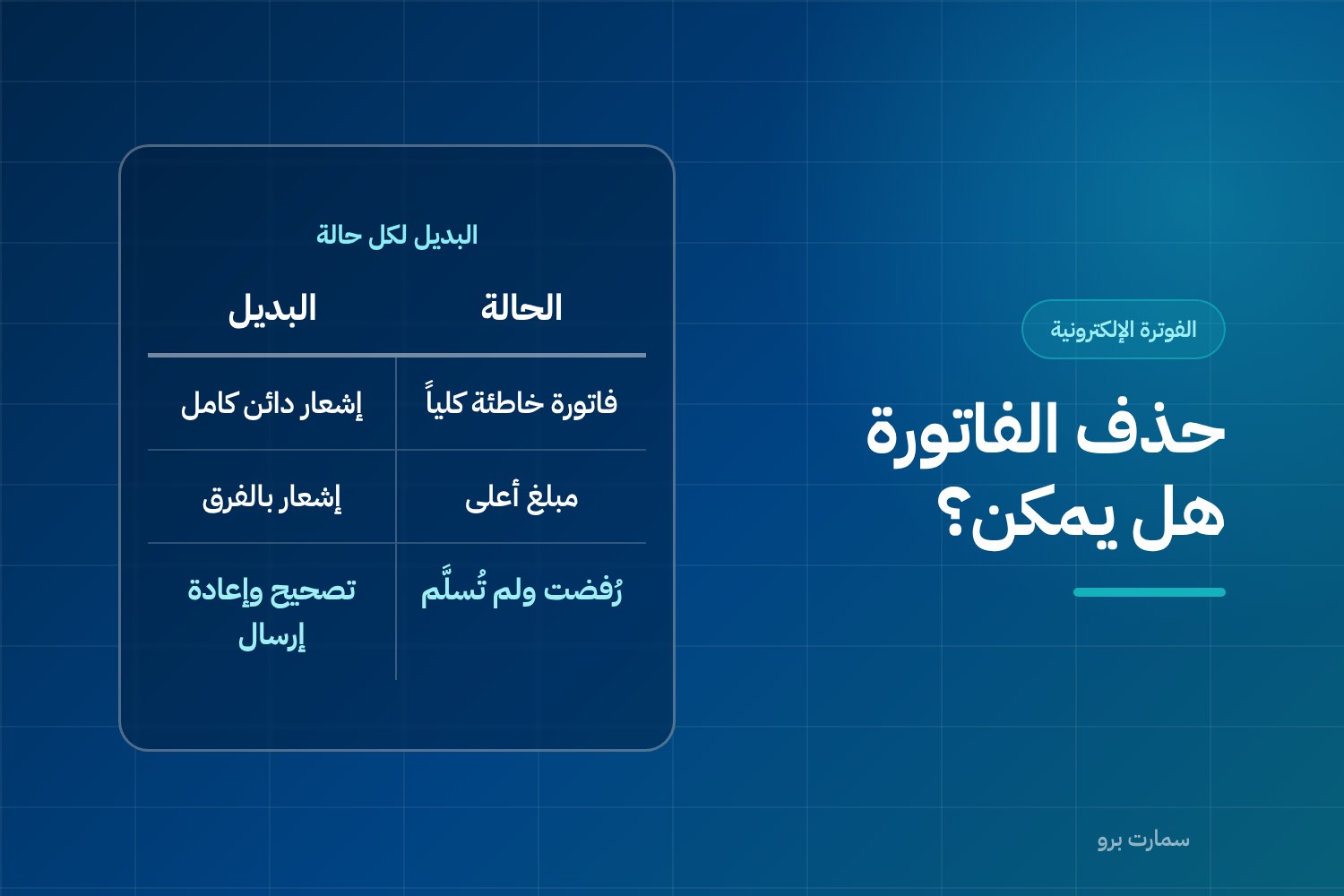
Can you delete an e-invoice? Every accountant asks this in the first week of Phase 2: we issued a wrong invoice, how do we remove it?
The answer is definitive: you cannot delete it, and you should not try. Once issued, the invoice is part of a signed chain that has been sent to the Fatoora platform. Deleting it breaks that chain and counts as a separate violation in its own right.
That does not mean you are stuck with the mistake. Every situation has a correct alternative, and this article walks through each one.
Why is it impossible to delete an e-invoice?
There are three overlapping technical reasons:
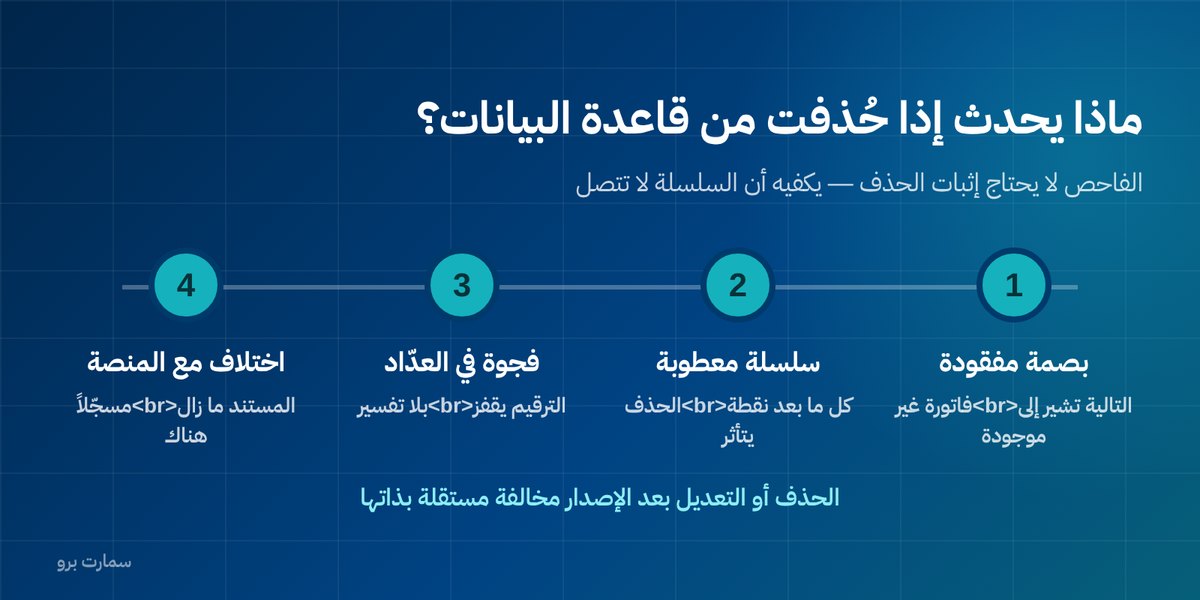
- The hash chain: every invoice carries the digital fingerprint (hash) of the invoice before it. Deleting one from the middle leaves the next invoice pointing to a link that no longer exists.
- The incremental counter: each invoice-generation unit (EGS unit) has a counter that never resets. A deletion leaves an unexplained jump in the numbering.
- Submission to the platform: the invoice has already reached ZATCA. Deleting it from your system does not delete it there, so your books and the official record no longer match.
The full mechanism is explained in Cryptographic Stamp and Hash Chain.
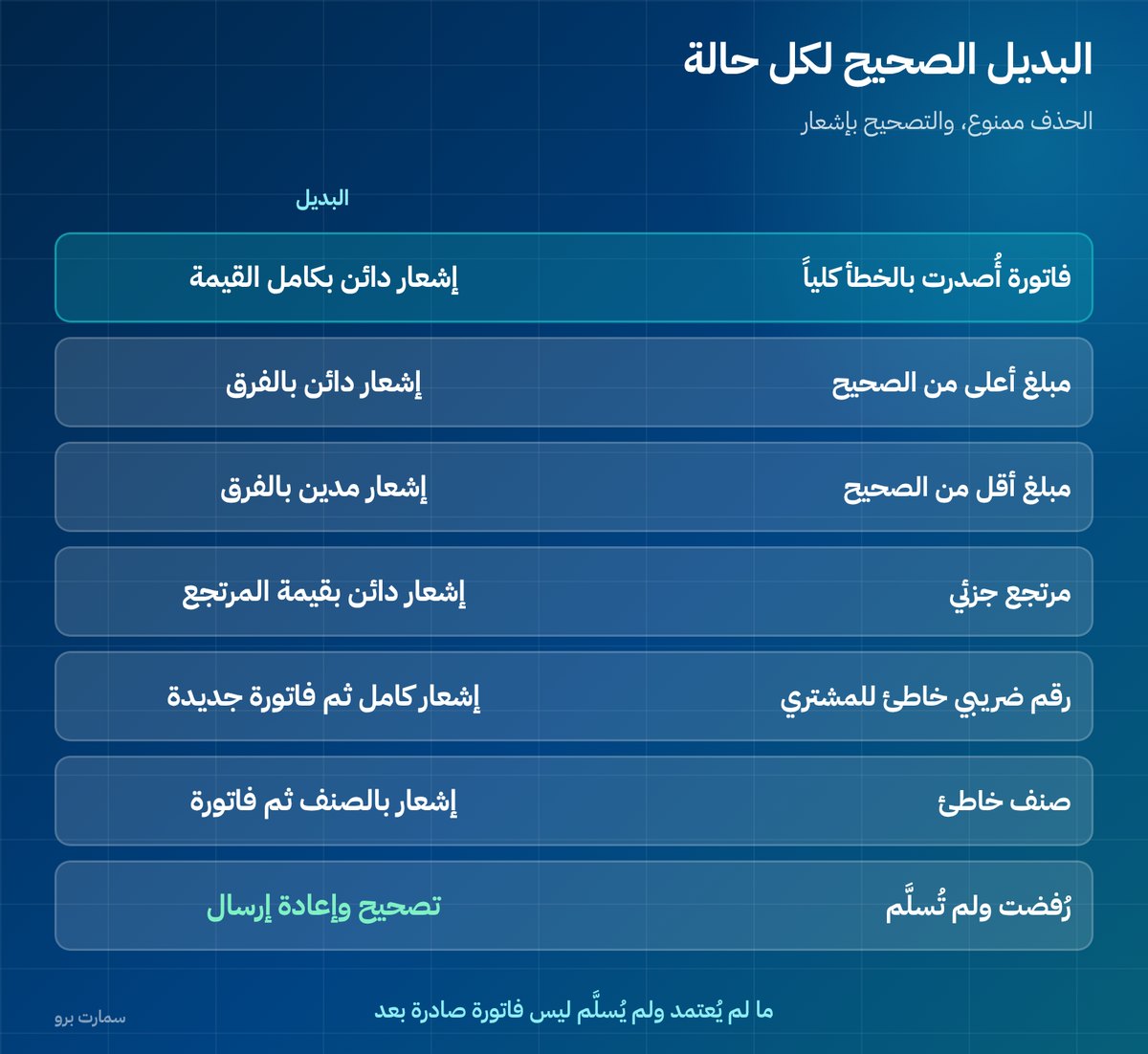
What is the correct alternative in each case?
| Situation | Alternative |
|---|---|
| Invoice issued entirely by mistake | Credit note for the full amount |
| Amount higher than it should be | Credit note for the difference |
| Amount lower than it should be | Debit note for the difference |
| Partial return | Credit note for the returned value only |
| Wrong buyer VAT number | Full credit note, then a new invoice |
| Wrong item | Credit note for the item, then an invoice for the correct one |
| Invoice rejected and not delivered | Correct and resubmit, no note needed |
A credit note reduces or cancels the value of an issued invoice, while a debit note increases it; both reference the original invoice. The last row matters: a document that was never approved or delivered is not yet an issued invoice, so it can be corrected directly. The difference is explained in Clearance and Reporting.
What actually happens if it is deleted from the database?
Some technicians "solve" the problem by deleting the row directly from the database. This is the worst thing you can do, and the result is:
- The next invoice carries the hash of an invoice that no longer exists, so the chain breaks.
- Every invoice after the deletion point is now linked to a broken chain.
- The counter skips a number, and the gap is visible to any auditor.
- What was deleted from your system is still recorded on the platform.
- Fixing things afterwards becomes far harder than the original mistake.
An inspector does not need to prove that an invoice was deleted; it is enough that the chain does not connect.
Is deleting an invoice a regulatory violation?
Deleting or modifying invoices after they are issued is listed among the violations that are monitored, alongside adding prohibited functions to the system, such as the ability to reset the counter or make retroactive edits.
The penalty escalates: it starts with a warning and a grace period to correct, then increases with repetition. The details are in E-Invoicing Penalties, and the official texts are published by the Zakat, Tax and Customs Authority (ZATCA).
Is "Cancel" on the cashier screen the same as deleting?
At the point of sale, the cancel button means two completely different things depending on timing:
- Before printing and issuing: the transaction has not yet become an invoice, so cancelling is fine and leaves no trace.
- After printing and issuing: the invoice has been issued and reported, or will be reported, and cancelling from the screen does not cancel it. A credit note is required.
This point needs explicit cashier training, because the screen looks similar in both cases. The rule to teach: once it is printed, there is no deleting.
What if your system allows deletion?
If your system lets you delete an issued invoice from the interface, that is not a feature; it is a problem. The mere existence of the function counts as a prohibited function, even if it is never used.
Ask your vendor directly, and request a written confirmation that the system cannot: delete an issued invoice, modify it, reset the counter, renumber invoices, or issue invoices with a past date. The full checklist is in E-Invoicing Compliant System.
What is the difference between cancellation, correction and return?
These three terms are often used interchangeably, but they are completely different:
- Cancellation: the invoice was issued entirely by mistake and there is no supply behind it. The treatment is a credit note for the full amount, with no replacement invoice.
- Correction: the supply took place, but the invoice has an error in the amount, item or details. The treatment is a note for the difference, or a full credit note and a new invoice if the error is in the buyer's details.
- Return: the supply took place and the invoice is correct, but the customer returned the goods. The treatment is a credit note for the returned value and its VAT only.
The distinction is not just wording: the first produces no revenue at all, the second adjusts existing revenue, and the third creates sales returns that appear in your reports as a separate line.
What do you do about the customer's copy?
With a simplified invoice, the customer has left holding a paper copy of an invoice that has since been cancelled with a note. Do not ask them to return it, and do not rely on that.
The right approach is to issue the note and hand them a copy if they are present, or send it if you have their details. What governs the record is what was sent to the platform, not the paper in their hand.
How can you reduce the need for notes in the first place?
A note is a cure, not prevention. Most causes of wrong invoices can be prevented:
- Prices not kept up to date in the system.
- Staff choosing the wrong invoice type, issuing a simplified invoice to a business.
- Incomplete customer details, so the invoice is issued and the gap discovered later.
- Issuing before the order is confirmed or before the supply takes place.
Track the ratio of credit notes to invoices every month. A persistently high ratio is not a sign of many returns; it points to a problem in how invoices are issued, which is worth fixing at the source.
Key takeaway: An issued e-invoice can never be deleted; correct it with a credit or debit note linked to the original, and correct rejected, undelivered documents directly before resubmitting.
Read also
- Credit and Debit Notes: How to Correct an Invoice
- Cryptographic Stamp and Hash Chain
- E-Invoicing Penalties: Violations and Fines
To see how SmartPro handles credit notes and Phase 2 e-invoicing without any deletion option, book a demo or start a free trial.
Frequently asked questions
Can an e-invoice be deleted after it is issued?
No. Once issued, the invoice is part of a signed chain sent to the Fatoora platform, and deleting it breaks the chain and counts as a violation. The only accepted correction is a credit or debit note linked to the original invoice by its number and date.
What is the alternative to deleting an invoice issued by mistake?
Issue a credit note for the full amount if the invoice is entirely wrong, or for the difference if the amount is higher than it should be, and a debit note if it is lower. If the error is in the buyer's VAT number, issue a full credit note and then a new invoice.
What happens if an invoice is deleted from the database?
The hash chain breaks because the next invoice carries the hash of an invoice that no longer exists, and the counter skips a number, leaving a visible gap in the numbering. The document also remains recorded on the platform, and fixing things afterwards is far harder than the original mistake.
Does the cancel button on the cashier screen delete the invoice?
It depends on timing. Before printing and issuing, the transaction has not yet become an invoice, so cancelling is fine. After printing, the invoice has been issued and cancelling from the screen does not cancel it, so a credit note is required.