
Moving to a New Accounting System Without Losing Data or Breaking Your Period Close
How to move to a new accounting system without losing data or breaking your close: the right timing, what actually gets migrated, invoice numbering, and parallel running.
Author:سامي الحيدري
Moving to a new accounting system usually fails for procedural reasons, not technical ones. To switch without losing data or breaking your period close, start on the first day of a financial or VAT period, migrate master data and opening balances rather than full history, plan invoice numbering before the first invoice, and run both systems in parallel for one period.
The typical failure looks like this. The data is transferred, the screens work, the team is trained. Then the close or the VAT return comes due, and the accountant finds they are working in two systems at once: balances in the old one, transactions in the new one, and no single place that produces a correct trial balance. The problem is not the software. It is that the timing and the migration scope were decided after signing the contract, not before.
This guide explains the method and the order of work, and refers to “the current system” and “the new system” without naming products. The figures below are hypothetical, to illustrate the method; they are not industry benchmarks or market prices.
Why does moving to a new accounting system fail? The causes are procedural, not technical
A business that switches smoothly and one that stumbles are usually using similar tools. The difference lies in four decisions made before a single balance is entered:
- When live work on the new system starts, and from which date.
- What is actually migrated, and what is kept read-only.
- Where invoice numbering resumes, and how.
- Which figures will be reconciled at the end of the first period to prove the migration is correct.
If you have not answered these four questions in writing, you are not migrating a system; you are entering data and hoping. The usual result is that the team keeps posting in the old system “because the new one isn’t finished”, and the new system becomes an expensive demo.
When is the right time to switch?
Go live at the start of a financial period, not in the middle. The best point is the first day of the financial year; if that isn’t possible, the first day of the next VAT period.
The reason is purely practical. A close needs a closed period with opening and closing balances in one place. A VAT return needs the full period’s output and input tax from a single source. If the cut-off falls mid-quarter, you have to gather half the period from a system you are cancelling and half from one that hasn’t settled yet, reconcile the two by hand, and then file a return built on that combination. Every error in that process surfaces later, somewhere hard to correct.
Three more timing rules are worth keeping:
- Don’t migrate in your busiest month. Peak season is not the time to learn a new screen.
- Don’t migrate in the two weeks when you are preparing the VAT return or the annual financial statements.
- Don’t migrate in a week when the responsible accountant is away. Migrations don’t fail on cut-over day; they fail in the week after.
If you are still comparing solutions before setting a date, start with how to choose the best accounting software in Saudi Arabia, then come back to your migration plan.
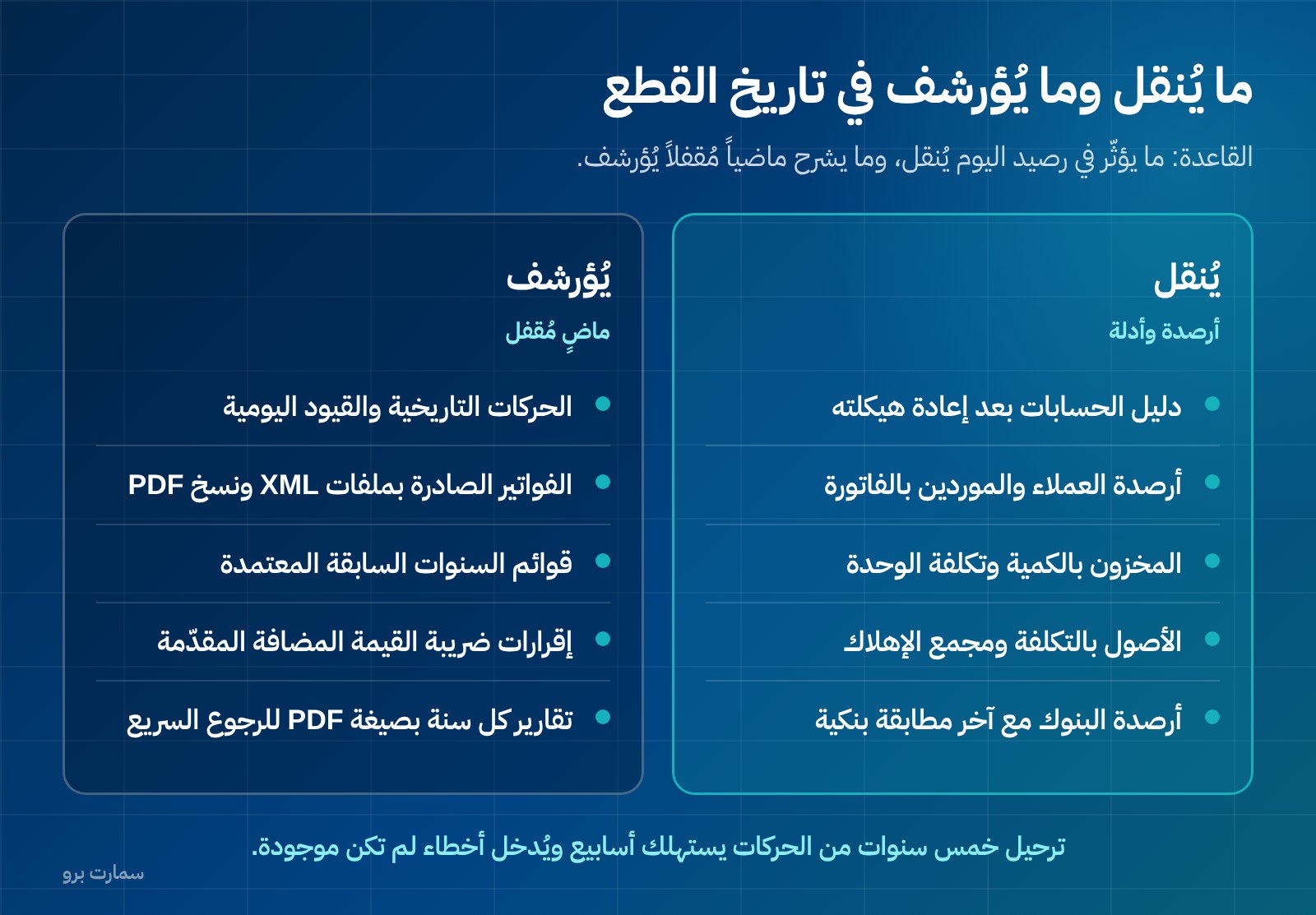
What actually gets migrated: balances and master data, not full history
The most common mistake is trying to move five years of historical transactions into the new system. It takes weeks, introduces errors that didn’t exist before, and often ends with balances that don’t match previously approved financial statements.
Two things are migrated:
Master data: the chart of accounts and the customer, supplier, item, fixed-asset and cost-centre records. This is relatively stable reference data; moving it saves a great deal of work and reduces entry errors.
Opening balances: the balance of every account at the cut-off date, with receivables and payables broken down by invoice, not just by customer. Invoice-level detail is essential: it is what makes the ageing correct from day one, and what lets you match a late payment to its original invoice.
Historical transactions are archived. Prior years’ statements have already been approved and their returns filed; there is no accounting value in rebuilding them inside a new system.
The chart of accounts: a one-time opportunity
The chart of accounts is the structured list of every account your business posts to. The cut-off date is the only moment you can clean it up without breaking comparisons. Use it: merge duplicate accounts, remove anything unused for two years, standardise names, and fix the split between cost of revenue and operating expenses. After the first entry in the new system, every restructuring becomes harder and more expensive.
Table: what to migrate and what to archive
| Item | Migrate or archive | Why |
|---|---|---|
| Chart of accounts | Migrate, restructured before migration | The basis of every later report; changing it after the first entry is costly |
| Customer balances | Migrate as opening balances, detailed by invoice | Invoice-level detail is what makes ageing and payment matching correct |
| Supplier balances | Migrate as opening balances, detailed by invoice | Separates amounts due from prepayments, and supports payment scheduling |
| Inventory by quantity and cost | Migrate with quantity and unit cost per item | Opening stock value flows straight into cost of sales; any error distorts profit |
| Fixed assets | Migrate with cost, accumulated depreciation and remaining life | Depreciation resumes; it doesn’t start over |
| Historical transactions and journal entries | Archive | Their periods are closed and statements approved; rebuilding them adds errors for nothing |
| Issued invoices | Archive in original form, with XML files and PDF copies | An issued invoice is a standalone document and must stay readable exactly as issued |
| Bank and cash balances | Migrate as opening balance with the latest bank reconciliation | Reconciliation starts from a documented figure, not a guess |
The general rule: whatever affects today’s balance is migrated; whatever explains a closed past is archived.
How do you keep invoice numbering intact when you change systems?
This is the most important technical and organisational point in the whole migration, and the most often neglected.
Under Phase 2 of ZATCA e-invoicing (Fatoora), an invoice is issued as XML to the UBL 2.1 standard, carries a cryptographic stamp, a counter that is never reset, and a hash chain linking each invoice to the one before it. In other words, invoices are not separate documents; they form one continuous chain.
That is why numbering continuity is not a formality when you change systems. Agree in writing with the new system’s provider, before any invoice is issued, on:
- The number of the last invoice actually issued from the current system, and the number the new system starts from.
- How the counter and hash chain start in the new system, and how that is documented.
- Who issues invoices on cut-over day itself: one system only, by written decision.
- Which devices or branches issue simplified invoices, and who is responsible for reporting them.
Then apply the one-day rule: from a defined moment, the current system stops issuing invoices for good. Issuing invoices from two systems on the same day is the fastest route to duplicate numbers and a gap in the chain that is hard to explain later.
Keep two practical points in mind. A simplified invoice must be reported within 24 hours of issue, so don’t experiment with live invoices from the new system before you are sure the integration is ready. And an invoice cannot be edited once issued; corrections are made with a credit or debit note. If a wrong invoice is issued during the transition, don’t try to delete it from either system; issue the corresponding note.
A useful warning when evaluating offers: the Zakat, Tax and Customs Authority (ZATCA) does not “approve” software or certify it; what it publishes is an indicative list of solution providers. Any offer presenting “official approval” of its system as an exclusive advantage deserves checking at the source. For more on this, see what ZATCA-approved accounting software really means.
How long should you run both systems in parallel?
Run both systems together for one period only: a month if you file VAT monthly, a quarter if you file quarterly. One period is enough to prove the balances are right; longer than that becomes a double burden on the team and creates divergence between the systems instead of exposing it.
Parallel running does not mean issuing invoices from both systems. Invoices come from the new system only. Parallel means recording and comparing.
At the end of the period, reconcile four things by the numbers:
| What to reconcile | Standard | What to do if there’s a difference |
|---|---|---|
| Trial balance | Totals match account by account | Check opening balances before checking transactions |
| Customer balances | Total and invoice-level detail match | Usually a payment recorded in one system only, or an unmatched receipt |
| Inventory value | Quantity and unit cost match per item | Check the valuation method in both systems before blaming the data |
| Output and input VAT | Period totals match | Check VAT rates on items and the linked accounts |
Don’t close the old system until these four match. And don’t accept “the difference is small”: a small difference at the start of the period becomes one that is hard to explain at year end. If you need a clear closing decision, lock the cut-off date and block posting before it in the new system.
What data should you request from your current system before cancelling?
The strict rule here: request the export before you sign with any new provider, not when you leave. Being able to take your data out is a selection criterion, not an administrative step at the end. If your current system cannot hand over your data in a readable format, you need to know that while you are evaluating offers, not after you have committed.
Request the following, in open formats such as CSV, Excel or XML, not images or PDF reports alone:
- The full chart of accounts with codes, levels and classification.
- The trial balance at the cut-off date, and the trial balance for every prior year.
- Receivables and payables ageing, detailed by invoice and date.
- Complete customer and supplier statements.
- Inventory balances by quantity and unit cost, plus item cards.
- The fixed-asset register with cost and accumulated depreciation.
- Journal entries for all periods, as a single readable file.
- Issued invoices: XML files and PDF copies, plus the numbering log with the last invoice number.
- Filed VAT returns and their details.
- The latest approved bank reconciliation for each account.
Set a written deadline for delivering these files, then receive them, open them and check they are readable before cancelling. An exported file that won’t open is not an export.
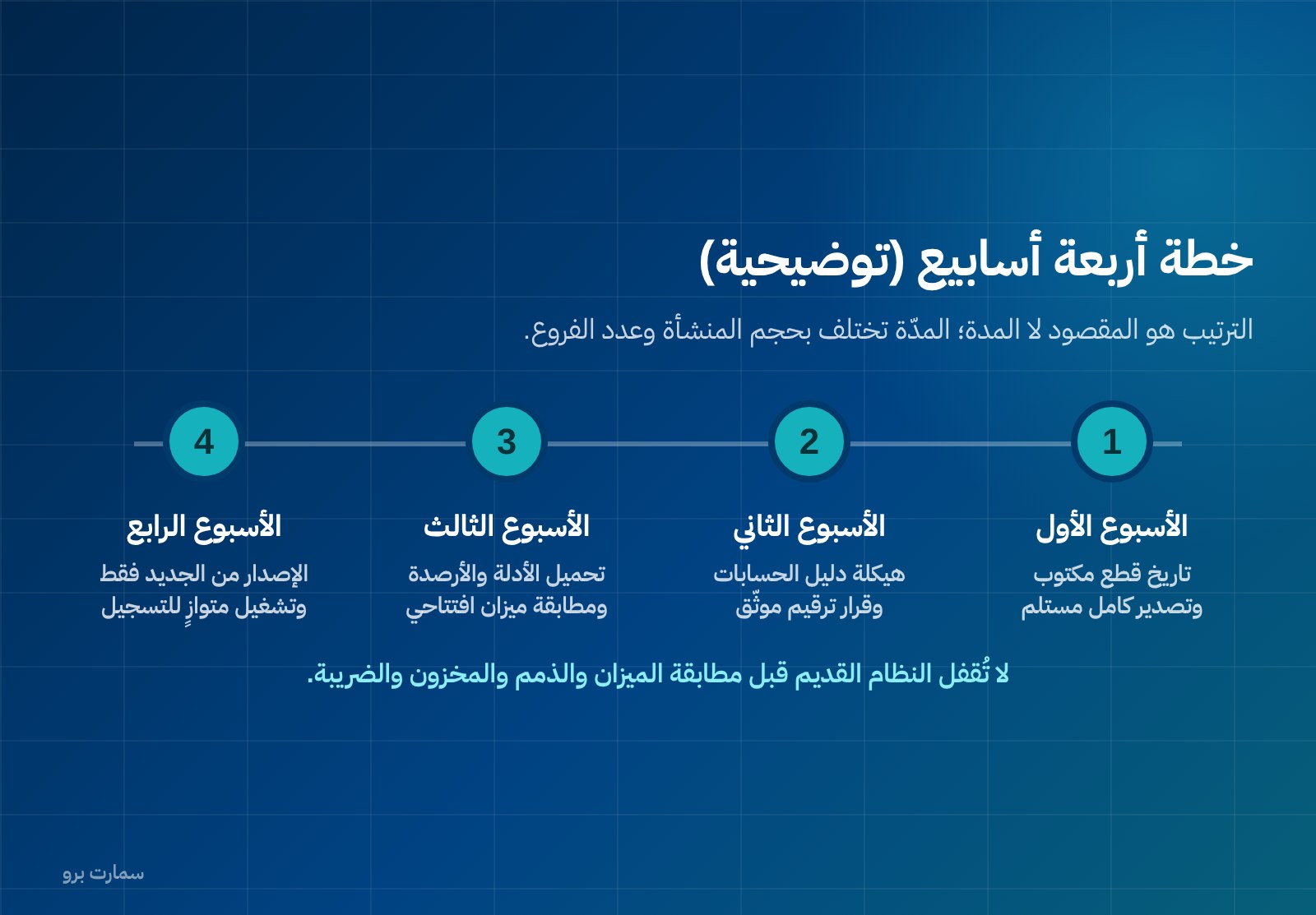
A four-week plan (illustrative)
The table below illustrates the order of work, not a time commitment; the duration varies with the size of the business and the number of branches.
| Week | Work | Output |
|---|---|---|
| One | Set the cut-off date, request the full export from the current system, and name one person responsible for the migration | A written cut-off date, and export files received and opened |
| Two | Restructure the chart of accounts, clean customer, supplier and item records, and agree invoice numbering in writing | An approved chart of accounts, clean master data and a documented numbering decision |
| Three | Load master data and opening balances, reconcile the opening trial balance, and train the team on the sales and purchasing cycles | A reconciled opening trial balance, and a team that has run a full cycle on test data |
| Four | Start issuing from the new system only, run parallel recording, and reconcile period end | A reconciled first period, and a decision to lock the old system as read-only |
If you are moving to a cloud system, add a check of user permissions and the backup policy to week one, as explained in cloud or on-premise accounting software: a frank comparison.
What should you keep from the old system after cut-over?
Don’t shut down the old system the day after cut-over. Turn it into a read-only archive with three steps:
- Stop posting: remove entry permissions from everyone. An old system that can accept a new entry will receive one.
- Keep the exported files yourself: store the ten files above somewhere you own, not inside a service you will stop paying for. Add a copy of the invoices in both formats, and each year’s reports as PDF for quick reference.
- Write a one-page note: the cut-off date, the last invoice number, where the exported files are kept, and the name of the responsible person. This page is what helps you in any later audit or inspection, or when someone asks about a figure from a prior year.
The archive has one purpose: to let you answer a question about a past period without restarting a system or reviving a subscription.
How should you budget for the move?
The cost of switching is not just the licence price. Add the accountant’s time for migration and reconciliation, time to clean master data, training, setup and any integration with existing systems. Then add the cost of staying where you are: hours lost every month pulling figures together from more than one source, and a VAT return prepared under pressure.
SmartPro’s prices are published, and all include 15% VAT: the Mini package at SAR 1,500 a year, Pro at SAR 4,500, and Max at SAR 20,500, which adds manufacturing and projects to the core systems. Implementation, data migration and Fatoora onboarding are included at no extra charge. To see what the finance side covers in practice, see Finance & Accounting. For a broader method of estimating the full cost, see what ERP costs in Saudi Arabia in year one and at renewal.
Where can you check the official requirements?
E-invoicing requirements, the UBL 2.1 XML format, the cryptographic stamp, the counter and hash chain, the reporting deadline for simplified invoices, the rules on correcting with credit or debit notes, and the indicative list of solution providers should all be checked at the one authoritative source: the Zakat, Tax and Customs Authority at zatca.gov.sa. Any regulatory claim made to you in a sales pitch should be verified there, or with a tax adviser, before you base a migration decision on it.
Key takeaway: A clean switch is decided before you sign: a cut-off date at the start of a period, balances and master data rather than history, one system issuing invoices from a defined moment, and one period of parallel reconciliation.
Read also
- How to choose the best accounting software in Saudi Arabia
- Cloud or on-premise accounting software: a frank comparison
- ZATCA-approved accounting software: what the phrase really means
If you are planning a move, you can start a free trial or book a demo to walk through migration with a product expert.
Article visuals
Frequently asked questions
When is the best time to move to a new accounting system?
At the start of a financial period, not in the middle: the first day of the financial year if possible, otherwise the first day of the next VAT period. A close needs a full period with opening and closing balances in one place, and the VAT return needs the period’s output and input tax from a single source. Also avoid your peak month and the two weeks when you prepare the VAT return or annual statements.
Do I need to migrate all historical transactions to the new system?
No, and trying to is the biggest waste of time in a migration. What you move is master data (chart of accounts, customers, suppliers, items and assets) and opening balances at the cut-off date, with receivables and payables detailed by invoice. Historical entries are archived, because their periods are closed, their statements approved and their returns filed; rebuilding them only introduces errors.
How do I keep invoice numbering intact when changing systems?
Under ZATCA Phase 2 e-invoicing, each invoice is issued as UBL 2.1 XML with a cryptographic stamp, a counter that is never reset and a hash chain linking it to the previous invoice, so invoices form one continuous chain. Before any invoice is issued, agree in writing with the new provider on the last invoice number issued and where the counter resumes. Then apply the one-day rule: only one system issues invoices from a defined moment.
What data should I request from my current system before cancelling?
Request the export before signing with any new provider, because being able to take your data is a selection criterion. Ask for the chart of accounts, trial balances at cut-off and for each prior year, invoice-level ageing, customer and supplier statements, inventory by quantity and cost, the asset register, journal entries, invoice files in XML and PDF with the numbering log, filed VAT returns and the latest bank reconciliation. Open and check every file before cancelling; an export that won’t open is not an export.