
Free Accounting Software: When It's Enough and When It Costs You More
Three kinds of free, where free is genuinely the right choice, and the concrete events that mean it stops being enough: a comparison by criteria and real cost, not by product names.
Author:سامي الحيدري
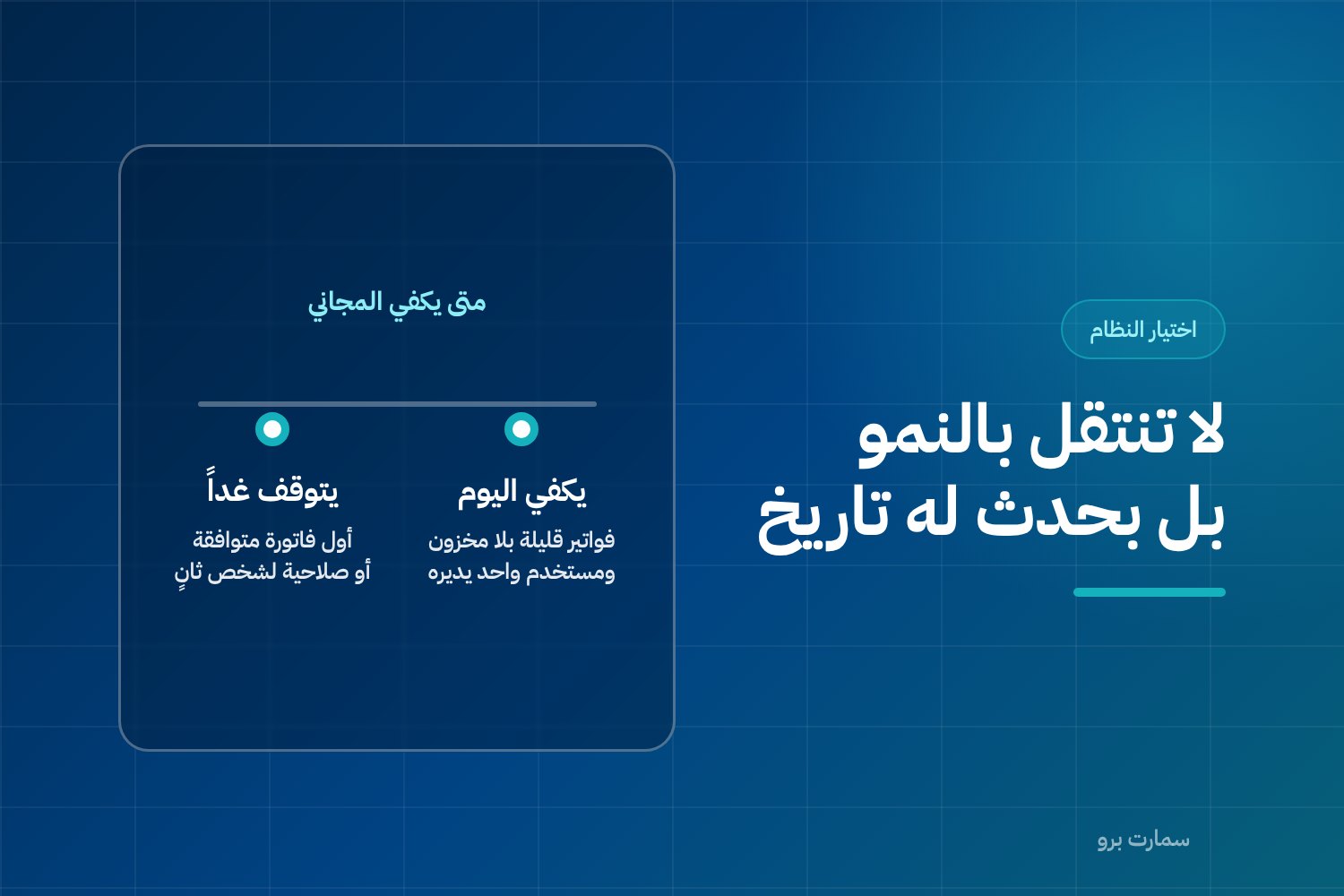
Free accounting software is enough for a Saudi business with a handful of invoices, no inventory, no staff and one person running the books. It stops being enough at specific, datable events: issuing a Phase 2 e-invoice, giving a second person access, tracking stock, running payroll, or needing last year's figures intact.
Many business owners in Saudi Arabia start with the same question: is there free accounting software that will do the job for me? It is a perfectly reasonable question, and the honest answer is neither yes nor no. Free is a real tool that works in some situations and fails in others. The dividing line is not company size or years in business. It is concrete events with dates you can name: the day you issue your first invoice under Phase 2 e-invoicing requirements, the day a second person needs a login, the day you have stock to track, the day you hire and run payroll, and the day you need last year's numbers and nobody kept them.
This article explains the three kinds of free, says plainly where free is the right choice, and shows where its cost moves from the subscription line to another line in your books.
Free accounting software: what do you pay when you don't pay cash?
Every free accounting tool has an operating model that covers its costs, and understanding that model matters more than reading the feature list. Some tools give you small limits for free and ask you to upgrade once you exceed them. Some give you a full-featured period that then ends. Others are open source: the licence costs nothing, but running, updating, hosting and supporting it are all on you.
None of these models is wrong or deceptive. The only mistake is picking one without knowing which part of your business will hit its limits first.
The practical rule: free does not mean no cost, it means the cost does not arrive as a monthly bill. It may be your working hours, a mistake you have to unwind, or data you cannot easily export when you decide to move. These costs are real but never show up in a price comparison, which is why so many people are surprised by them in year two.
What are the three kinds of free, and what does each one cost?
First: free with limits. You get a permanent free version capped by invoices per month, number of users, number of customers, or basic reports only. This is the most common model and usually the most honest, because the limit is stated upfront.
What to check before you start: what happens when you hit the limit? Do you stop issuing invoices mid-month, or carry on with an upgrade prompt? The difference is large if your limit runs out in the second week of Ramadan or during your peak season.
Second: a time-limited trial. Full features for a fixed period. This model is excellent at what it was built for: evaluation. Use it to evaluate, not to run your business.
If you enter three months of data into a temporary trial and it ends, you are now negotiating from a weak position, because your data is inside the system and the alternative means re-entering it. Ask about export before you enter your first invoice, not on the last day.
Third: open source. The licence is free and open, the code is available, and the flexibility is genuinely high. The cost here is human and technical: who hosts it? Who updates it when regulatory requirements change? Who fixes it when it breaks at month-end? Who takes backups and tests restoring them?
If you have a developer on the team or a technical partner with a clear contract, this is a serious, respectable option. If the answer is "we'll manage", the cost will appear later, and at the worst possible moment.
When is free genuinely the right answer?
This is not a courtesy paragraph. There are situations where paying for an accounting subscription is a poor decision and free is the better choice:
- A new business before its first revenue. If you haven't sold anything yet, you don't need an accounting system; you need an organised record of start-up expenses. A free tool or a tidy spreadsheet does the job until your first real revenue cycle.
- A freelancer issuing a handful of invoices a month. Five or ten invoices to regular clients, with no stock, no staff and no branches, need nothing more than an organised invoicing tool and a saved copy of every invoice.
- Testing an idea. A side project you want to validate. Spend your time on the idea, not the system. If it works, you will move, and you'll be glad to.
- A learning season. Sometimes the goal is for you to understand how an income statement is read and how personal and business money are kept apart. A simple tool teaches you that at zero cost.
In these cases, anyone trying to sell you a fully integrated system is selling you something you don't need yet. The criteria that decide when you should move are explained in detail in our guide on how to choose the best accounting software in Saudi Arabia.
At what moments does free stop being enough?
The move doesn't happen because of "growth" in general; it happens because of one specific event. These are the events, and each one has a date:
The day you issue a Phase 2-compliant invoice. This is the hardest test. Phase 2 requirements are not a change to how the invoice looks but to how it is built: an XML file following the UBL 2.1 standard (a structured data format, not a printable layout), a cryptographic stamp (a digital seal proving the invoice came from your system), a counter that cannot be reset, a hash chain linking each invoice to the one before it, and a QR code on simplified invoices.
Simplified invoices must be reported within 24 hours of issue. There is no editing after issue; corrections are made with a credit or debit note. A tool that does not generate this structure and connect it to the platform cannot be fixed by adding a field or changing a print template.
The day a second person needs access. A single-user cap is fine until your accountant, partner or salesperson needs their own login. Sharing one username is not a solution: you lose the trail of who did what, which is exactly what you need at the first dispute or the first mistake.
The day you have inventory. An invoice without stock is simple arithmetic. An invoice with stock means cost of sales, balances, stocktakes, and a profit figure you cannot know unless your quantities are right. Free tools usually stop at the invoice.
The day you hire and run payroll. Salaries and monthly obligations run on a fixed, unforgiving schedule. Calculating them by hand month after month is a recurring source of errors that stay invisible until they blow up at year-end.
The day you need last year's numbers and can't find them. This is the worst discovery: you apply for a loan, meet an investor or face a review, and realise twelve months of data are scattered across two spreadsheets, WhatsApp messages and a device that was never backed up.
What is the visible cost versus the real cost?
| Item | Visible cost | Real cost that appears later |
|---|---|---|
| Subscription | Zero | Genuinely zero — this line is honest |
| Manual work hours | Not counted | Double entry, manual bank reconciliation, compiling reports from scattered sources |
| Errors and corrections | Not counted | Reversed entries, balances to reconcile, accountant time billed by the hour to fix a whole month |
| Backup | Not mentioned | No restorable copy; one device failure can wipe out a year |
| Compliance updates | Assumed automatic | They don't arrive on their own in free models; you track what changed and apply it yourself |
| Permissions and change log | Not available | At the first dispute you don't know who changed what, or when |
| Data export when you move | Not mentioned | May be partial or in a format that can't be imported, so you re-enter from scratch |
| Reports | Basic | Profitability analysis or period comparisons built by hand every time |
The table above is not a verdict on free; it is a checklist. If every line genuinely equals zero in your case — no stock, no staff, few invoices, a manual backup that is enough for you — stay where you are.
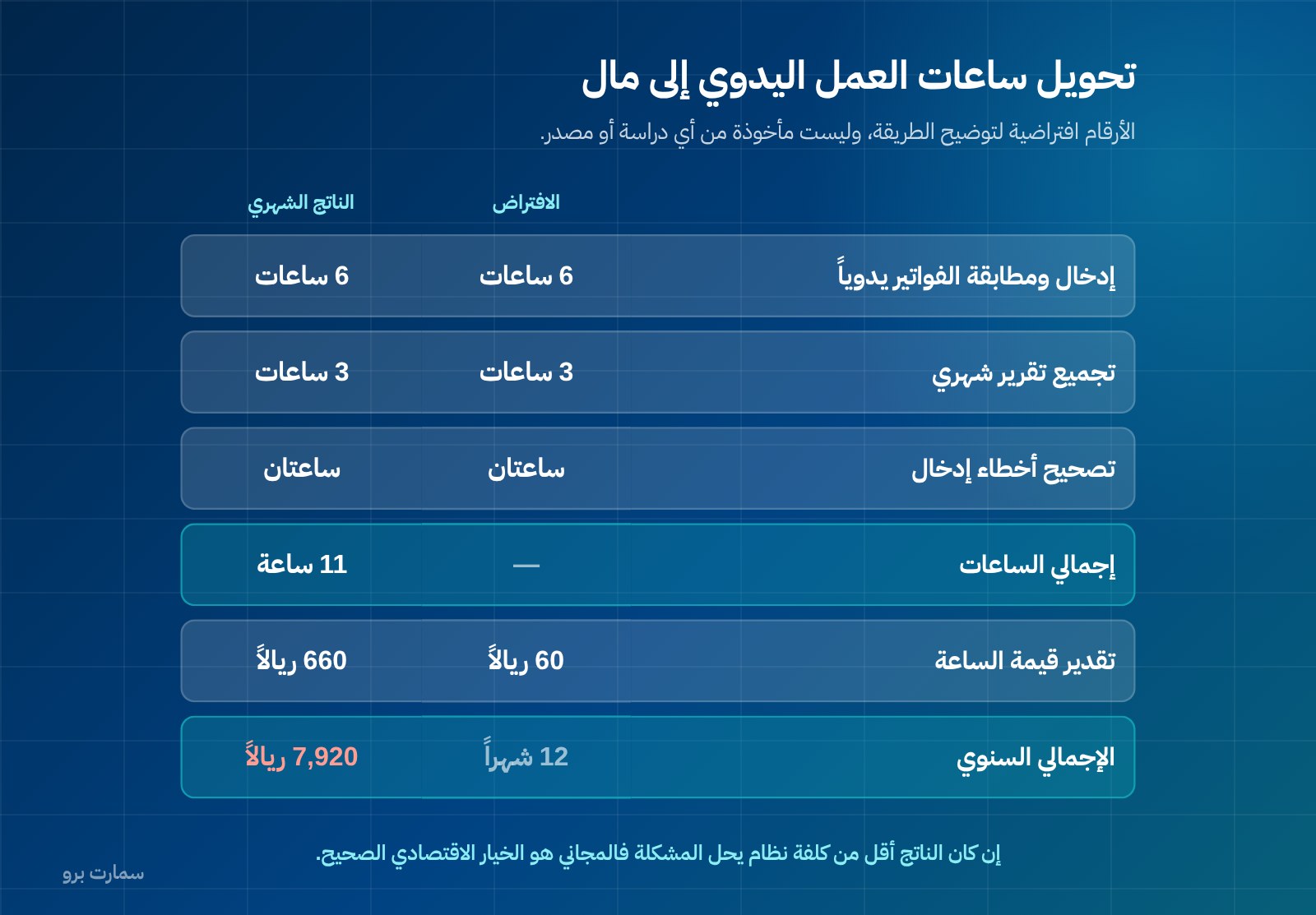
Worked example: turning manual hours into money
The figures below are hypothetical, used only to illustrate the method. They are not taken from any study or source; the point is for you to redo the calculation with your own numbers, not to adopt ours.
| Item | Assumption | Monthly result |
|---|---|---|
| Entering and matching invoices by hand | 6 hours | 6 hours |
| Compiling a monthly report from scattered sources | 3 hours | 3 hours |
| Correcting entry errors | 2 hours | 2 hours |
| Total hours | — | 11 hours |
| Estimated value of an hour | SAR 60 | SAR 660 |
| Annual total | 12 months | SAR 7,920 |
The method is what matters here, not the result. Spend ten minutes writing down the hours you actually spend each month on manual accounting work, and multiply by the value of your hour or the hour of whoever does it for you.
If the result is lower than the cost of a system that solves the problem, free is the right economic choice, full stop. If it is higher, you are already paying, just in a different currency.
To estimate the other side of the equation, we explain the full cost components in our guide to what ERP costs in Saudi Arabia. For comparison only, our published packages start with Mini at SAR 1,500 a year including VAT for one user and one branch, then Pro at SAR 4,500 and Max at SAR 20,500. You can review the package details and prices and compare them with the result of your own calculation above.
E-invoicing: the test that makes no allowances
This is where tools genuinely part ways. The question is not "does it issue invoices?" but: does it generate an XML file following UBL 2.1? Does it apply the cryptographic stamp? Does it keep a counter that cannot be reset and an unbroken hash chain? Does it put a QR code on simplified invoices? Does it report simplified invoices within 24 hours of issue? Does it block editing after issue and direct you to a credit or debit note for corrections?
One point deserves clarity because it is used so often in marketing: ZATCA does not approve software or issue certificates for it. It publishes an indicative list of qualified solution providers. That means a compliant taxpayer remains compliant even if their provider is not on that list, and a provider being listed does not mean every package it sells meets your requirements.
Ask for a live demonstration: a simplified invoice, a standard tax invoice, a credit note, and an XML file you look at with your own eyes. The full details of this point are in our article on what "ZATCA-approved accounting software" really means.
How do you leave a free tool without losing your data?
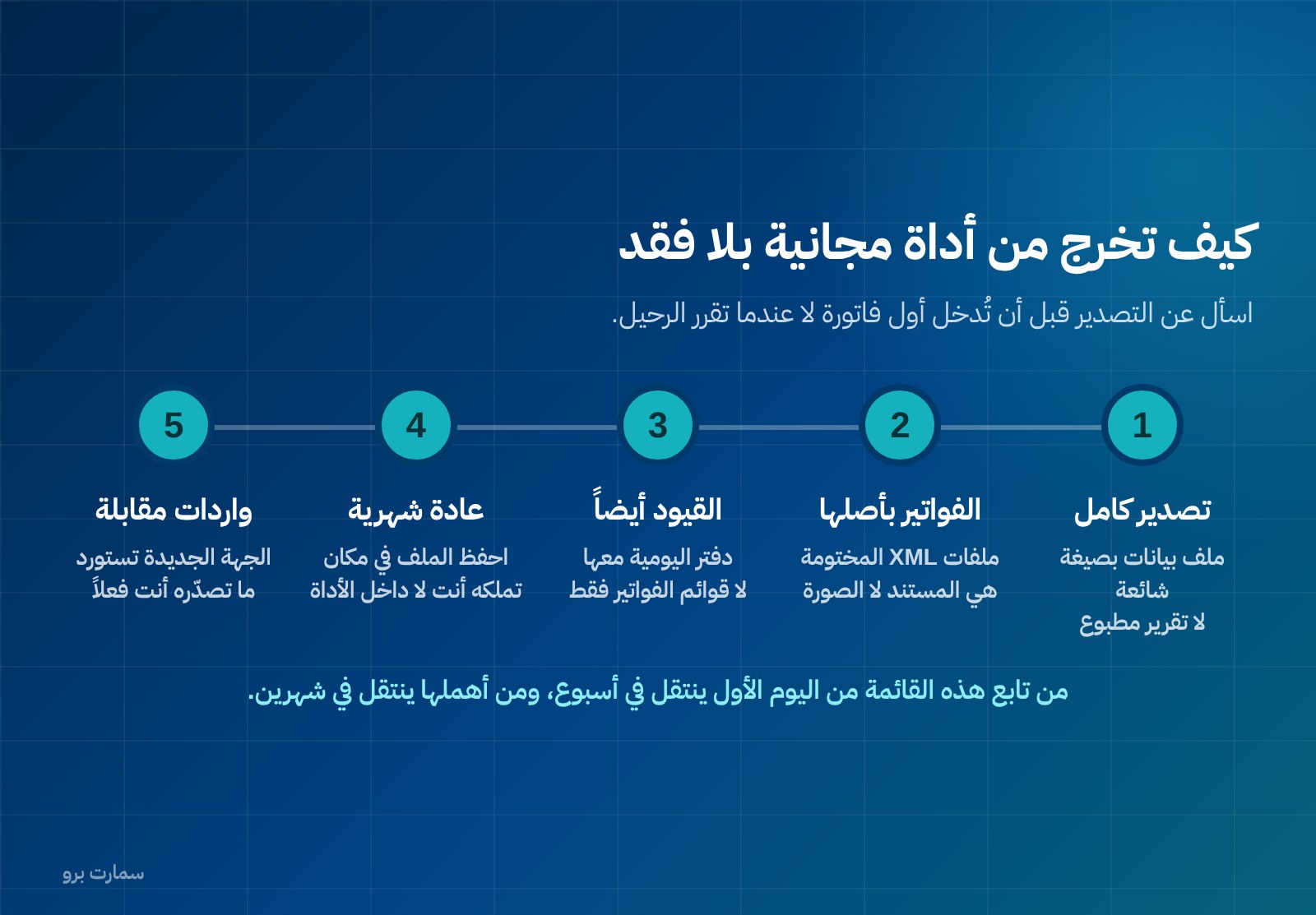
This section is the most important part of the article, and it is usually read too late. One rule: ask about export before you start, not when you decide to leave. Whoever asks at the start gets to choose; whoever asks at the end accepts what they are given.
The checklist before you enter your first invoice:
- Is there a full export? Not a printed report, but a data file in a common format covering customers, suppliers, invoices, journal entries and opening balances.
- Are invoices exported in their original form? Under Phase 2, the stamped XML files are the document; a PDF image is no substitute.
- Does the export include journal entries, or only what's on screen? Many tools export invoice lists and leave the general journal inside.
- How often do you export? Make it a monthly habit and save the file somewhere you own, not only inside the tool.
- How long is data kept after you stop? If you stop using the tool, how long does your account stay available for export?
- Is there a matching import? The system you move to must be able to import what you export, and the question should be put to both sides before you decide.
If you follow this list from day one, you move in a week. If you ignore it, you move in two months of re-entry. And if you are moving to a cloud solution, the practical considerations for backup, access and permissions are covered in our frank comparison of cloud and on-premise accounting software.
What criteria should you compare instead of product names?
We won't name tools, and we advise you not to choose by name at all. Choose by criteria, and apply them to any option in front of you, free or paid:
- Phase 2 e-invoice structure, demonstrated in practice, not described on a marketing page.
- Users and permissions: how many users, whether permissions can be restricted, and whether there is a log of who changed what.
- Inventory and branches: genuinely supported, or managed in an outside spreadsheet.
- Backup and restore: not whether a copy exists, but whether it can be restored and has been tested.
- Compliance updates: who is responsible for applying any regulatory change, and when.
- Data export: available, complete, and in an importable format.
- Support: a clear channel and a known response time, or a community you can rely on in the case of open source.
The right choice is the smallest solution that passes every criterion that applies to you today and can handle the next event you know is coming. If that is a free tool, it is the right one. If it is a paid system, the reason is not appetite for features but an event with a specific date.
Key takeaway: Free accounting software is the right choice until a dated event — a Phase 2 invoice, a second user, inventory, payroll or the need for clean historical records — makes its hidden costs larger than a subscription. Check export and e-invoicing structure before you enter your first invoice.
The official reference
E-invoicing requirements, rollout phases and the indicative list of qualified solution providers are published on the official website of the Zakat, Tax and Customs Authority (ZATCA): zatca.gov.sa. Go there directly for any regulatory detail, and don't rely on a description on a product page — including ours.
Read also
- How to choose the best accounting software in Saudi Arabia
- Cloud or on-premise accounting software? A frank comparison
- ZATCA-approved accounting software: what the phrase really means
If your calculation points past free, you can start a free SmartPro trial and test a Phase 2 invoice, a credit note and a full data export with your own figures.
Article visuals
Frequently asked questions
Is there free accounting software that's enough for a small business in Saudi Arabia?
Yes, if you issue few invoices, have no inventory and no staff, and one person runs the books. It stops being enough at specific events: your first invoice under Phase 2 e-invoicing requirements, a second person needing access, or starting to track stock or payroll. Base the decision on these events, not on the size of the company.
Does free accounting software meet Phase 2 e-invoicing requirements?
Some may and some don't, and the only way to be sure is a hands-on check. Ask for an XML file in UBL 2.1 format and verify the cryptographic stamp, the counter that cannot be reset, the hash chain and the QR code on simplified invoices. Also confirm the system reports simplified invoices within 24 hours and blocks editing after issue, directing corrections to a credit or debit note.
What is the difference between free-with-limits and open-source accounting software?
Free-with-limits software is ready to use straight away but is capped by invoices, users or features, and upgrading is its natural exit. Open source has no licence restrictions and high flexibility, but hosting, updates, backups and support are your responsibility or that of a technical partner under contract. The first has a stated future cost; the second has a human and technical cost from day one.
How do I move away from a free tool without losing my data?
Ask about export before you enter your first invoice, not when you decide to leave. Request a full export in a common format covering customers, suppliers, invoices and journal entries, and under Phase 2 ask for the stamped XML files themselves, because a PDF image is no substitute for the document. Make exporting a monthly habit, save the file somewhere you own, and confirm the system you're moving to can import what you export.