
How to Choose Payroll Software in Saudi Arabia: Get the Contributory Wage Right
A practical guide to choosing payroll software in Saudi Arabia: the GOSI contributory wage, the Wage Protection file, the payroll journal entry, mixed pay, deduction caps and the end-of-service provision.
Author:سامي الحيدري

Choosing payroll software in Saudi Arabia comes down to one question: does it calculate each step correctly, not just the total? Good payroll software separates the GOSI contributory wage from gross pay. It also enforces deduction caps and generates the Wage Protection file from the approved run. Finally, it posts the payroll journal entry automatically.
Payroll looks like the simplest decision on the systems list: a salary multiplied by headcount, then a bank transfer. That assumption causes most of the errors we see when businesses migrate from one system to another. Payroll is not one calculation but a chain of decisions: what enters the social insurance contribution base and what does not, the permitted cap for each type of deduction, how overtime is calculated, what is actually transferred versus what is declared, and how all of it lands in the general ledger. A system that gets any link in this chain wrong does not show an error message; it quietly produces a wrong number every month.
This guide compares criteria and working methods, not product names. The figures below are hypothetical, used only to illustrate the method; they are not market prices, salary levels or calculation rates.
Why does payroll break in Excel or in a generic accounting system?
An Excel file calculates well and remembers nothing. It calculates what you type. It does not know that this employee's transport allowance is outside the contribution base. It does not know that the remaining advance is now three instalments, not five. And it does not know that this month's absence deduction plus a disciplinary deduction together exceed the permitted cap on the wage due.
A generic accounting system is built around the idea of an expense: an amount posted to an account. So it treats payroll as a single monthly entry you write by hand. The details you will be asked about later get lost: which base the contribution was calculated on, why this employee's net pay differs from last month, and where the advance shows up on the balance sheet.
The symptoms to diagnose before you buy:
- A payroll sheet prepared in an external file, then copied into a manual journal entry.
- A bank file reassembled by hand every month.
- Advances tracked by one person on a sheet of paper.
- An end-of-service amount nobody knows until the day the employee leaves.
If you are at the broader stage of choosing a full HR system, we covered that in how to choose an HR system.
Why is the contributory wage the backbone of payroll software?
This is where a system's quality is decided. Contributions to GOSI (the General Organization for Social Insurance) are not calculated on everything the employee is entitled to, but on the contributory wage, meaning the part of pay that is subject to contributions. These are two different numbers: some allowances enter the contribution base and some do not, and Saudi employees are treated differently from non-Saudi employees.
The practical result: a system that takes gross entitlement and applies the calculation to it produces a wrong number every cycle, in one direction, with no warning. The error does not show in the monthly review because net pay looks reasonable. It does not show in the income statement because the amount has been posted. It shows up later, multiplied by the number of months and the number of employees.
So the first test is not "Does it calculate GOSI?" It is this: is there a separate field for each pay element? Is there a setting on each element that decides whether it enters the base? Does that setup vary by the employee's nationality and registration status? If the answer is a single field called "Salary", the system cannot calculate correctly in the first place. We explain how the base is built, and the effect of each element on it, in the GOSI contributory wage.
How do you get from gross pay to the cost to the business? A worked example
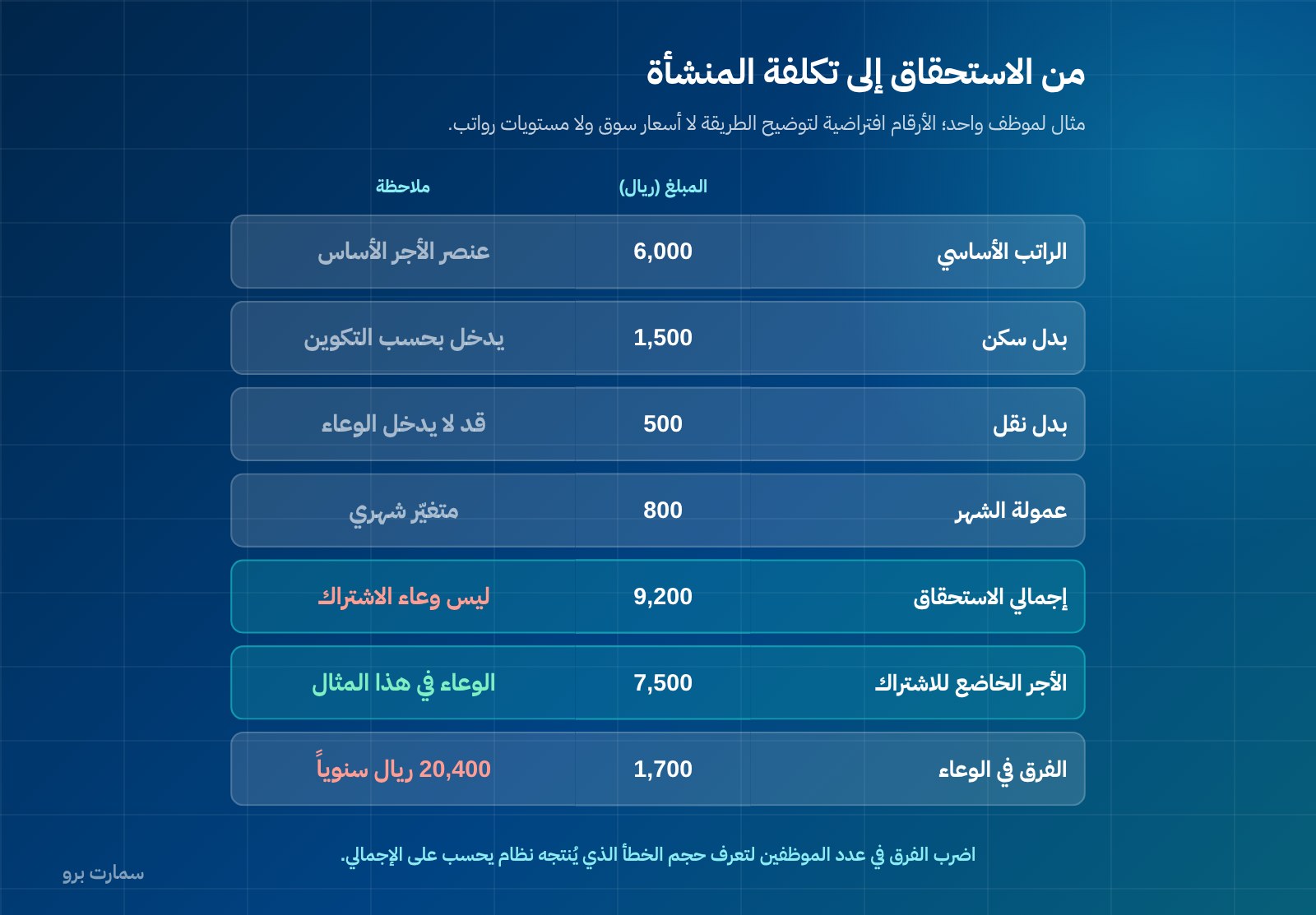
Follow one employee through five steps. The figures below are hypothetical, used only to illustrate the method. The make-up of the base in your case depends on the employee's pay structure and the applicable regulations, not on this example.
| Step | Item | Amount (SAR) | Note |
|---|---|---|---|
| 1 | Basic salary | 6,000 | Core pay element |
| 1 | Housing allowance | 1,500 | Enters the base depending on the pay structure |
| 1 | Transport allowance | 500 | May not enter the base |
| 1 | Nature-of-work allowance | 400 | May not enter the base |
| 1 | Monthly commission | 800 | Monthly variable |
| 1 | Gross entitlement | 9,200 | Not the contribution base |
| 2 | Contributory wage | 7,500 | The base in this example |
| 3 | Employee's contribution share | Calculated on 7,500 | Not on 9,200 |
| 3 | Advance instalment | 500 | Capped |
| 3 | Absence deduction | 300 | Cap varies by reason for deduction |
| 4 | Net pay transferred | Gross minus deductions | What must appear in the Wage Protection file |
| 5 | Cost to the business | Gross + employer share + end-of-service provision | Higher than the contract salary |
The difference between 9,200 and 7,500 is SAR 1,700 a month in the calculation base alone, or SAR 20,400 a year for one employee. Multiply that by your headcount to see the size of the error a system produces when it calculates on gross pay.
Step five is the one missing from most budgets. The figure your budget carries is not the salary in the contract, or even gross entitlement. It is gross pay plus the employer's contribution share, the end-of-service provision, and employee-related insurance, tickets and fees. We explain how to calculate this full figure in the total cost of an employee.
Is the Wage Protection file generated from the approved payroll run?
The principle of the Wage Protection System (WPS), the framework for reporting salary payments, is that what you declare is what you actually paid. The only way to guarantee that is to generate the file directly from the approved payroll run, not to assemble it in a separate file.
The difference is fundamental. In a sound system, the run is approved and its payroll sheet is locked. The upload file and the bank transfer file are then generated from that same source. Any change after approval requires a visible correction run, not overwriting the amount. With the manual method, the file is rebuilt every month. A small gap between declared and paid keeps recurring and surfaces in any future reconciliation.
Ask one question in the demo: show me the file being produced from the approve button, not from a separate export screen. We cover the link between the run and the file in detail in the Wage Protection System.
Also check how regularly pay is issued. An employee paid monthly is paid once a month. An employee whose pay is set on another basis is paid at least once a week. A system that only knows one monthly cycle will force you to handle a group of employees outside it.
Is the payroll journal entry posted automatically to the same accounts every month?
The payroll sheet is not the end of the process but the middle of it. The expense must land in the general ledger in these accounts:
- Salaries expense
- Employer contribution expense
- GOSI payable
- End-of-service provision
- Employee advances receivable
- Cash or bank
If the entry is written by hand, three predictable problems follow. Accounts vary from month to month depending on who wrote the entry. The entry lags behind the payment, so any mid-month report is incomplete. And a difference between the payroll sheet total and the entry total goes unnoticed until the year-end count.
The practical standard: one posting rule, set once. Every approved run then produces an entry that matches it to the riyal and can be traced from the entry back to the employee. We walk through the full cycle from data entry to posting in the payroll run guide.
Can the software handle mixed pay: fixed salary plus output or commission?
Many businesses in contracting, retail and sales pay mixed wages: a fixed part and a part tied to output, piece rate or commission. This is where many systems break, because they assume a fixed number on the employee card.
What you need is a fixed pay element and a variable element entered or imported monthly. Each element needs a setting that defines its effect on the contribution base, on the overtime calculation and on the end-of-service basis. The variable element changes gross pay every month. It does not necessarily change the base by the same amount. A system that confuses the two produces a different number each month for reasons nobody can explain.
A simple test: enter an employee with a fixed basic salary and a different commission in each of three months. Then ask for the difference in net pay between the months, explained line by line. A system that shows you the comparison understands mixed pay; a system that shows you only two numbers does not.
Are advances and deductions capped so they cannot be exceeded by mistake?
Deductions from wages are not unrestricted. The cap differs by the reason for the deduction, and there is a cap on total deductions from the wage due to the employee. A system that accepts any deduction amount in any field shifts responsibility for compliance onto whoever types the number.
What must exist:
- A set cap for each deduction type.
- A control on total deductions within a single run.
- Automatic deferral of any excess to the next run, instead of rejecting it or letting it through.
An advance needs its own instalment schedule: the principal, the number of instalments, the amount recovered and the remaining balance. Each instalment should be linked to that month's payroll sheet and stop automatically when the balance reaches zero.
In the demo, try entering a deduction above the permitted limit and watch the response. The right answer is that the system blocks or warns and defers the excess, not that it silently accepts the number.
Are working hours and overtime calculated inputs rather than typed numbers?
Overtime is paid at the hourly wage plus 50% of the employee's basic wage. This formula leaves no room for estimates, because it needs an hourly rate built on the correct pay element, not on gross pay.
Normal working hours are eight a day or forty-eight a week. They drop to six hours a day during Ramadan for Muslim employees, with an absolute ceiling of ten hours a day or sixty a week that may not be exceeded.
The standard here is that attendance and overtime reach the payroll sheet as inputs calculated from the attendance log, not as numbers someone types into a box. A system that asks you to type "Overtime hours: 12" with no traceable source may calculate correctly. But it cannot prove anything in a dispute.
Is end of service a monthly provision or a surprise on the last day?
End-of-service benefits are calculated on the employee's last wage. That has two consequences: the figure rises with every pay increase, and the liability exists from the first month, not from the day of resignation.
A business that does not set aside a monthly provision faces the full amount in a single month, usually at the worst time, such as a period of team turnover or the end of a project. A sound system calculates each employee's accrued liability monthly and posts it to the provision account in the same entry. It then shows you the total balance as a line under liabilities, not as a surprise.
Ask for one report in the demo: each employee's accrued end-of-service liability as of today, and the effect of a hypothetical pay rise on that liability. If the report does not exist, the provision is not being calculated, and the figure in your books is lower than reality.
Comparison criteria table
| Criterion | Why it matters | Demo test |
|---|---|---|
| Pay element setup | Basis of every later calculation | Show me how to mark an allowance as outside the base |
| Contribution base | An error here repeats every month | Show me the base figure separately from gross entitlement |
| Saudi vs non-Saudi treatment | Treatment differs | Add one employee of each type and compare the payroll sheet |
| Wage Protection file | Declared equals paid | Generate the file from the run's approve button |
| Multiple pay cycles | Non-monthly pay groups | Show me a weekly cycle alongside the monthly one |
| Automatic payroll entry | Prevents the books from drifting | Show me the entry before and after posting |
| Mixed pay | Fixed plus output or commission | Three months with different commissions, compared line by line |
| Deduction caps | Compliance not left to whoever enters data | Try entering a deduction above the limit |
| Advances | A tracked balance, not a sheet of paper | An advance in five instalments with automatic stop |
| Attendance and overtime | Calculated inputs, not typed ones | Show me the source of each overtime hour |
| End-of-service provision | A liability accrued monthly | Report of the accrued liability as of today |
| Data export | Ownership of your data | Export the full payroll history |
If you want payroll linked to the rest of the employee file, from hiring to leave to end of service, that is what SmartPro's HR and payroll system covers.
Pre-purchase checklist: what should you test before you buy?
Do not judge a system on demo data. Take last month's actual payroll, whose numbers you know and paid yourself, and rerun it on the candidate system:
- Enter ten employees with different pay structures, including Saudi and non-Saudi employees and one on mixed pay.
- Enter allowances, some inside the base and some outside, and check the base figure for each employee.
- Enter an existing advance with its real balance and number of remaining instalments.
- Enter an absence and a disciplinary deduction in the same month, and try to exceed the permitted cap.
- Enter overtime from the attendance log, not by typing it in.
- Run and approve the cycle, then compare each employee's net pay with what you actually paid.
- Generate the Wage Protection file from the approved run and reconcile it with the bank transfer file.
- Review the resulting payroll entry and check that its total equals the payroll sheet total to the riyal.
- Ask for the cost-to-business report per employee, not just net pay.
- Ask for the accrued end-of-service liability.
- Create a correction run for one employee and check whether the original remains visible.
- Ask to export all your data.
Step six is the real test. If any employee's net pay differs from what you actually paid, do not accept "it's the settings" as an explanation. Ask to trace the number from net pay to the base to the pay element. A discrepancy at this stage is free information; after migration it becomes a correction project.
How should you budget for payroll software?
Compare the annual licence and the setup of pay structures for each employee group. Include loading opening balances for advances and end-of-service, plus training for the person who runs the cycle, not just the person who reviews it. Add any bank integration.
Also factor in the cost of staying as you are: hours spent preparing the payroll sheet and bank file by hand every month, the impact of a wrong calculation repeated twelve times a year, and an unfunded provision that lands all at once.
SmartPro's prices are published on the pricing page, all including 15% VAT: the Mini package is SAR 1,500 a year, Pro is SAR 4,500 and Max is SAR 20,500. Payroll runs on the Human Resources system, added to any package for SAR 2,500 a year, with the Wage Protection (Mudad) file available as an option at SAR 1,500 a year. The Enterprise package, priced on request, includes Human Resources with unlimited users.
Where is the official reference?
The official source for rules on working hours and overtime, caps on wage deductions, pay dates and end-of-service benefits is the Ministry of Human Resources and Social Development: hrsd.gov.sa. Rules on the contributory wage and employee registration are set by the General Organization for Social Insurance. Verify any regulatory claim made to you in a sales pitch with its source or a legal adviser before you build a setting on it in your system.
Read also
Key takeaway: Judge payroll software on whether it separates the contributory wage from gross pay and generates the WPS file and journal entry from the same approved run. Then prove it by rerunning last month's real payroll.
To test this with your own payroll, start a free trial or book a demo with a SmartPro product expert.
Article visuals

Frequently asked questions
Why does payroll software get GOSI contributions wrong?
Because it calculates on the employee's gross entitlement instead of the contributory wage. Some allowances enter the contribution base and some do not, and Saudi employees are treated differently from non-Saudi employees. The result is a wrong number every cycle with no error message, because net pay looks reasonable and the amount has been posted. So in a demo, ask to see the base figure shown separately from gross entitlement.
Is an employee's cost the salary stated in the contract?
No. The contract salary is only one pay element, and gross entitlement adds allowances and monthly variables. The cost to the business then adds the employer's contribution share, the end-of-service provision and other employee-related items. That last figure is the one your budget should carry, not the number written in the contract.
How do I make sure what I declare under Wage Protection equals what I paid?
Generate the upload file from the approved payroll run itself, rather than assembling it in a separate file. When the file is rebuilt by hand each month, a small recurring gap appears between declared and paid amounts. The practical test is to ask for the file to be generated from the run's approve button, then reconcile it with the bank transfer file.
What is the best way to test payroll software before buying?
Run last month's real payroll on the candidate system, using numbers you know and paid yourself, then compare each employee's net pay with what was actually transferred. Include an advance with its remaining instalments, an absence and overtime taken from the attendance log. If any number differs, ask for it to be traced from net pay to the base to the pay element instead of accepting a general explanation about settings.