
Best Accounting Software in Saudi Arabia 2026: The Criteria That Decide, Not a List of Names
Four regulatory conditions that rule systems out in 2026, published prices in SAR, and five practical questions that expose any system before you sign its contract.
Author:سامي الحيدري
The best accounting software in Saudi Arabia is not one name. It is the system that meets the obligations placed on your business in 2026: working Fatoora integration, payroll that handles both GOSI schemes, Qiwa-documented contracts, and a permanent audit trail. Shortlist only systems that pass all four, then compare the full three-year cost.
Any page that hands you a ranked list of ten names is answering a question you did not ask: "Which systems are best known?" rather than "Which one fits my business?" The gap between those two questions is the gap between a sound decision and one you regret a year later.
In 2026 the answer has narrowed. Three regulatory obligations now in force rule out systems that were acceptable two years ago. So the first selection criterion is no longer features. It is whether the system meets what the authorities require of you in 2026.
What makes a system the best accounting software in Saudi Arabia in 2026?
Start with the conditions that eliminate, not the features that tempt. If a system fails any one of these four, it is out, however polished it looks.
1. Integration with the Fatoora platform, in practice, not in theory. Phase 2 e-invoicing (the integration phase, where your system sends invoices to ZATCA's Fatoora platform) is rolled out in waves. The Wave 25 threshold has dropped to SAR 187,500; it is the first wave based on 2025 revenue, and the integration deadline is 1 February 2027. A threshold that low brings very small businesses into scope. The complete table of every wave is in E-invoicing integration waves 1 to 25.
The question that separates vendors: how many businesses has this vendor actually integrated, and in which waves? Not "are you compliant?", because every vendor will say yes.
2. Two GOSI schemes in one payroll run. The new social insurance law applies to employees with no contribution periods before 3 July 2024. So today you have employees on different contribution rates in the same business, and the new rate rises every year. A system that applies one rate to everyone produces a wrong payroll every month.
3. Contracts documented on Qiwa. From 15 April 2026, Saudization percentages are calculated on electronically documented contracts. A Saudi employee whose contract is not documented does not count towards your percentage. That makes integration with government platforms a requirement, not a nice-to-have.
4. An audit trail that cannot be erased. A system that lets you edit or delete a posted journal entry without leaving a trace is not an accounting system. This is the most important technical question you will ask.
What do accounting systems cost in SAR?
Hiding the price until a sales call wastes your time and ours. Here are SmartPro's published annual prices, VAT included:
| Package | Users included | Annual price incl. VAT |
|---|---|---|
| Mini | 1 user | SAR 1,500 |
| Plus | 3 users | SAR 5,000 |
| Max | 10 users | SAR 12,000 |
| Enterprise | Unlimited | Price on request |
Extra users above a package's allowance start at SAR 500 per user per year, and each branch beyond the main one costs SAR 1,000 per year. Full details are on the SmartPro pricing page.
Use the same yardstick for any quote you receive. Ask for the annual price including VAT, the number of users included, the cost of adding a user, and the cost of a second branch. Those four numbers reveal the real offer.
Why isn't the advertised price the real cost?
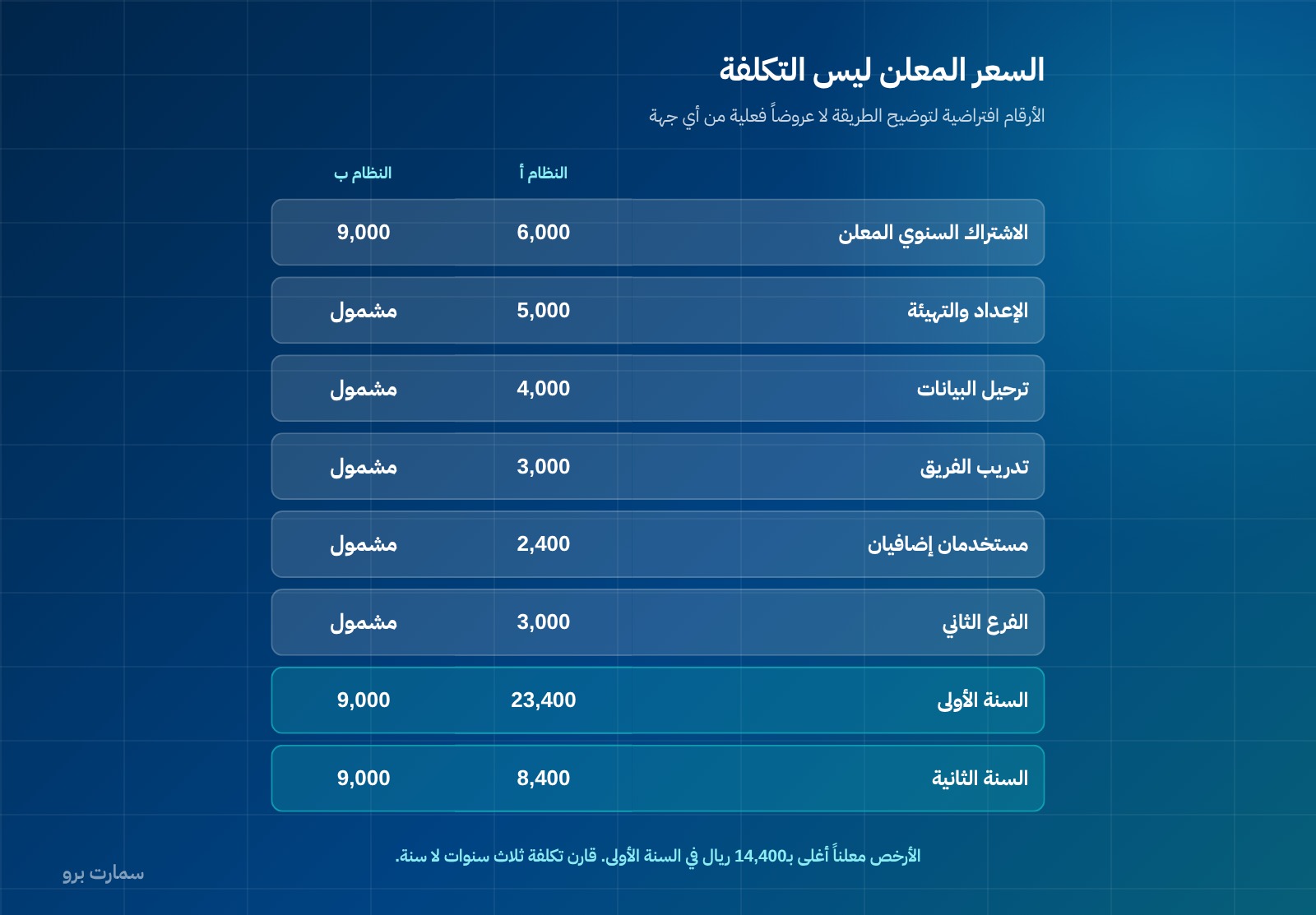
The figures below are hypothetical, to illustrate the method; they are not actual quotes from any vendor. Two systems advertised at SAR 6,000 and SAR 9,000 a year:
| Item | System A | System B |
|---|---|---|
| Annual subscription | 6,000 | 9,000 |
| Setup and configuration | 5,000 | Included |
| Data migration | 4,000 | Included |
| Team training | 3,000 | Included |
| Two extra users | 2,400 | Included |
| Second branch | 3,000 | Included |
| Year one | 23,400 | 9,000 |
| Year two | 8,400 | 9,000 |
The system with the lower advertised price costs SAR 14,400 more in year one. That is not necessarily deceptive; it is a difference in what the price includes. But it means that comparing advertised prices without a breakdown is meaningless.
Ask for an itemised quote: subscription, setup, migration, training, users, branches, and support after year one. Then compare the three-year cost, not one year.
Which system fits my type of business?
Needs differ fundamentally between activities. What suits a retail shop does not suit a contractor.
| Activity | What rules a system out if missing |
|---|---|
| Retail and restaurants | POS that works offline · simplified tax invoice · delivery-platform integration |
| Contracting | Progress billing · completion percentage · withholding tax · cost centres |
| Manufacturing | Bills of materials · production orders · batch costing |
| E-commerce | Store integration · the marketplace's responsibility for its sellers' VAT |
| Services and offices | Hourly billing · deferred revenue for subscriptions |
| Warehouses | Perpetual inventory · a valuation method that works in real time |
These are not features added later; they are architecture. A system built without cost centres does not gain them through an update.
Cloud or installed on your own server?
This decision comes before choosing a vendor, because it settles who carries what:
| Aspect | Cloud | Installed on your premises |
|---|---|---|
| Payment | Recurring subscription | One-time licence + annual maintenance |
| Regulatory updates | Vendor's responsibility | Bought or requested |
| Backups | Vendor's responsibility | Yours |
| Access outside the office | Available | Needs setup and securing |
| Internet outage | Stops, unless it has an offline mode | Keeps running internally |
| Server and maintenance cost | None | Yours |
The decisive point in 2026 is not price but regulatory updates. E-invoicing, GOSI and Saudization change through successive decisions. With an on-premises system, every regulatory change becomes an upgrade project with a cost and a timeline. A cloud system should arrive already updated, and you should ask about it directly: are regulatory updates included in the subscription, or charged separately?
If you choose on-premises for a good reason, such as data you do not want outside your building, you need a contract clause obliging the vendor to deliver compliance updates. Otherwise you may find yourself non-compliant with a system that still runs.
Which integrations does an accounting system need?
A system that does not integrate creates double entry, and double entry creates two different numbers. Ask about every integration that applies to you:
- Banks: importing statements to make bank reconciliation easier. Ask about your bank by name, not "banks" in general.
- The Fatoora platform: a proven, working integration. This is a requirement, not an optional integration.
- Point of sale (POS): if you have branches or cashiers.
- Online store: and if you sell through a marketplace, check the marketplace's responsibility for its sellers' VAT.
- HR platforms: for contract documentation and wage protection without re-entering data.
- Delivery platforms: for restaurants in particular.
The practical question for each one: is the integration ready and used by current customers, or is it "possible to develop"? The difference between those answers is six months and an invoice.
What transfers in a data migration, and what doesn't?
This is what surprises businesses most when they switch systems. Agree on this list before you sign:
| Item | Usually migrated | Moved as a total, or not moved |
|---|---|---|
| Chart of accounts | Yes | — |
| Opening account balances | Yes | — |
| Customer and supplier balances in detail | Should be yes | Often migrated as a single total |
| Inventory with quantities and costs | Should be yes | Often migrated as quantities only |
| Historical invoices | Usually not | Stay in the old system |
| Attachments and documents | Usually not | — |
| Historical journal entries | Usually not | — |
The real risk sits in the two "should be yes" rows. Migrating receivables as one total instead of each customer's balance means you can no longer reconcile any individual customer afterwards. The same goes for inventory: quantity without cost means your cost of goods sold is wrong from day one. The effect is explained in The item card.
Ask a specific question: who performs the migration, what does it cost, how long does it take, and what is the vendor's responsibility if the balances come out unbalanced?
Which contract clauses should you read before the price?
- Data ownership: an explicit statement that the data is yours.
- Export on termination: in what format, within how many days, and at what cost.
- A cap on renewal price increases: without one, you may face a large increase in year two, once your data is already inside.
- What support covers: what is charged outside it, and the response times.
- Regulatory updates: included or charged.
- Number of users: the cost of adding one, and whether users are counted by name or by concurrent session.
The export-on-termination clause is the most important and the most often overlooked, because it is the clause that stops you from becoming a hostage.
How long does it take to implement a new accounting system?
The durations below are estimates for a small or medium business and vary with the volume and readiness of your data.
| Stage | Approximate duration |
|---|---|
| Defining needs and choosing a vendor | 2 to 4 weeks |
| Setting up the chart of accounts and settings | 1 to 2 weeks |
| Preparing migration data on your side | 1 to 3 weeks |
| Migration and reconciliation | 1 to 2 weeks |
| Parallel run alongside the old system | 1 month |
| Fatoora integration and testing | 2 weeks |
The stage that always gets cut, and causes the most damage, is the parallel run. Running both systems for a full month and comparing their outputs is what exposes errors before they reach your official books. Businesses that switch overnight discover the differences in their VAT return, not in testing.
That is why it is better to switch at the start of a financial period rather than in the middle of one.
How many users do you actually need?
This question decides the package, and it is often misjudged in both directions. The right count is who needs to enter or approve something, not who wants to see a report.
- Who enters data: the accountant, storekeeper, cashier, purchasing officer and payroll officer.
- Who approves: the finance manager and the owner.
- Who only views: a periodic report or view-only access may be enough, and many systems do not count them as full users. Ask.
The common mistake is buying a package with few users, then finding that each added user carries an annual charge that exceeds the difference to the next package up. Size the package on the number of users you will have in a year, not today.
What are the warning signs when choosing a vendor?
- "We'll add it in the next update" about a feature you need today.
- Refusing a trial with your own data and insisting on the demo environment.
- Not a single customer integrated in an earlier e-invoicing wave.
- The price drops every time you hesitate, which means the first price was not real and services will be charged later.
- No data-export clause in the contract.
- A vague answer about what happens when entries are edited.
Which five questions reveal more than a full presentation?
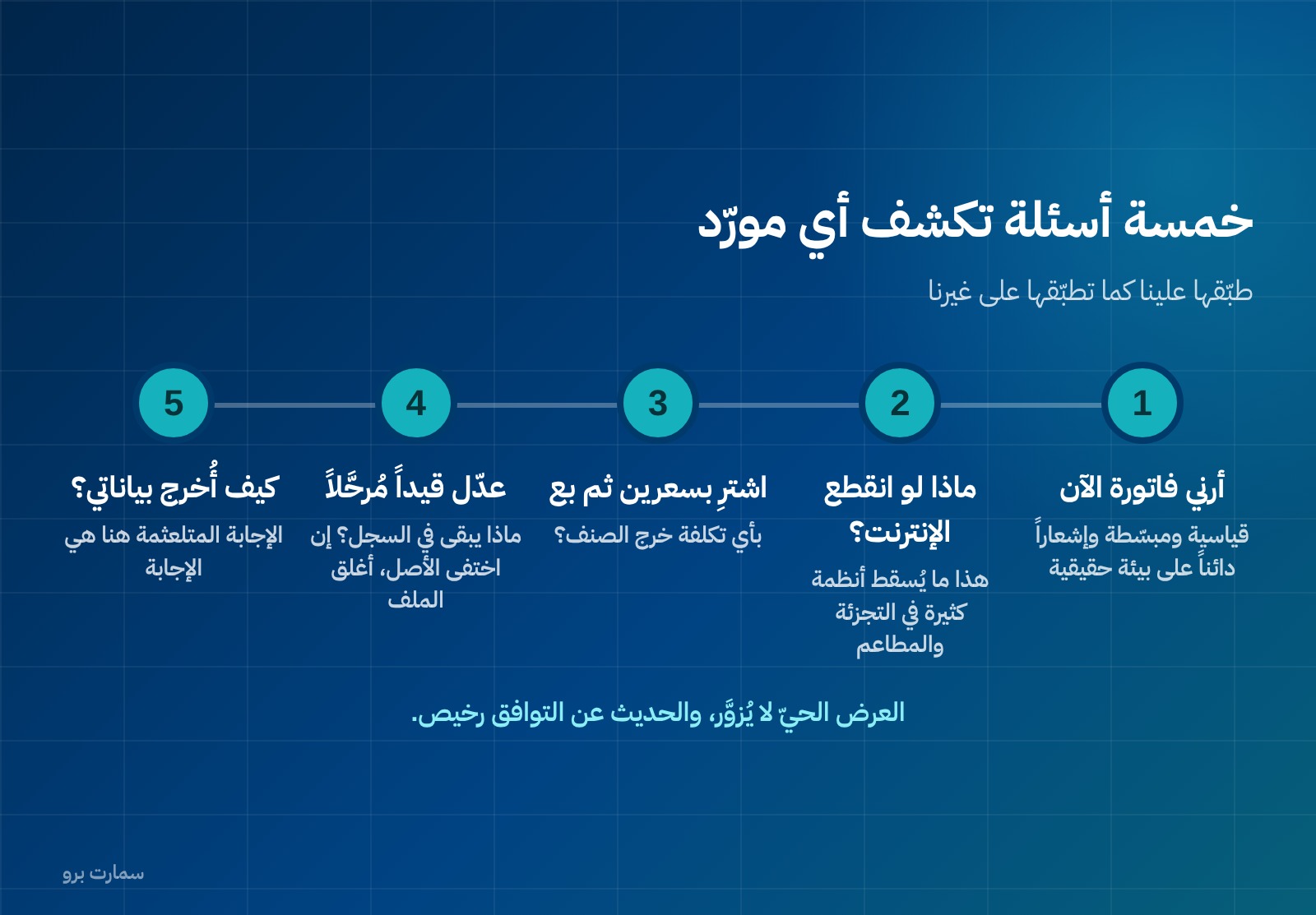
- "Show me a standard tax invoice, a simplified tax invoice and a credit note, now, in a live environment." Talk about compliance is cheap; a live demonstration cannot be faked.
- "What happens if the internet drops in the middle of a sale?" This is what brings down many systems in retail and restaurants.
- "Buy one item at two different prices, then sell it. At what cost did it go out?" This shows whether the system applies a recognised valuation method or simply the last purchase price.
- "Edit a posted entry. What remains in the log?" If the original disappears, close the file.
- "How do I export all my data if I decide to leave?" A hesitant answer here is the answer.
Add a question about automation: what does the system produce automatically, and does it leave a trace for every automated transaction? What can sensibly be automated today is covered in AI in accounting.
What are the most common mistakes in choosing a system?
First: choosing by number of features. A long feature list does not mean a better system; it means a broader one. What matters is the depth of what you use every day, not the breadth of what you will never open. Write down the ten operations that repeat every week in your business, and ask to see all of them live.
Second: choosing from a presentation. A demo is prepared with clean data along a rehearsed path. Ask for a trial with your own data: your chart of accounts, a sample of your items and one of your real invoices. Most systems stumble here, not in the demo.
Third: ignoring who will use it. A system the finance manager understands but the storekeeper does not will produce incomplete data from the first working day. Involve the people who will actually enter data in the trial, not only those who will read the reports.
What should you check before signing?
- Calculate the three-year cost, not one year.
- Confirm your e-invoicing wave and its deadline before asking about any other feature.
- Ask for a trial with your own data, not a demo with ready-made data.
- Read the termination and data-export clause before the price clause.
- If you are moving from an existing system, plan the migration before you sign the contract.
The regulatory deadlines and criteria above are published on the Zakat, Tax and Customs Authority website, and labour and Saudization rules on the Ministry of Human Resources and Social Development website. Our prices are published and kept up to date on the pricing page.
Key takeaway: In 2026 the best accounting system is the one that passes four regulatory tests (Fatoora integration, both GOSI schemes, Qiwa contracts and a permanent audit trail) and still wins on a three-year, itemised cost comparison.
To test these questions on your own data, start a free SmartPro trial or book a 30-minute demo with a product expert.
Article visuals
Frequently asked questions
What is the best accounting software in Saudi Arabia?
No single name suits every business. The right question is not which systems are best known but which one meets your business's obligations in 2026: Fatoora integration, both GOSI schemes in one payroll, contracts documented on Qiwa, and a permanent audit trail for every entry. Criteria decide, not ranked lists.
How much do accounting systems cost in Saudi Arabia?
Many vendors do not publish a price at all. SmartPro's published annual prices, VAT included, are SAR 1,500 for Mini with 1 user, SAR 5,000 for Plus with 3 users and SAR 12,000 for Max with 10 users, while Enterprise with unlimited users is priced on request. When comparing any quote, ask for the annual price including VAT, the users included, the cost of adding a user and the cost of a second branch.
Why isn't the advertised price enough for comparing systems?
The advertised price often excludes setup, data migration, training, extra users and branches. A system with a lower headline price can cost thousands of riyals more in year one once those items are added. Ask for an itemised quote and compare the three-year cost, not one year.
Which questions reveal an accounting system's quality before buying?
Ask for a live demonstration of a standard invoice, a simplified invoice and a credit note in a real environment, and ask what happens if the internet drops mid-sale. Buy an item at two prices and sell it to see which cost is used, and edit a posted entry to see what stays in the log. Finally, ask exactly how you would export all your data if you left.
What changed in 2026 that affects the choice of system?
Three obligations are in force. The Wave 25 e-invoicing threshold dropped to SAR 187,500, based on 2025 revenue, with an integration deadline of 1 February 2027. The new GOSI law means different contribution rates within one business, rising every year, and from 15 April 2026 Saudization percentages are calculated on contracts documented on Qiwa.